How do I generate an RSS feed for just one event type?
I am using the RSS Feed add-on. I can generate an RSS feed for all of the events, but how do I create one for just a certain type of events? For example, is it something like:
https://mysite.com/event-type/parties/evofeed or https://mysite.com/evofeed?event-type=concerts?
Thank you!
- Feb 7,2023 AT 1:39PM - 3 years ago-
-
Feb 7,2023 AT 5:36PM -
Posted 3 years ago
- #306164
see video below
https://mysite.com/evofeed?event-type=3
http://yoursite.com/evofeed?event_type=63that number is found under events>>>event_type
so currently you only have 1 event type
all future events:
https://podcastparties.com/evofeed
Only virtual mixers
https://podcastparties.com/evofeed?event-type=3
please note you need to have events in the future for them to display on the rss feedyou’ll want to update your rss addon
To update eventon addons: You can download latest eventon addons from. Then you can go to your website, deactivate old addon and install new one and activate then delete the old addon.
will further explain the process. Also you can follow us on twitter to get real-time announcements on updates!
-
Feb 20,2023 AT 6:30AM -
Posted 3 years ago
- #308041
I am actually working on this for another website, star991.com, where I want an RSS feed for the category with the ID of 1063 and the slug “concerts.”After watching your video, I think the event-type tag is in fact supposed to control event categories. (I was confused because there’s both event_type and event-type.)So I think this is what we’re supposed to use: https://star991.com/evofeed?event-type=1063But it comes back with a list of all events, not just the ones in the category. We just one the events in this one category.Thank you,Seth
-
Feb 21,2023 AT 4:28AM -
Posted 3 years ago
- #308176
Hello,
The correct URL is
https://star991.com/evofeed?event_type=1063
But please make sure to update EventON and RSS add-on first.
To update eventon to latest version: If you are unable to do autoupdate, you can go to codecanyon your account > download and get the latest eventon version as zip file. Then you can go to your website > make sure “Delete eventon settings & data when EventON is uninstalled” is Deslected from eventon settings, delete old eventon, install new one and activate.
will further explain the process it. Also you can follow us on twitter to get real-time announcements on updates!
To update eventon addons: You can download latest eventon addons from
. Then you can go to your website, deactivate old addon and install new one and activate then delete the old addon.
will further explain the process. Also you can follow us on twitter to get real-time announcements on updates!
-
Feb 21,2023 AT 1:21PM -
Posted 3 years ago
- #308244
Unfortunately, this still isn’t working properly. The link with an underscore doesn’t work at all (https://star991.com/evofeed?event_type=1063).
If we change the underscore to a dash (https://star991.com/evofeed?event-type=1063), we do get an RSS feed, but it includes items that are not in category 1063. For example, the item “Left Behind: Rise of the Antichrist Free Screening” is not in category 1063 (“Concerts”). In fact, there is only one event currently in that category: “Zach Williams Fall ’22 Tour.”
We are using version 4.3.4 of the EventOn plugin and version 1.1.5 of the RSS Add-on.
-
Feb 22,2023 AT 4:07AM -
Posted 3 years ago
- #308363
Just to show you that event_type works:
When I check your website it still says 4.0.5 and 1.1.3: https://podcastparties.com/wp-admin/plugins.php
-
Feb 22,2023 AT 5:22AM -
Posted 3 years ago
- #308388
The site in question is https://star991.com/, not https://podcastparties.com/. This site is running version 4.3.4 of the EventOn plugin and version 1.1.5 of the RSS Add-on. If you need admin access to this site, let me know.
Event type is not working for this site: https://star991.com/evofeed?event_type=1063
I notice that the example you sent me uses “evofeeds,” not “evofeed” in the URL. But that doesn’t work either: https://star991.com/evofeeds?event_type=1063
-
Feb 22,2023 AT 8:06AM -
Posted 3 years ago
- #308398
Can we access wp-admin of the website?
-
Mar 2,2023 AT 4:37AM -
Posted 3 years ago
- #309295
I enabled WP_DEBUG and noticed this error:
[02-Mar-2023 11:35:02 UTC] WordPress database error Got error ’empty (sub)expression’ from regexp for query SELECT * FROM kbm_bsa_pro_ads
Can we please try the instructions mentioned in this
?
-
Mar 8,2023 AT 8:14PM -
Posted 3 years ago
- #309918
After deactivating all the plugins and reactivating them one at a time (more fun than watching paint dry!), it appears as though the culprit is the Yoast SEO plugin. Is this a known conflict? That’s a pretty popular plugin to be fighting with.
-
Mar 9,2023 AT 4:20AM -
Posted 3 years ago
- #309956
Login link stopped working. Could you create a new one?
-
Mar 9,2023 AT 10:52AM -
Posted 3 years ago
- #310001
We extended the time on your login link so it should work now.
-
Mar 9,2023 AT 2:24PM -
Posted 3 years ago
- #310021
Thank you for your messages, I am going to assign this ticket to Ashan and he will be able to take it from here and find you a solution. Please allow some time for him to get back to you, we greatly appreciate your patience and thank you for being a eventon customer! Also please disable any IP blocking on your site if there are any.
-
Mar 13,2023 AT 10:59AM -
Posted 3 years ago
- #310339
Hello Ashan. Please let us know the status of this issue. Is there a known conflict between the EventOn RSS Add-on and the Yoast SEO plugin?
Thank you!
-
Mar 16,2023 AT 3:36PM -
Posted 3 years ago
- #310820
We are sorry for the delay. Ashan will check this ASAP.
-
Mar 20,2023 AT 4:46PM -
Posted 3 years ago
- #311137
Seth, we are working on a huge ticket system update and that is why the slowness in getting back.
Looks like this part of the feed URL “evofeeds?event_type=18” cause the issue with yoast. Wonder if you could reach out to them and ask why URLs with passed values are not directed to usual locations as without yoast?
Because I am not finding anything from EventON side. Other than we change our code, but that would be a lot of work.
-
Mar 22,2023 AT 12:35PM -
Posted 3 years ago
- #311431
Thank you very much!
-
Apr 11,2023 AT 1:13PM -
Posted 3 years ago
- #313140
Here’s an update: Yoast says they’re working on it. You can see the math here:
https://github.com/Yoast/wordpress-seo/issues/19981
-
Apr 14,2023 AT 3:53AM -
Posted 3 years ago
- #313446
Perfect! Ashan will check it our ASAP.
-
Apr 18,2023 AT 10:46AM -
Posted 3 years ago
- #313703
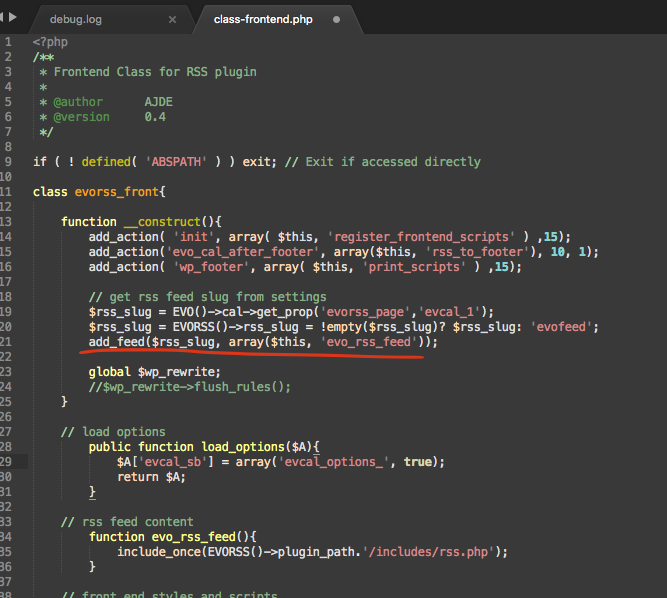
Very glad the yoast team was able to look into this for you and for others with a similar issue. But their diagnose is so vague. “caused by how the feed/relevant post type was registered/created” Would be nice if they could point to the part in the code that is not accepted within their plugin.
The RSS feed addon does not do any rewrite rules and we use add_feed() hook. So I wonder if yoast is wanting other plugins to use rewrite rules…
-
Apr 21,2023 AT 11:02AM -
Posted 3 years ago
- #314021
Hello Seth, we’ve had some issues with the helpdesk and should be all sorted out now. We try to keep all the communications in here makes things easier as emails can get lost very easily. Hope you understand!
I will reach out to the yoast team!
-
Feb 7,2023 AT 5:36PM -
Posted 3 years ago
- #306164