Event past midnight / display end time but do not display event on next calendar day
Hello,
I followed the instructions on this link (https://docs.myeventon.com/documentations/how-to-create-events-that-goes-past-midnight/), but the problem is that it implies that you have to hide the end time of the event.
I'd like to display the end time but not display the event on the calendar the next day.
On the other hand, would it be possible to apply this setting automatically to all events in one or more categories (events are inserted by clients, hence my question)?
Are there any hooks or filters that can do this?
Thank you in advance for your help,
Regards,
- Apr 15,2024 AT 3:32AM - 2 years ago-
-
Apr 15,2024 AT 11:40AM -
Posted 2 years ago
- #350575
Hello,
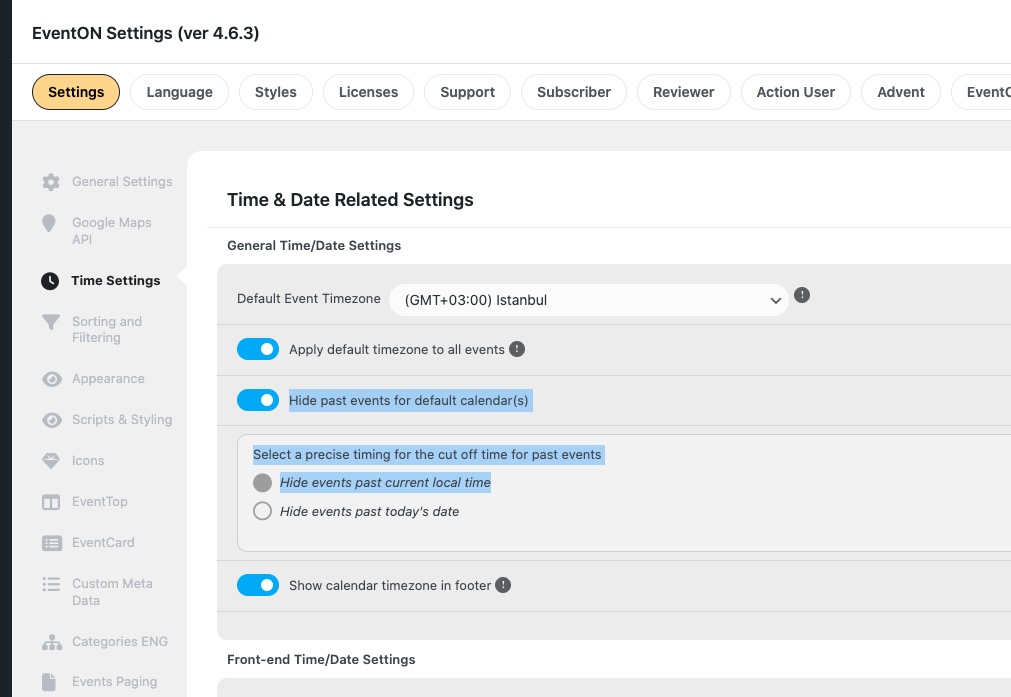
Please take a look at EventON > Time Settings > “Hide past events for default calendar(s): Hide events past current local time”:
On the other hand, would it be possible to apply this setting automatically to all events in one or more categories (events are inserted by clients, hence my question)?
Thank you for your great suggestion, at the moment it is not supported. However please create a new ticket and select Feature Request as category so others can vote on your idea and get it moved into development faster.
-
Apr 22,2024 AT 2:07AM -
Posted 2 years ago
- #351469
Hi,
I already use this function, but when a visitor consults the calendar a few days beforehand, he’ll see that the event will take place on Friday and Saturday, which can be confusing if the user isn’t careful.
I think we should have the option of displaying the end time without displaying the event on the following day.
I’m going to create a feature request in this sense.
Regards,
-
Apr 23,2024 AT 1:49PM -
Posted 2 years ago
- #351705
Please create a new featured request. We check all of them all the time and add new functionality.
-
Apr 24,2024 AT 12:13AM -
Posted 2 years ago
- #351730
Ok just did it, thank you
-
Apr 24,2024 AT 2:37AM -
Posted 2 years ago
- #351734
Perfect! If you have any further questions or concerns please create a new ticket.
-
Apr 15,2024 AT 11:40AM -
Posted 2 years ago
- #350575