Edit event date picker not displaying correctly
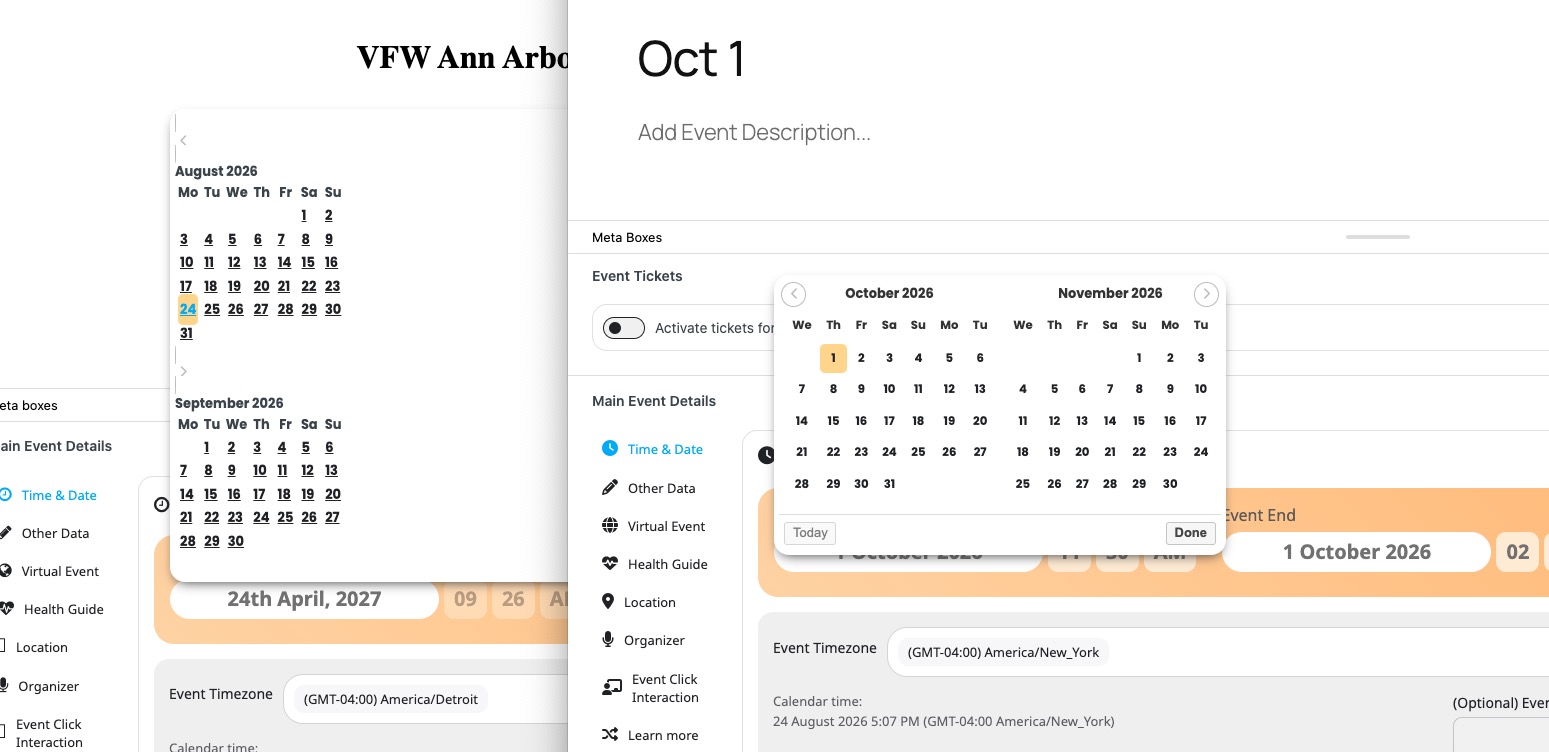
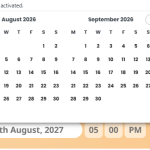
When editing or creating an event, if I click on the Event Start or Event End I get a very basic calendar showing two months (current month & next month) on above the other. There are || text icons to skip the month forward/backward but they don't do anything. This isn't the correct date picker and looks like it isn't loading the stylesheet, so just reverting to plain text. The only way I can skip forward a month is to click on a date in the second month which moves it up to the top and shows the following month underneath and keep doing that until the month I want is visible.
- Aug 21,2026 AT 7:24AM - 2 months ago-
-
Aug 21,2026 AT 7:26AM -
Posted 2 months ago
- #410840
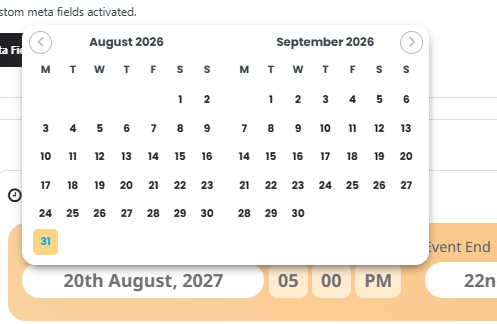
As a follow-up, here’s how the date picker looks when adding or editing an event.
Regards,
Martin.
-
Aug 22,2026 AT 12:51PM -
Posted 2 months ago
- #410869
Yeah – I hate this updated version of the date picker. The old one was MUCH easier to work with since it was side by side, not up and down. Now when you advance it several months, it ”jumps” because some months have 4 weeks and some have 5. It was LOTS BETTER BEFORE – no idea why you guys had to mess with it. If it matters, I vote to restore the old version of this element of the plugin.
-
Aug 23,2026 AT 8:47AM -
Posted 2 months ago
- #410874
OK – still hating this updated date picker – – I now have ACCIDENTALLY gone too far forward and don’t see a way to go BACKWARD on the dates. Is this not possible with this new update? It seems so. I could do it with the previous version easily.
Is there a possibility of allowing us to just enter the date in manually instead of forcing us to use the picker? That also would be extremely helpful.
Please advise.
Otherwise I’ll have to redo the entire event posting from scratch – that seems to be the only way I can put it on the correct date at this point….
-
Aug 24,2026 AT 2:10PM -
Posted 2 months ago
- #410908
Hello,
Sorry for delay. Please note that your calendar looks different from the one on our test site:
Could you please try the instructions mentioned in this
?
I think that your theme or one of your plugins can cause the issue.
-
Aug 25,2026 AT 4:56AM -
Posted 2 months ago
- #410928
Thanks for the reply.
I have disabled each plugin but it makes no difference. I already had logging turned on from an earlier issue, but looking at the log file there are no errors shown.
I could try switching to a default theme, but even if that fixes the problem that won’t help in the long term as the theme author isn’t going to change it just to fix an issue with your plugin. Plus, from comments added here it seems I am not the only one with this problem and we are very unlikely to be using the same theme.
Regards,
Martin.
-
Aug 25,2026 AT 6:09AM -
Posted 2 months ago
- #410943
Hello Amy Blain,
Is your calendar looks like this (no formatting):
https://helpdeskx.s3.amazonaws.com/wp-content/uploads/2026/08/21072525/EventOn-Error-150×150.png
Martin Ayub,
We just need to figure out where the issue is coming from, so we can then provide you with solution if possible.
-
Aug 25,2026 AT 7:37AM -
Posted 2 months ago
- #410945
Hi Artem,
No, my calendar date picker looks exactly like the one you included earlier in this thread….the problem is I accidentally clicked to far forward on it and now it won’t let me go backward. The PREVIOUS calendar picker would have let me do that no problem – – this updated one stinks! Please advise as to WHY you guys changed it and if there’s a possibility that you will switch it back to the MUCH EASIER TO USE old one.
Also, is there any way to go back to a previous month on the current calendar picker? If so, please let me know HOW because I don’t see any way to do that.
I can’t stress enough how much this updated calendar picker is awful!
-
Aug 26,2026 AT 12:44AM -
Posted 2 months ago
- #410952
Re: Amy
Although the date picker doesn’t allow you to go backwards, I found if you go to the Events list and choose ’Quick Edit’ rather than ’Edit’, you can manually edit the start/end dates and times.
Hope that helps.
Martin.
-
Aug 26,2026 AT 5:40AM -
Posted 2 months ago
- #410963
Martin Ayub,
Have you tried switching the theme?
Amy Blain,
Could you create a new ticket and include login info, so I can check wp-admin?
-
Aug 26,2026 AT 7:06AM -
Posted 2 months ago
- #410965
I don’t want to change my theme – – – you have not answered my main question which is WHY did you guys change the way the date picker is displaying now and more importantly, can you change it back to the way it was?
-
Aug 26,2026 AT 1:58PM -
Posted 2 months ago
- #410973
Thank you for your messages!
I am going to escalate this ticket to development to help in here. Please allow us some time to address this, and we truly appreciate your patience. Thank you for being a valued EventON customer!
-
Aug 27,2026 AT 3:31PM -
Posted 2 months ago
- #411002
Date picker new design was introduced in version 4.8 back in 2025 Jan. From what it seems your theme updates are causing a conflight with jquery date picker styles to look the way it is. We introduced the horizontal dual month approach as a way to make it easier to select events than span over multiple months.
@martin, let me see what styles we need to add into your site to get the calendar fixed so you can use it as it suppose to be. These styles we will pass on to version 5.1
-
Aug 27,2026 AT 4:07PM -
Posted 2 months ago
- #411004
Looks like @martin the jquery UI styles are not loaded on your site, and I added several codes to eventON elements.css file but the changes I made to the code is not reflecting on your website perhaps cache not loading new changes?
Please see clear cache and see if date picker look the same.
-
Aug 28,2026 AT 11:00AM -
Posted 2 months ago
- #411028
I have the same issue with one of my sites. Google’s CDN doesn’t appear to have the jqueryui 1.41.2 file which the plugin is looking for.
I added this into my theme’s functions.php file and the date picker is loading like it should.add_action( ’admin_print_styles-post-new.php’, ’fix_broken_jquery_ui_theme_cdn’, 20 );
add_action( ’admin_print_styles-post.php’, ’fix_broken_jquery_ui_theme_cdn’, 20 );
function fix_broken_jquery_ui_theme_cdn() {
wp_deregister_style( ’jquery-ui-css’ );
wp_register_style(
’jquery-ui-css’,
’https://ajax.googleapis.com/ajax/libs/jqueryui/1.14.1/themes/smoothness/jquery-ui.min.css’,
array(),
’1.14.1’
);
wp_enqueue_style( ’jquery-ui-css’ );
} -
Aug 31,2026 AT 2:02AM -
Posted 2 months ago
- #411062
Thanks for the info regarding jQuery.
I installed the jQuery Updater plugin and this seems to have fixed the problem, with the calendar date picker now appearing correctly. I hope this helps anyone else having the same issue.
-
Aug 31,2026 AT 6:02AM -
Posted 2 months ago
- #411072
Thank you for letting us know! Our devs are going to check this ASAP.
-
Sep 2,2026 AT 10:17AM -
Posted 2 months ago
- #411129
Thank you for letting us know we will include those minified styles as part of eventON in the next version update.
-
Aug 21,2026 AT 7:26AM -
Posted 2 months ago
- #410840