Many thanks for the quick response. I have inserted the following code:
.evcal_event_title {
text-transform: none !important;
}
span.evcal_event_subtitle {
text-transform: none !important;
}
.EVOWV_content.wk_1 .evowv_col_events .event {
text-transform: none !important;
}
The result: Each word starts with a capital letter in the standard views of EventON. Unfortunately it does not work in the week view.
Actually, the calendar should display the text as I entered it. Example: “Das kleine Yin Retreat mit Maren” – currently the output is “Das Kleine Yin Retreat Mit Maren”.
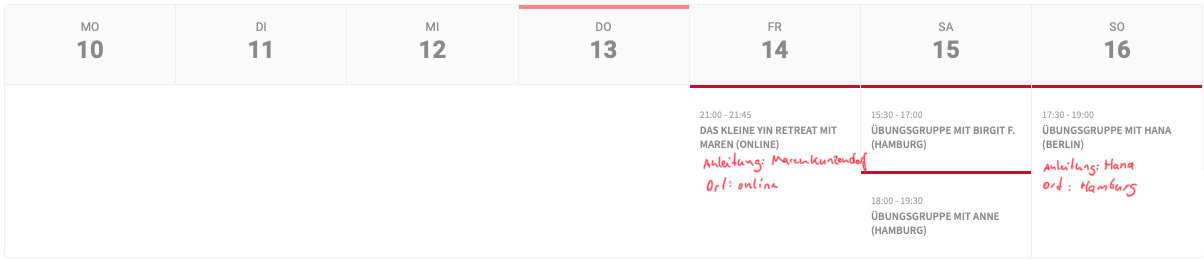
In the standard views you can show the Organizer, but unfortunately not in the week view. I added a handwritten description of how it could look like in the picture.
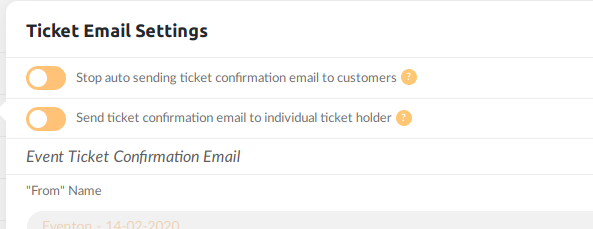
Please check the screenshot and in settings.
#1 is eventon default if enabled will stop sending to admin
#2 is from child plugin if enabled will send to individual
If it still does not work, you will need to send us wp-admin access to live site where we can test it ourselelf.
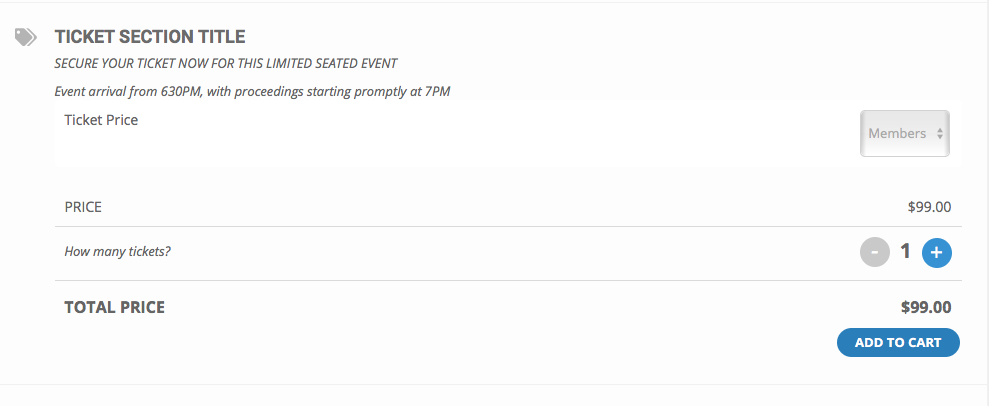
Hi – I did select variations initially as it was working fine a week ago. I think the upgrade as sent it a bit crazy as dates also keep reverting back to august instead of November with no change from our end.
I fixed it this morning but then it crashed again and I notice that there is a new weird text box for guests and members ticket variations. This works but isn’t ideal as it isn’t clear the user has to select guest. They are more likely to just add tickets at member price. See attached image.
I was hoping you were contacting me to say the job was completed, since the 3-week time frame ends tomorrow. 🙂
I feel speechless.
I think I marked my message that I included wp credentials as “private”… but I can’t remember for sure.
I was really scared and really really surprised that our website got hacked. Holly-reck.
My god
I don’t know how else the hacker would’v got the credentials… because I recreated the credentials for Ashish, and it got hacked right away, few minutes after.
Now I laugh about it. I changed all my passwords !
Marc, that is very strange. You can not access this ticket https://helpdesk.ashanjay.com/ticket/follow-up-for-ashish-customization-work/ without login in. So no way anyone could have seeing your wp-admin access. Unless the ticket was created as public ticket.
I am checking into to see if there is any issues that caused this in the system.
I recently switched the site over from a temporary URL to the permanent URL. And now I don’t know how to fix this with google API.
We are glad your issue is resolved, if you have any further questions or concerns please create a new ticket.
Hi,
Sure I’ll do this in the future. But the code you provided above worked. Thank you.