Hi Artem, and thanks for your reply.
Is there any way that I can achieve this with https://www.myeventon.com/addons/seats/
I need to check before purchase, sorry
appreciate your time
kind regards
Marko
Replies for tickets on suppota
Hi Artem, and thanks for your reply.
Is there any way that I can achieve this with https://www.myeventon.com/addons/seats/
I need to check before purchase, sorry
appreciate your time
kind regards
Marko
We are glad your issue is resolved, if you have any further questions or concerns please create a new ticket.
If you have a moment, we would greatly appreciate if you could kindly leave us a review at codecanyon! from your account > downloads. Cheers!
Please remove/rename this file: https://isaaclomman.com/wp-admin/theme-editor.php?file=eventon%2Farchive-ajde_events.php&theme=thrive-theme
Hi,
it works! thanks for the help!
You can close the topic.
Regards
Great! Please keep us updated.
Hello,
With Variations add-on https://www.myeventon.com/addons/ticket-variations-options/ you can set Ticket Variation Stock Quantity for each variation:
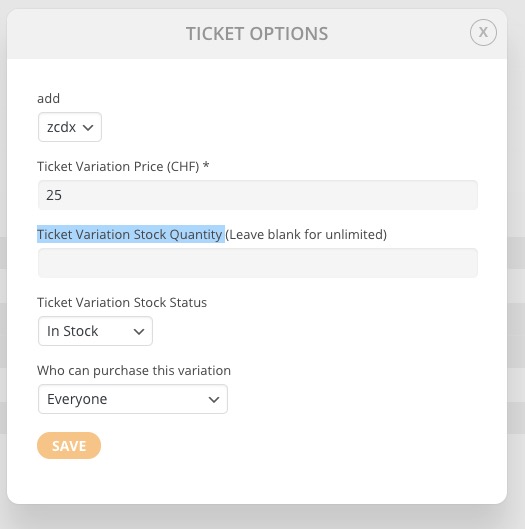
Try on http://dev.myeventon.com/wp-admin/
However, you cannot set it for a specific user role. You can send us a customization job request by creating a new ticket in here and selecting Customization Request as the category. Maybe one of our developers can extend this to make it work for user roles as well.
No, only if you update EventON with disabled EventON > Do not delete eventon settings & data when EventON is uninstalled.
Closing this one.
If you need anything else please create a new ticket.
Thanks,
I’m going to purchase another license.
An important question.
When I do “EventON > Licenses > Deactivate > Activate a new License” do I lose any setting or data?
thank you for the video – very handy
I went in and edited that event and found no issues
and then created this event http://thevegasmovement.com/events/eventon-test/
and after clicking publish that warning didn’t go away until I refreshed the page- so I wouldn’t worry about it- we will get a fix for that- its more a backend cosmetic effect rather than an error actually happeningthe links took me to the zoom page
other than the warning message that comes in the pack end- could you rephrase the issue you are having