No it’s not working.
I got this message: Successfully performed the scheduled fetching of events.
But when I look in the Events section nothing was imported.
Replies for tickets on suppota
No it’s not working.
I got this message: Successfully performed the scheduled fetching of events.
But when I look in the Events section nothing was imported.
Could you try deleting all lines except devwordpress.apps4you.hu/*
Ashan,
Could you check:
I’ve made some tests to solve this issue and when I deleted all my events in Hebrew and created an event that is all in English, including the organizer and the location then suddenly it started working. Apparently the plugin does not support special characters like Hebrew. This is weird because when I tried to export the attendees list to CSV it does work, so does the CSV export file for the language translations.
Thank you for your messages, I am going to assign this ticket to Ashan and he will be able to take it from here and find you a solution. Please allow some time for him to get back to you, we greatly appreciate your patience and thank you for being a eventon customer! Also please disable any IP blocking on your site if there are any.
Thank you. Where on WP can I check the settings on this?
Also, when exactly is this notification triggered?
Hello,
Could you elaborate more? “Members are attending” number isn’t correct:
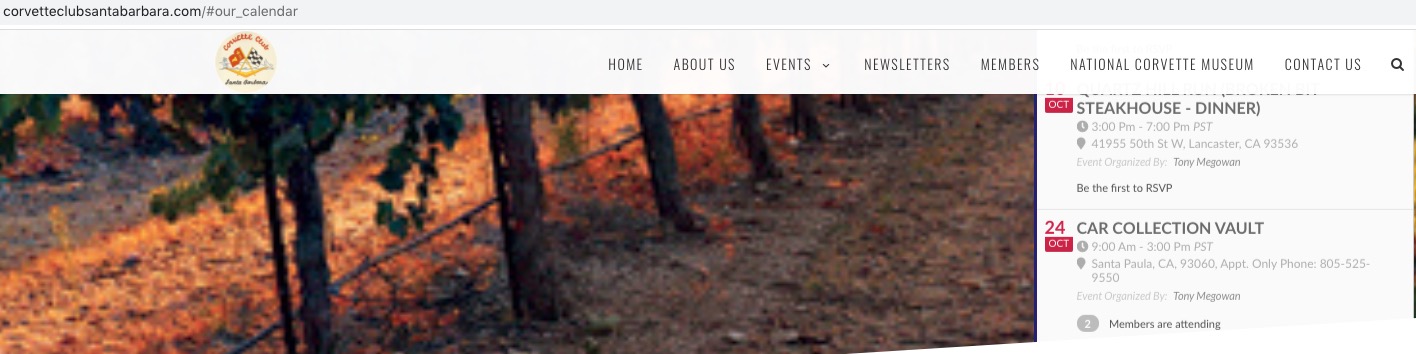
Hello,
Please add this to the shortcode:
event_past_future=”future”
This hides past events from the calendar.
FYI no. 2, for your information. What’s for sure, if I deactivate the My Wishlist add-on, all the sidebars in my site (not just calendar, but also blog page sidebar) work. So there is an issue with the My Wishlist sidebar.
If you check my 4 calendars (www.spainonyou.com/calendario-de-eventos), you’ll see that I’ve finally added the sidebar and added two EventON sidebar widgets. If I dare to add the My Wishlist/EventON shortcode executor widget, it breaks the page (the My Wishlist widget text header is displayed (in English, not in Spanish), but the main calendar on the page disappears and all it shows left is the shortcode). If happen to SAVE the page, it destroys it altogether and removes the entire content, except the footer. Amazing….! WTH??!!! Luckily I can redo the page in 2 mins as I’ve saved the shortcodes in excel.
What do you suggest we do? Can you guys take a look at the MyWishlist add-on and see what’s wrong with it??
Thanks.
Order ID – #91165
I would think maybe you have recommendations on what to exclude because it is impossible to know which files you use. It would be very useful for you to provide what to exclude from cache solutions since nearly all WordPress sites use cache software. The other hope I had is that you would recommend some solutions that you have proven that would work well with your tools as a service to your customers.
Any guidance you could provide would be extremely valuable since my client is ready to remove your calendar software because of the problems described in this ticket,