Hello,
No issues from my side:
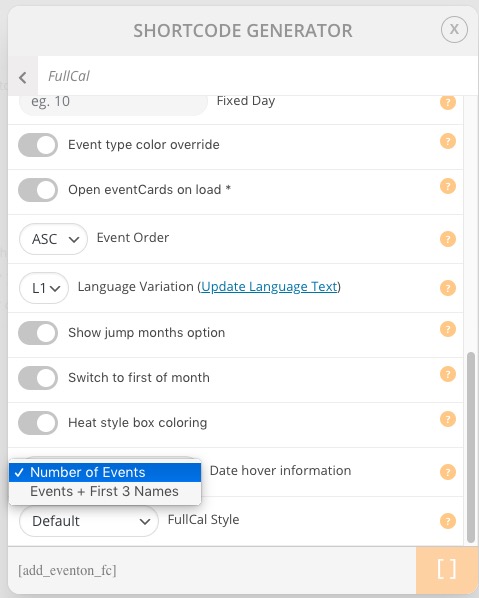
also I would like to use the multicolor configuration but I can’t find the corresponding shortcode
Could you send us a screenshot? Try going to EventON > Shortcodes > [ ] GENERATE SHORTCODE:
Replies for tickets on suppota
Hello,
No issues from my side:
also I would like to use the multicolor configuration but I can’t find the corresponding shortcode
Could you send us a screenshot? Try going to EventON > Shortcodes > [ ] GENERATE SHORTCODE:
Please go to https://helpdesk.ashanjay.com/wp-content/uploads/2020/07/Screenshot-2020-07-20-at-20.40.53.jpg and press “Sync Count” arrow.
Please add this CSS code to EventON > Styles (If you don’t see any change, EventON > turn off Write styles to header > save settings > turn on Write styles to header):
.evo_metarow_socialmedia a.evo_ss i { font-family: ‘evo_FontAwesomeS’,’evo_FontAwesome’,’evo_FontAwesomeB’ !important; }
Please use this code:
.evcal_cblock .evo_start { font-size: 27px !important; }
.ajde_evcal_calendar .evcal_month_line p { font-size: 23px !important; }
We are glad your issue is resolved, if you have any further questions or concerns please create a new ticket. If you have a moment, we would greatly appreciate if you could kindly leave us a review at codecanyon! from your account > downloads. Cheers!
admin
carrozzone199bart
thanks
My email address is navbahl@hotmail.com
Hi,
Thank you for your request.
We have not changed something related to that, duplicate is based on WordPress and the functionality is taken from there.
Hi Jason,
As those pages also do not have eventON I do not think that this comes from us.
Can you show us with a screenshot this area I loaded some random pages and I could not see them, just some space at the bottom coming from Elementor.
Hi Ryan,
Yes please do send us a copy of the CSV file so we can test it from our side please.