Wp admin > lms > settings > appointment > admin calendar.
https://littlemandarin.hk/wp-admin/admin.php?page=lms-settings&tab=appointments&sub=calendar
or
use admin account to view the profile of instructors > appointment
https://littlemandarin.hk/members/ivanlwk2020gmail-com/book/instructing/
Hello,
There seems to be a problem of incompatibility with the theme. Please try going to EventON > enable Disable JQuery Mobile script.
After you deactivated EventON Slider please also delete it by pressing “Delete” button. Now you can press “Add New” and upload the updated version.
Please note that deleting add-ons doesn’t delete events.
If you need to sell the tickets online, yes you do need it.
Can I know any event which has a booking, or a page in admin where I can see booking of users
Hello,
Could you update Action User to 2.2.1 and check once?
To update eventon addons: You can download latest eventon addons from myeventon > my account. Then you can go to your website, deactivate old addon and install new one and activate then delete the old addon. This link will further explain the process. Also you can follow us on twitter to get real-time announcements on updates!
Ashan,
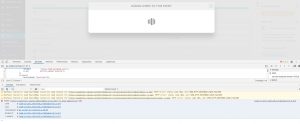
POST https://sweatnet.com/wp-admin/admin-ajax.php?_fs_blog_admin=true 500
send @ load-scripts.php?c=0&load[chunk_0]=jquery-core,jquery-migrate,utils,jquery-ui-core,jquery-ui-widget,jquery-ui-mouse,jquery-ui-sortable&ver=5.3.4:4
ajax @ load-scripts.php?c=0&load[chunk_0]=jquery-core,jquery-migrate,utils,jquery-ui-core,jquery-ui-widget,jquery-ui-mouse,jquery-ui-sortable&ver=5.3.4:4
(anonymous) @ au_script_b.js?ver=2.1.15:12
dispatch @ load-scripts.php?c=0&load[chunk_0]=jquery-core,jquery-migrate,utils,jquery-ui-core,jquery-ui-widget,jquery-ui-mouse,jquery-ui-sortable&ver=5.3.4:3
r.handle @ load-scripts.php?c=0&load[chunk_0]=jquery-core,jquery-migrate,utils,jquery-ui-core,jquery-ui-widget,jquery-ui-mouse,jquery-ui-sortable&ver=5.3.4:3
Hi Artem,
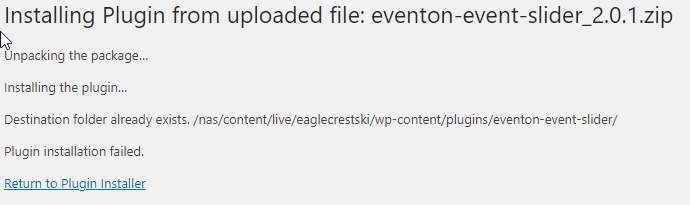
I just tried following your instructions and got the same results as when I tried the main plugin.
Can you please help?
Also, why don’t these have the option to update automatically like my other plugins?
Thanks,
Charlie
I request to return the order with invoice number: 28001
since I have another one that corresponds to the invoice nº 27943
Could you please double check these invoice numbers and let us know if there are also Order IDs you can tell us?
Thank you for your messages, I am going to assign this ticket to Ashan and he will be able to take it from here and find you a solution. Please allow some time for him to get back to you, we greatly appreciate your patience and thank you for being a eventon customer!
Ashan,
I request to return the order with invoice number: 28001
since I have another one that corresponds to the invoice nº 27943
These invoice numbers aren’t correct.
It seems that the customer is referring to
#90165 completed
Ticket Variations & Options – Single Site
EVOVO1ef71aed-6f96-4215-b950-fc7cfc07928e
#42006 completed
Ticket Variations & Options – Single Site
EVOVO3b84dfd9-411b-4bf6-b17c-ab22d076049f
And they want to refund #42006.