Hey,
I replied to your request.
Noone else is going to handle it except me.
Replies for tickets on suppota
Hey,
I replied to your request.
Noone else is going to handle it except me.
Sure I will do it for you.
Email me tomorrow
https://madamcarroll.com/wp-admin/
username: chrisdavidpeters
password: wor@Mtmcga74
If these credentials do not allow you to log in, please let me know what the error is however I just used them and they were able to authenticate fine. Thanks!
Ok I get what you are saying. The program is designed to use all days inbetween 2 days as a day for the event. But I see what you mean. And actually thank you for giving us this idea for the schedule. Let me some magic and get you a solution where you can pick what day number it is.
Best Ashan
that should do the trick dan. it worked on our end. If you want to send wp-admin access we can take a look and see ? you can also try clearing cache to make sure the changed js code is reflected on the website.
Hi there
Thanks for this.
I just tried that and it didn’t seem to make a difference though.
It’s currently live on the site to see.
Many thanks,
Dan
ps: If there’s any other code-suggestions, would it be possible to send the code for me to copy and paste in?
Kindly update actionUser to version 2.2.1 and that will resolve this issue.
Stephan i was simply able to change everything. I think you are not doing something right here, may be you are not fully understanding how to change it.
In the above code you send,
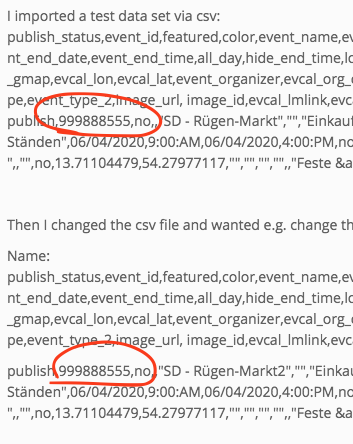
what is this long ID none of your events in your website have long IDs like this. So may be the problem is you are not using matching event IDs to existing events?
Pedro I am not sure where exactly you are referring to here, mind sending me a screenshot? 🙂
That is fine my friend, if overriding allow to you achieve what you want, and that is what you shall do 🙂 If you have more questions, kindly send us a new ticket and we would be more than happy to help you resolve your issues!