No worries Seth got you refunded for the Weeklyview addon 🙂 If you have more questions, kindly send us a new ticket and we would be more than happy to help you resolve your issues! Also If you have a moment, we would greatly appreciate if you could kindly leave us a review at codecanyon! from your account > downloads. Cheers!
Archives: Replies
Replies for tickets on suppota
Reply to: tickets(175015)
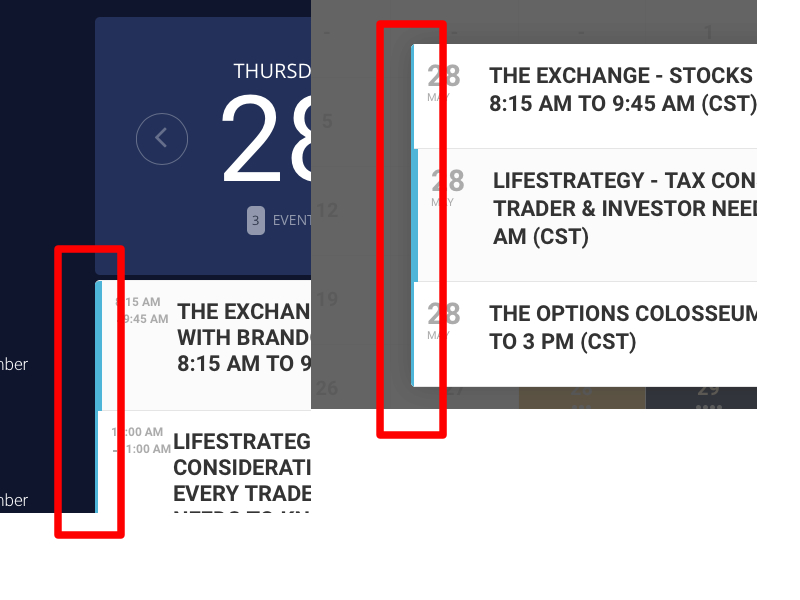
Hello.
A couple more color changes.
1) I can’t seem to find the option to change the blue line on the left of the events.
Where is that option located exactly? or which style to use in case I need to add some custom css to override it.
2) If possible (this is extra) …
Is there a way to change the Background color of the big number in Daily View from solid to a gradient? I know it only supports a solid color but maybe a gradient from top to bottom can be possible with some css?
Thanks for your help.
Reply to: tickets(178614)
So closing the ticket while the customization isn’t finished is following rules?
1 time a client doesn’t reply within 5 days and the ticket is closed. While the same client waits for 2 months for a customization to be finished and for something that has already been paid in full 6 months ago.
Why close my ticket twice while the job is not done?
please finish the job or refund the money
Reply to: tickets(178301)
was the bad event created via a csv import or via the normal way to add an event
(if it was via csv importer please update the csv importer to the latest version
Ashan will get onto this ticket- I am just brainstorming possible reasons for the error as there really isn’t any difference between the good and bad event to explain the error
Reply to: tickets(178628)
I see; thank you very much for your detailed response!
Reply to: tickets(178496)
Hello
alrighty- Yes we offer refunds 30 days
the speakers addon content appears within the event itself and the only way to have that appear elsewhere would be through custom coding- you could simply put a single event in the area if you just wanted to show that event without the entire calendar- so out of the box- no you couldn’t just take the speaker section and wack that into another page or post
technically if you were good with css you might be able to via a shortcode to put a single event on a page and then with diusplay none css hide everything but what youneed but thats not really a fast solution and requires css know how to implement
here is a video on ticketing and possibly an easy way to add the company without needing to do any code work
using a combination of simply changing the language from phone number to Company Name
and checking a few options in the tickets setting
https://vimeo.com/423756008
as for learn dash, we have not played with that to know if it would work sorry- we are unfamiliar with how you buy course on that learning system- but you can get a refund on tickets if it doesn’t seem to work the way you need.- I used to use sensai from woocomerce and that had its own payment system- if tickets doesn’t work- you could have your normal calendar and use the “learn more” option within the event to link to where they buy tickets for a learn dash course (in myeventon>>>>language>>>change learn more to buy now for example
Reply to: tickets(178140)
Hi there,
I would just like to check if is there any progress on 4 and 5?
Also, could you please assign the ticket #175773 to Ashan, I’m not getting any replies from Basilis and I’m not satisfied with his work. He didn’t meet my expectations on the assigned task and I want a refund for that specific task.
Please note that I really like your plugin and all addons and I’m happy with everything except the communication and service that Basislis provided or didn’t provide.
Thank you in advance.
Best,
Brando
Reply to: tickets(178628)
if you are using Zoom you really want to have that waiting room feature which is enabled by default running so you can tick off the names of those who have registered and then close the door to the event
we are also incorporating the RSVP and the tickets addons to work with virtual events (so the link is shown after they pay for example) or you can set it to display link 1 hour or so before the event
the current tickets addon includes: Ability to enter information sent via ticket confirmation email to attendees (which could be the link for example)
emailing (from experience) can cause an issue as people don’t get the email and then right before the event you have people calling and social media messaging- “wheres the link”?
we are looking into having a zoom meeting embed in its own player on the website but there is no eta on that feature, as we are still learning the API. (And with zoom their API is changing as they add security)
Reply to: tickets(158969)
Basilis. What the hell is going on. This is absurd. Just give me my money back and I’ll try my luck with some other developer.
Reply to: tickets(165840)
Ashish, please, what is going on… This is not OK… It’s been another 2 weeks now.