Hello,
Please go to EventON > EventCard Data > enable LEARN MORE & ADD TO YOUR CALENDAR. After go to Edit Event > add User Interaction for event click.
Replies for tickets on suppota
Hello,
Please go to EventON > EventCard Data > enable LEARN MORE & ADD TO YOUR CALENDAR. After go to Edit Event > add User Interaction for event click.
Ah yes, sorry about that. Please try following https://docs.myeventon.com/documentations/add-additional-fields-actionuser-event-submission-form/ and create several new fields or create multiple custom fields by following https://docs.myeventon.com/documentations/setup-use-custom-meta-fields-events/ and then enable them from EventON > Form Fields.
Hi Michaela,
You mean all the users from your WordPress Installation?
Hello,
Thank you for your great suggestion, at the moment it is not supported. However please create a new ticket and select Feature Request as category so others can vote on your idea and get it moved into development faster. Or You can send us a customization job request by creating a new ticket in here and selecting Customization Request as the category.
We are glad your issue is resolved, if you have any further questions or concerns please create a new ticket.
Ashan,
If EventON is enabled you cannot duplicate contact forms, it just overwrites the same form over and over again.
Thank you for your messages, I am going to assign this ticket to Ashan. The problem is that I am not sure if we’ll be able to fix this, since Contact Form 7 is not our plugin.
Hello,
Please check available emailing groups:
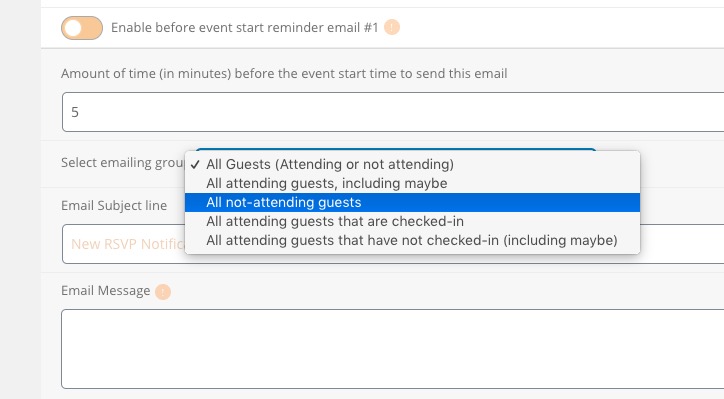
“All not-attending guests” is what you need. Please check and let us know.
Hey Shannon,
That is unforutnately the default functionality that the lightbox plugins do use.
There might be a solution to fix that by editing the JS file of the lightbox, but we do not advise do changes onto the core of the plugin.
If you still need that, please create a customization request and we will review it.
I indicated that this solution would not work for us since it would change all fields to include the normal event fields