Hello,
Thank you for your messages, I am going to assign this ticket to Ashan and he will be able to take it from here and find you a solution. Please allow some time for him to get back to you, we greatly appreciate your patience and thank you for being a eventon customer! Also please disable any IP blocking on your site if there are any.
I added the code so please check and let me know.
Hi,
OK, I will see what we can do:
Here is the invoice:
https://www.paypal.com/paypalme2/Basilakis/100usd
Please send me:
1. Your Email
2. WordPress Access
3. FTP Details
And I will try get it done as soon as possible 🙂
Hello,
Please add this CSS code to EventON > Styles (If you can’t see any change, EventON > turn off Write styles to header > save settings > turn on Write styles to header):
i.editEventBtnET.fa.fa-pencil:before { content: “f303”; }
It seems that it fixed now. Could you tell us how did you find out about this error: Invalid enum value in field “eventAttendanceMode”? With email?
We are glad your issue is resolved, if you have any further questions or concerns please create a new ticket. If you have a moment, we would greatly appreciate if you could kindly leave us a review at codecanyon! from your account > downloads. Cheers!
ps i have now find out that under setting the fields are editable… do you have a german file i could import?
Yes, that works great, thanks! One question: At the top of the calendar, there are two sets of years and forward/backward buttons. This didn’t do this before. Can that be fixed?
Please use this shortcode: [add_eventon_yv_ext]
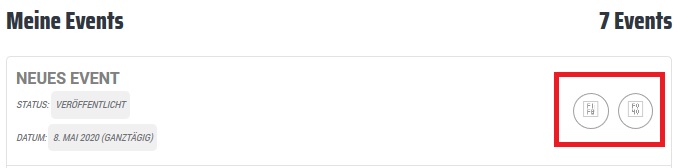
Picture of how Symbols are showing: