Correct. All child event types of “Dance Class”
Archives: Replies
Replies for tickets on suppota
Reply to: tickets(174909)
Hi Aaron,
With:
> Because “Dance Class” was selected, I’d like Sub-Category/Event Type 2 list to appear, which are only applied to “Dance Class”
You mean that this dropdown you want to only show the subcategories of Dance Class, correct?
Reply to: tickets(174053)
I created a feature request for this. I also played around with it a little and got something to work. The client wanted an alert to go off 15 minutes before any event. So this made things easier since I could just set it globally.
In EventOn > includes > class-evo-ajax.php I found where you are writing the ICS file.
I changed:
echo “DESCRIPTION: “.$this->esc_ical_text($summary).”n”;
echo “END:VEVENTn”;
echo “END:VCALENDAR”;
to:
echo “DESCRIPTION: “.$this->esc_ical_text($summary).”n”;
echo “BEGIN:VALARMn”;
echo “TRIGGER:-PT15Mn”;
echo “ACTION:DISPLAYn”;
echo “DESCRIPTION:n”;
echo “END:VALARMn”;
echo “END:VEVENTn”;
echo “END:VCALENDAR”;
Replaced the file in the plugins > EventOn > includes directory and it worked. However, I want the ability to update the plugin without losing this change so I was trying to put this file in my Child theme. I tried:
ChildTheme > Plugins > EventOn > includes > class-evo-ajax.php and it didn’t work.
I also tried ChildTheme > EventOn > includes > class-evo-ajax.php and that didn’t work either.
Is there a way to override a plugin file within the Child theme?
Thanks in advance
Reply to: tickets(174890)
Hello,
1. WordPress is not designed to be an image hosting service. It’s mostly a blogging platform where all users who can add content are logged-in. So you need a custom solution for this. You can send us a customization job request by creating a new ticket in here and selecting Customization Request as the category.
2. Please add this CSS code to EventON > Styles (If you don’t see any change, EventON > turn off Write styles to header > save settings > turn on Write styles to header):
span#evo_hide_endtime { display: none !important; } input[name=”evo_hide_endtime”] { display: none !important; } label.ajde_yn_btn_label[for=”evo_hide_endtime”] { display: none !important; } .row.allday_noendtime p:last-child { display: none !important; }
3. Unfortunately, no. You can send us a customization job request by creating a new ticket in here and selecting Customization Request as the category.
4. Use this code:
.evoau_submission_form .evoau_table .row.learnmove p.checkbox_field { display: none !important }
5. Could you send us a screenshot of this part?
6. Could you send us a screenshot of this part?
7. Only manually.
Reply to: tickets(174851)
Please go to EventON > Google Maps API > add Google maps API Key. More info: https://elfsight.com/blog/2018/06/how-to-get-google-maps-api-key-guide/
After go to EventON > EventCard Data > enable GOOGLE MAPS.
Reply to: tickets(174880)
Hello,
Where can I check this one your website? I need to check the HTML code.
Reply to: tickets(174878)
Hello,
Please go to EventON Settings and disable Hide past events for default calendar(s). Now add this to the shortcode:
event_past_future=”future”
By default it classifies Past Events based on End Time.
Please use this widget:
https://docs.myeventon.com/documentations/use-eventon-shortcode-executor-widget/
It allows you to customize the shortcode.
Reply to: tickets(174806)
To give you more info. I didn’t change any dates, I just went to https://dakotadiningdeals.com/wp-admin/post.php?post=1078&action=edit and pressed Update.
Reply to: tickets(174806)
Updated https://dakotadiningdeals.com/wp-admin/post.php?post=1078&action=edit from Edit Event, so now you cannot see it on this page: https://dakotadiningdeals.com/bars-restaurants/botskis/
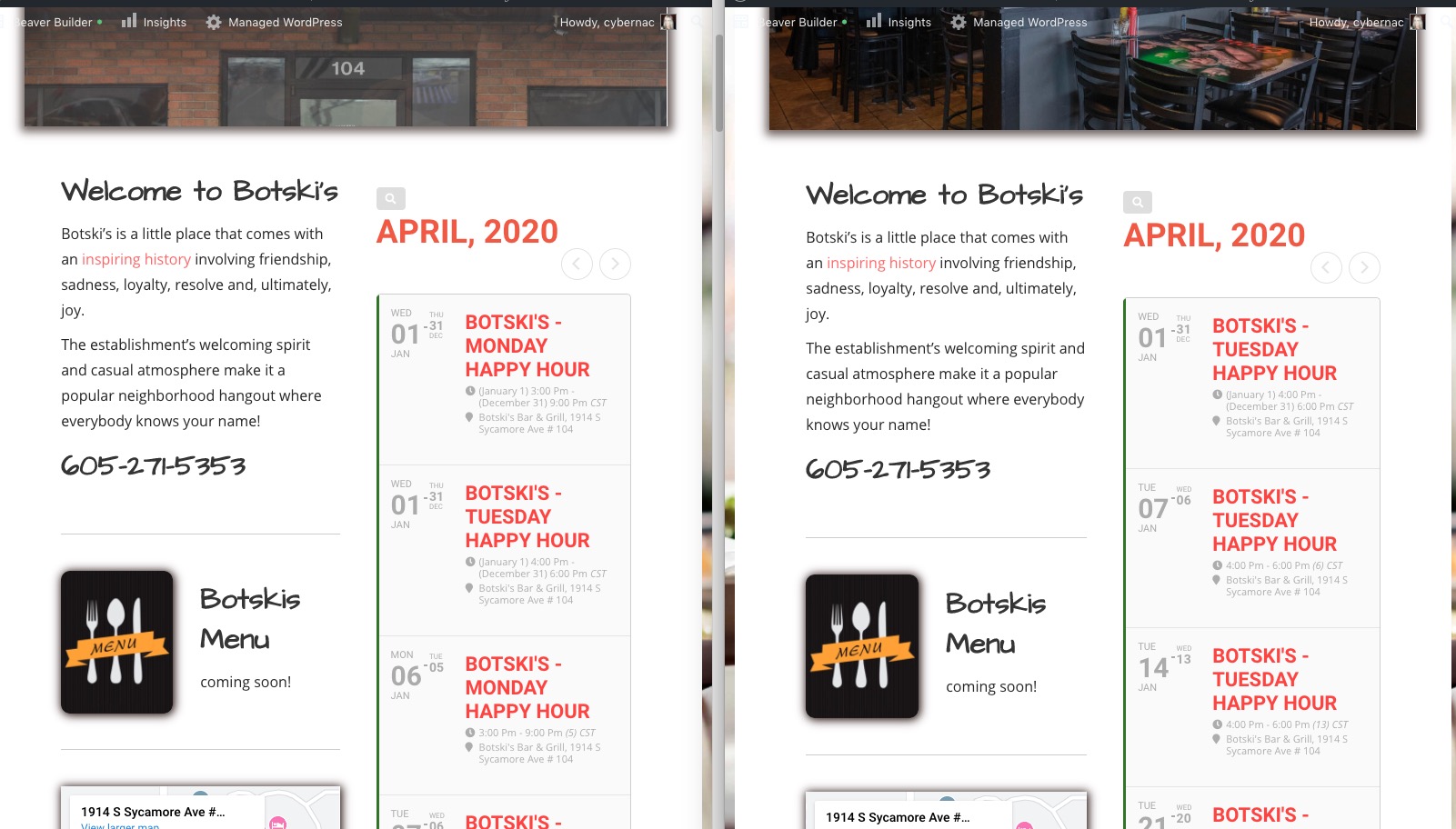
As far as the quick edit, I was just getting confused as there are 2 places to put dates in there – I think one must be just the day you do it or something. It is something that does not show in the regular edit.
Did you put a new value to Start/End Date or just updated them from Quick Edit?
Reply to: tickets(174760)
I planned to buy a calendar, will there be such an opportunity? So that the calendar for the current month shows both past and upcoming months
Like this? http://dev2.myeventon.com/21475-2/
If so then please use this shortcode:
[add_eventon_list number_of_months=”12″ hide_empty_months=”yes” hide_month_headers=”yes” ]