Hello,
Unfortunately, Action User isn’t supporting this at the moment. Locations list is fully available for every user.
Replies for tickets on suppota
Hello,
Unfortunately, Action User isn’t supporting this at the moment. Locations list is fully available for every user.
1. The problem is in “*****…”. Could you remove it?
2. Do you have the same issue on our test server: http://dev2.myeventon.com/20108-2/
Have you tried adding this to the shortcode: accord=”yes”?
3. I am sorry, the access information you have provided did not work for us. Please check them and post the correct login information as a private message, thank you!
thanks
1. Please add this to Date/Time Format:
{Uhr}
2. Unfortunately, PHP: date doesn’t support this. More: https://www.php.net/manual/en/function.date.php
Please check now. Thanks
Hello,
Please update EventON to 2.8.4. Then go to Edit Event > SEO Additions for Event for “Offer” and Edit Event > Organizer for “Performer”.
i was hoping to be able to use them as articles.
However in the example I can't see the image in the list.
As you can see from the first page:
www.eventibooking.it
In the February event there is a photo but I don't see it.
How can I solve this problem?
Thank You
Francesco
Hello,
Could you update EventON to 2.8.4 and Subscriber add-on to 1.3.1? Before update please backup your data.
To update eventon to latest version: If you are unable to do autoupdate, you can go to codecanyon your account > download and get the latest eventon version as zip file. Then you can go to your website, deactivate old eventon, activate (Do not delete eventon settings & data when EventON is uninstalled) from eventon settings, delete old eventon, install new one and activate. This link will further explain the process it. Also you can follow us on twitter to get real-time announcements on updates!
To update eventon addons: You can download latest eventon addons from myeventon > my account. Then you can go to your website, deactivate old addon and install new one and activate then delete the old addon. This link will further explain the process. Also you can follow us on twitter to get real-time announcements on updates!
Hello,
Please try adding this to the FullCal shortcode:
nexttogrid=”yes” load_fullmonth=”yes”
RSVP reduces event capacity only when customers choose Yes:
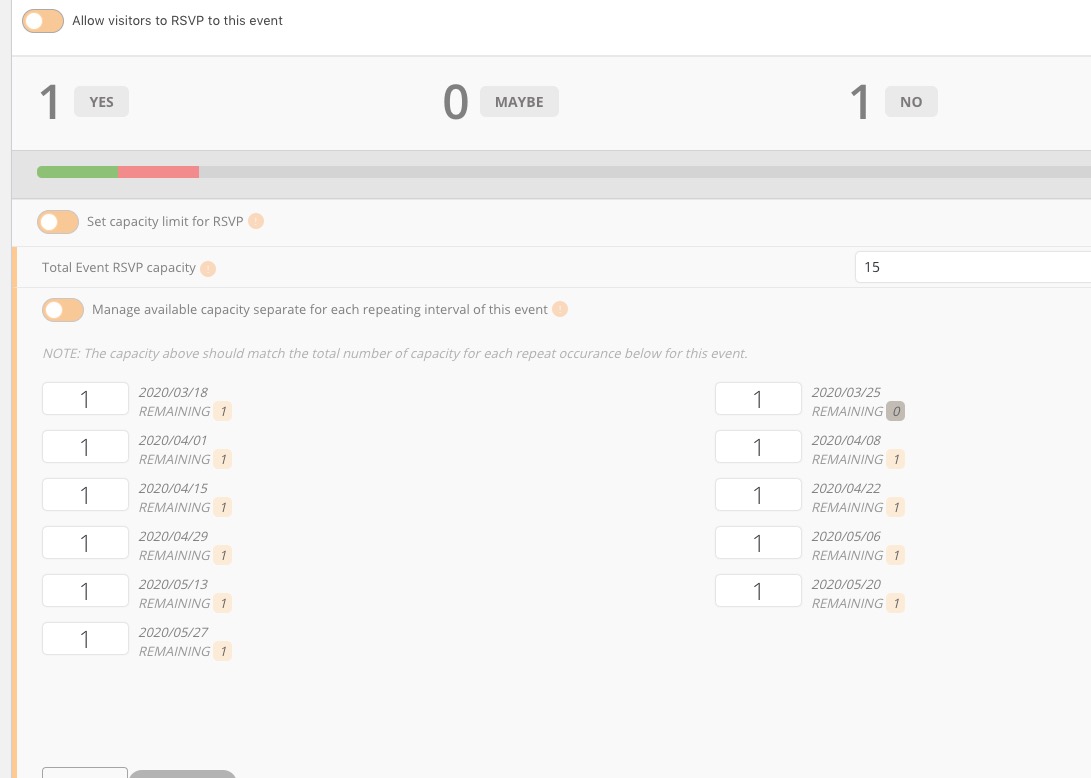
Please check 2020/03/25.