thank you very much for pointing this out. Here is the patch fix

Replies for tickets on suppota
thank you very much for pointing this out. Here is the patch fix
Hi there,
It work perfect!! Thank you very much for the fast response and giving me what I needed. It feel good to know you guys care and are there for us. I have another question, do I need the API for google map to show on the light box? Have a great day. Matthieu
We are glad that you’ve managed to resolve your issue, if you have any further questions or concerns please create a new ticket.
Hello,
It seems that something (your theme or a third-party plugin) replaces every image URL:

Could you please try the instructions mentioned in this documentation to make sure your issue is indeed coming from eventon.
Hello,
Your version of EventON is quite old. Could you please update EventON to 2.8.4? This will fix this issue.
To update eventon to latest version: If you are unable to do autoupdate, you can go to codecanyon your account > download and get the latest eventon version as zip file. Then you can go to your website, deactivate old eventon, activate (Do not delete eventon settings & data when EventON is uninstalled) from eventon settings, delete old eventon, install new one and activate. This link will further explain the process it. Also you can follow us on twitter to get real-time announcements on updates!
Hello,
1. Thank you for your great suggestion, at the moment it is not supported. However please create a new ticket and select Feature Request as category so others can vote on your idea and get it moved into development faster. OR You can send us a customization job request by creating a new ticket in here and selecting Customization Request as the category.
Otherwise I have to change the color of eventtime.
Please add this CSS code to EventON > Styles (If you can’t see any change, EventON > turn off Write styles to header > save settings > turn on Write styles to header):
.ajde_evcal_calendar.boxy.boxstyle0 #evcal_list .eventon_list_event .evcal_cblock, .ajde_evcal_calendar.boxy #evcal_list .eventon_list_event .evcal_desc em { color: black !important }
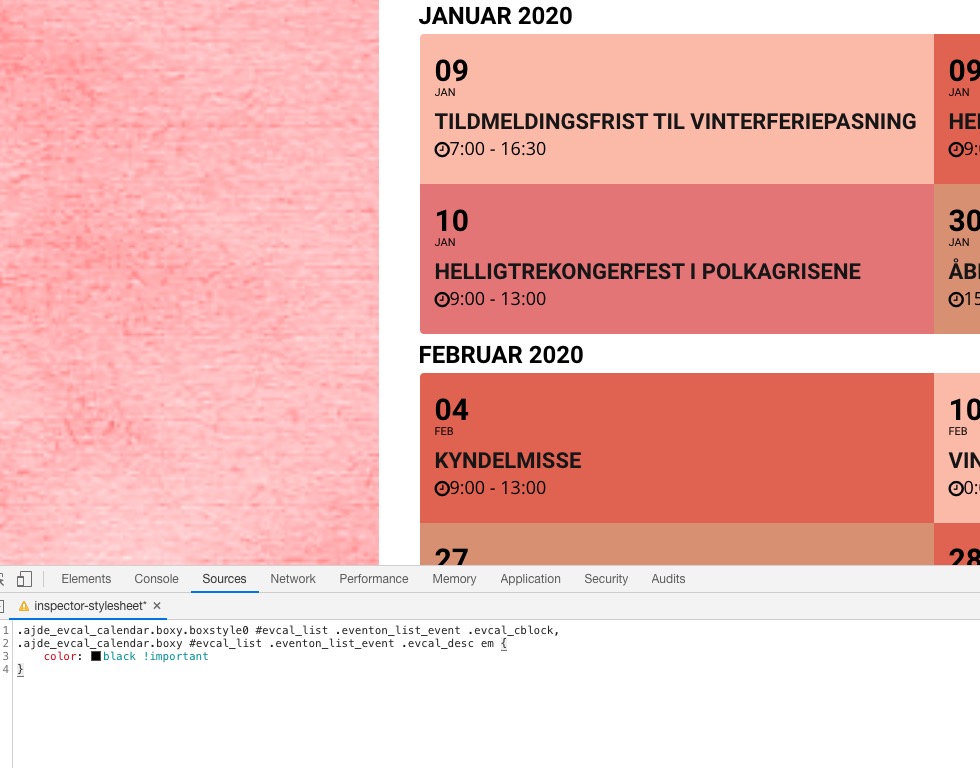
So, is the rsvp-events plugin purchase instead of Bookings the way I should have gone?
Only if it does what you need. Have you tested it’s functionality?
In order to request a refund, please create a new ticket under Billing & Accounts and be sure to include the order ID for which you need a refund for and the reason for requesting a refund.
You can use [evo_subscribe_btn] and add a standalone subscription button: http://dev.myeventon.com/testpage/ (check SUBSCRIBE TO THIS CALENDAR button). There is no need to activate the add-on, you can just use [evo_subscribe_btn].
Great! if you have any further questions or concerns please create a new ticket.
Hello,
Please follow this guide: https://docs.myeventon.com/documentations/getting-started/. Or this video tutorial https://www.youtube.com/watch?v=ijgMkKrdZfc