Hello,
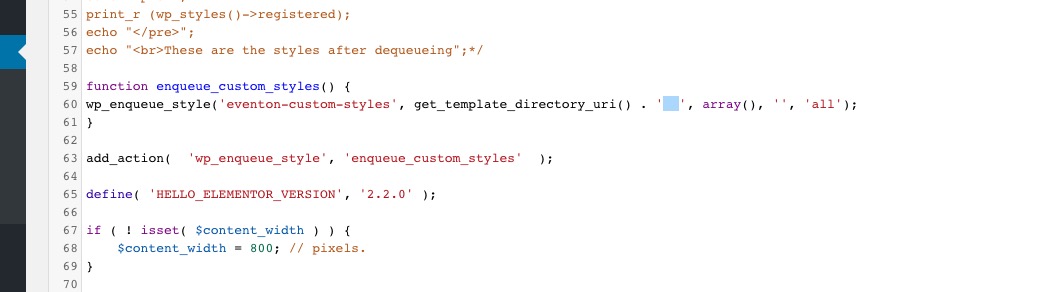
Please specify the path to eventON_custom.css in functions.php
Replies for tickets on suppota
Hello,
Please specify the path to eventON_custom.css in functions.php
I just added the code (attached) but it still showing the button as you can see.
Thanks.
That’s the problem… he tried every email address he could think of that he might have used and he couldn’t login or reset his password. I tried all the email addresses I could have possibly used with the same results. So… we aren’t sure who bought it (even though I know I have a license because the plugin is listed in my Envato account) and he can’t figure out where he bought it.
I just now put my activation code in f70c3e8a-39a3-4aa8-b092-3136382ed234 and in the section that I do that says it is active, but I still get a warning that the plugin is inactive and it still doesn’t work.
If it helps, please login to the site and see if you can help me figure out what is going on. Also, if it helps, my Envato user name is CaptClay.
Thank you for your help with this matter.
Hey Clay,
We need to reset the license, tell us which is the license the user bough the plugin?
Hey Dave,
We can add a title for this if you need, but it would require to use CSS and a ::before Class to add this over there.
If oyu need help you can create a customisation request and we can handle it.
Hey,
If you use the shortcode outside of the Fusion Builder, will this work better?
Hey,
Thank you for wating. We will help you handle this, just give us some time for Ashan to check further please.
You can add a simple CSS rule to hide this, so it is not visible anywhere would this work for you?
Hey Lisa,
Thank you for the request. This is possible to do it, but it will be a little bit more than your budget, because we have to integrate with one more plugin. It will be around $180.
Let us know if this is possible.
I gave you access but that doesn’t matter because you solved the problem! Yeah! I figured out the short code issue for the main section so now everything is working perfectly again. Thanks for all of your help. Much appreciated! Bruce