That has fixed it, thanks.
Does that mean I should not upgrade it again?
Replies for tickets on suppota
That has fixed it, thanks.
Does that mean I should not upgrade it again?
Hello,
You can go to EventON > Action User > enable Assign logged-in user to event after successful event submission. After you can add currentuser=”yes” to the shortcode to show only events from current loggedin user.
Unfortunately, you cannot assign user roles to submitted events from Action User’s Submission Form. You can send us a customization job request by creating a new ticket in here and selecting Customization Request as the category.
can you give me your email? please
Could you do this in Photoshop or similar software, how do you want it to look, and send it to us?
Hello,
Please check http://dev2.myeventon.com/20757-2/. You can try this shortcode [add_eventon_li tiles=”yes” tile_bg=”1″ tile_style=”1″] on http://dev.myeventon.com/wp-admin/
Ashan,
Similar issue: https://helpdesk.ashanjay.com/ticket/activate-addons-but-when-i-go-into-dashboard-myeventon-settings-licenses-they-will-not-activate/ except with Event API add-on.
Thank you for your messages, I am going to assign this ticket to Ashan and he will be able to take it from here and find you a solution. Please allow some time for him to get back to you, we greatly appreciate your patience and thank you for being a eventon customer! Also please disable any IP blocking on your site if there are any.
Please send us wp-admin access to your site as a private message for us to further assist your situation.
Could you tell us what hosting are you using?
Please add this CSS code to EventON > Styles (If you can’t see any change, EventON > turn off Write styles to header > save settings > turn on Write styles to header):
span.evcal_event_subtitle {
text-transform: none !important;
}
Please go to EventON Settings > Appearance > Calendar Date color:
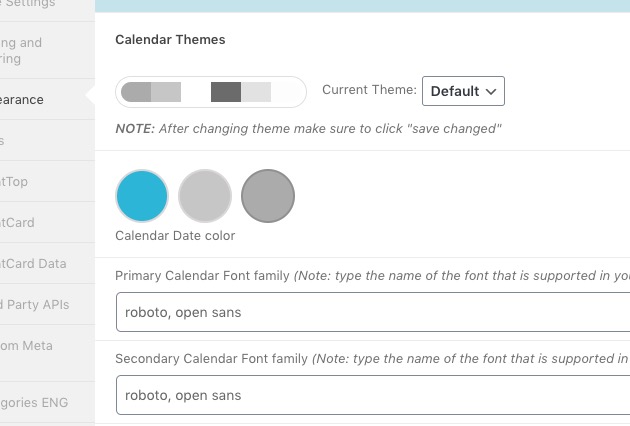
Please go to EventON Settings > Appearance > EventTop Styles > Category title color (eg. Event Type).
If you can’t see any change, EventON > turn off Write styles to header > save settings > turn on Write styles to header.