Hi there,
I’ve delved further into this and I am convinced that not being able to integrate with WPLMS events is due to changes within WPLMS. Long story short I’ve created a calendar manually and the site owner prefers your look to the old calendar so please close this ticket.
Best,
Michael
I am sorry, the access information you have provided did not work for us. Please check them and post the correct login information as a private message, thank you!
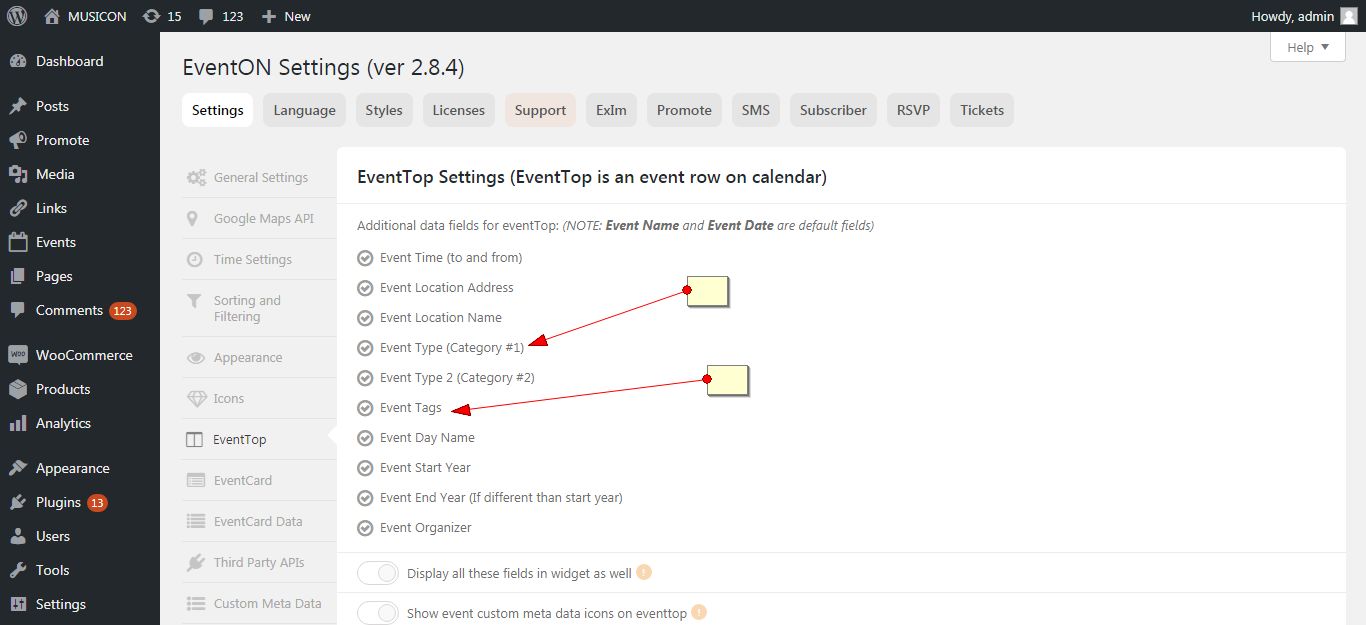
Hello,
Go to myeventon > setings > eventtop and check those options there.
Hello,
Try using the custom repeat feature. It will allow you to add separate date and time.
https://docs.myeventon.com/documentations/setting-up-repeating-events/
Hello,
Yes, please contact the theme developer. You can provide them with the error detail you are getting.
Thank You
Hi,
Thank you for your answer.
If it’s works, i didn’t understand how.We didn’t any documentation or video for explain. I guess it’s will more simple to do that.
But for yet, can you share me an example who works ? Because, on page for edit my event i don’t see how i can add pictures.
Thank’s again.
Regards,
I am waiting eagerly, but do understand the demands you’re under
I upgraded, and just received the error again on both sites. Do I need to talk to iThemes folks? If so, do you have detail that I can present to them?
Customer completed payment of 40 for the job.