Ashish has accepted the job for 250
Archives: Replies
Replies for tickets on suppota
Reply to: tickets(157940)
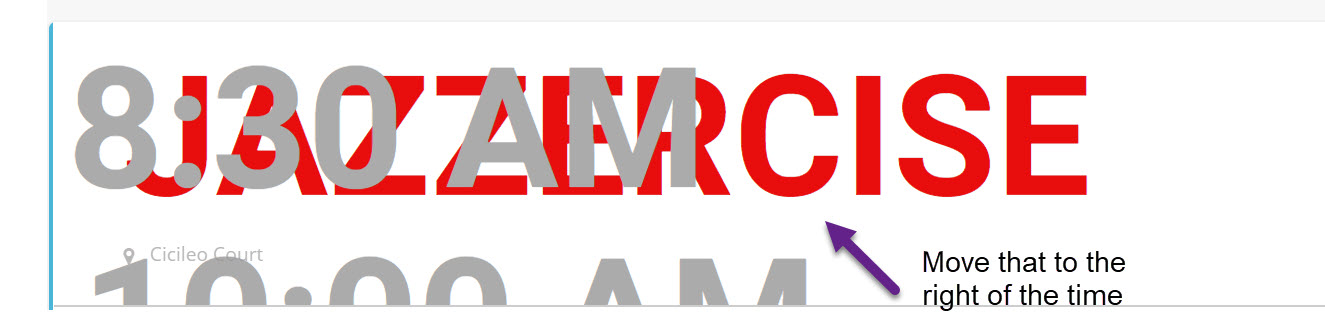
Sorry to add so quickly another question to the thread. What is the CSS block for the whole event? As you saw above, the text is getting HUGE. It has to be visible from 15′ on a 4k monitor. So I need each event to fit within the block that encompasses the whole event.
Thanks again!
dave
Reply to: tickets(157704)
Dear Basilis
i only have one site, but i order the wrong lincen and wrong add-on,please forgive my poor english, now i find out that RSVP event is the only one i needed ,so please help me to cancel this order, thank you so much
Reply to: tickets(157873)
Dear Basilis
please help me to cancel “Event Tickets” & ” Bookings” add on , i will order RSVP Event add on.
Thank You for your help, please forgive me
Reply to: tickets(157940)
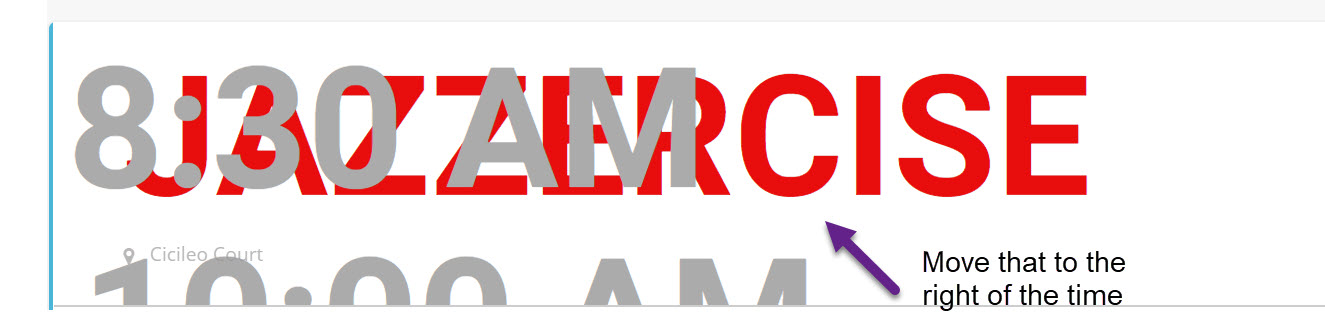
I am starting to make some progress 🙂
The issue I am having now is how do I move the block that has the event title and the event location further to the right?
From what I see, and again, I am not a CSS person, the block with the time is in a block called cblock. I need to either make that wider and have the block to the right of it start after that or I need to move the start of the block to the right.
Enclosed is an image of what I am seeing and trying to do.
This is the code that I used:
/*This is the section for the title of the filter*/
#evcal_widget .ajde_evcal_calendar .calendar_header p {
font-size: 96px;
height: auto;
color: #000000;
}
/*This is the section for the title of the event*/
#evcal_list .eventon_list_event span.evcal_desc2.evcal_event_title{
color: #e80d0d;
font-size: 96px;
}
/*This is the section for the time in it*/
#evcal_list .eventon_list_event em.time{
font-size: 96px;
}
I am still looking for the location css and then of course, how to move it around.
Thanks!
dave
Reply to: tickets(157953)
For the record, it took you longer than a month to respond to me, but three days? Yeah. Sure.
Reply to: tickets(157697)
before , I wasn’t add it and it was come automatic from Eventbrite
Reply to: tickets(157697)
Reply to: tickets(157700)
Hi there. I received a message saying you could not access my wordpress site despite me sending you the admin login details. Here they are again. Please let me know if there are any issues:
Website: www.ICAMH.org
Admin login: hiran.thabrew@gmail.com
Password: Temp@123!
Reply to: tickets(157648)
Ok, I have updated all of the plugins to current version. I used FTP since it saved a step or two with deactivation and reactivation.
Do I need to run a test on my end or can you tell from your end if it’s working correctly or not now?