Hello, could you check this problem? our website is public, and we have problems with PDF-s. its pretty ugly.
Archives: Replies
Replies for tickets on suppota
Reply to: tickets(157539)
SOME SUCCESS!! i used the api code for a single event and it worked! https://www.beniciaonthebay.com/go/
so why isn’t the full calendar working?
Maybe there is something inside of events that can cause this? Please go to https://www.sfonthebay.com/wp-admin/admin.php?page=eventon&tab=evcal_ap#evoapi > switch Number of months to show in API to 1 > hide events from February (make them Draft) and then show one by one.
Reply to: tickets(162422)
Possible isuee:
- First I have installed Actiouser Plus and then Woocomerce
- in EventOn Settings -> General calendar settings -> URL for custom login link, now is blank because with Actionuser Plus it seem non works because it redirected to the default WordPress login. Since I did not like this (I would have preferred the Woocommerce login page) I created new registration and login pages with “Ultimate member” but also this did not work!
I have not found in your pages a tutorial that fully explains how to set the settings between Actionuser plus and Woocommerce and how they must work together.
Thanks in advance
Reply to: tickets(161915)
Hello,
the fields above and below the picture, how to remove them?
You can send us a customization job request by creating a new ticket in here and selecting Customization Request as the category.
In the admin panel, I set the element colors – but the colors are not saved when you click the save changes button.
…
And here is the same:
…
When turned on, this is what happens:
…
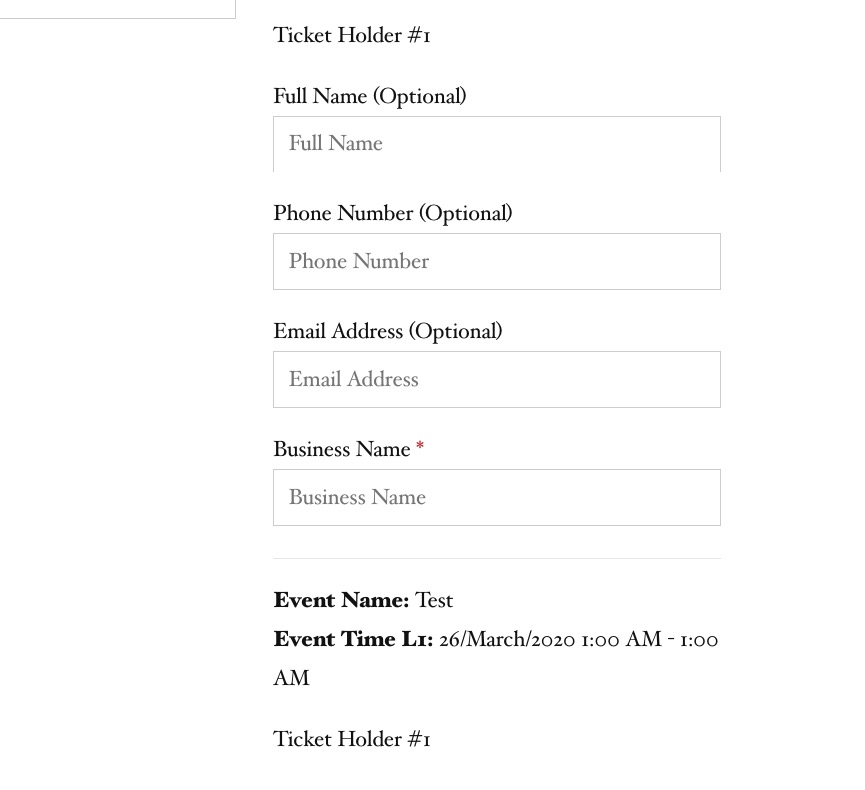
We chose two tickets, it is assumed that the name of the owner can be specified for each ticket, strange, the ticket number is the same everywhere – 1
Thank you for your messages, I am going to assign this ticket to Ashan and he will be able to take it from here and find you a solution. Please allow some time for him to get back to you, we greatly appreciate your patience and thank you for being a eventon customer! Also please disable any IP blocking on your site if there are any.
We conduct trainings and we have a training class (see screenshots above). We would like to:
1. & 2. & 3. Thank you for your great suggestions, at the moment they are not supported. However please create a new ticket and select Feature Request as category so others can vote on your idea and get it moved into development faster. OR You can send us a customization job request by creating a new ticket in here and selecting Customization Request as the category.
I’d like to be able to highlight part of the text in bold or color. Is it possible to enable html in this place?
Unfortunately, no. You can send us a customization job request by creating a new ticket in here and selecting Customization Request as the category.
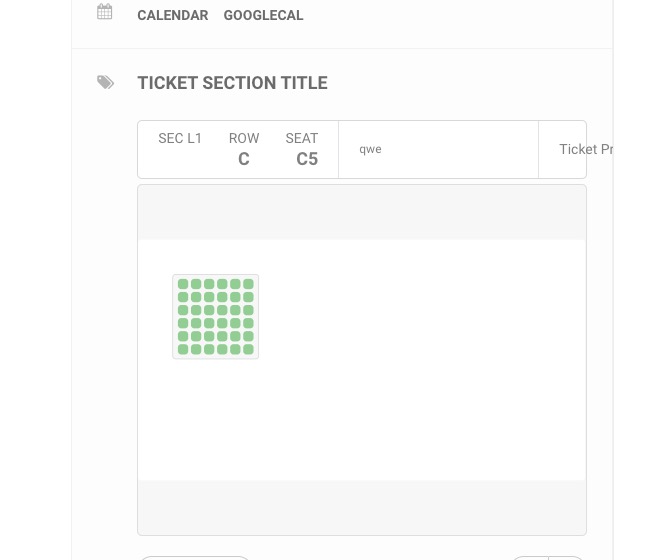
When you select seats, the “row 3” appears on the event page. The seat map editor lists the numbers for rows 1, 4, 5. Why do I see “row 3”? See the four pictures below.
Open Seat Map editor > press Select Rows:
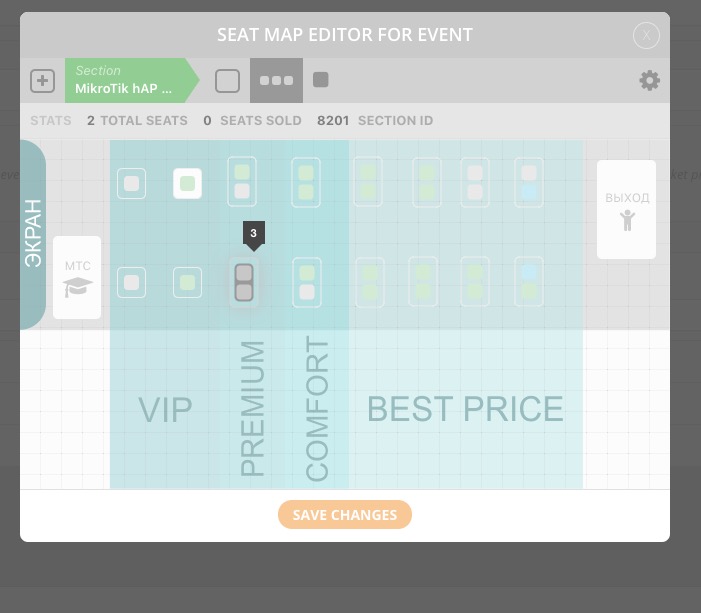 You can see that they have Row Index 3.
Please create a separate ticket for RSVP questions.
Reply to: tickets(161915)
Ashan,
We chose two tickets, it is assumed that the name of the owner can be specified for each ticket, strange, the ticket number is the same everywhere – 1
On dev2:
Reply to: tickets(161915)
Ashan,
In the admin panel, I set the element colors – but the colors are not saved when you click the save changes button.
…
And here is the same:
The same on dev2: http://dev2.myeventon.com/wp-admin/post.php?post=20456&action=edit
The format of the hall is possible only in landscape orientation, please add a portrait
Can you add one or do I need to ask the customer for a customization request?
When turned on, this is what happens:
On dev2:
Reply to: tickets(158403)
Could you send us FTP access? I would like to try a couple of customizations to remove Archive from /scholarships/ page title.
Reply to: tickets(160664)
I have uploaded new files. Please check
Reply to: tickets(160664)
Hello Guys,
Just checking in to see if its possible to review the above items? To confirm the issues we’ve spotted are as follows;
- The way its pulling through is loosing paragraph spacing, so its just showing as a total block.
- Other Events you may be interested in, i can see the code for Eventon but how would i go about showing three random events in the normal styling from Eventon?
- The Google Map is not generating anywhere on the page, ideally if this can be done within the Events Information box (On the right hand side) with a link to view in Google Maps. Or if not, if we can display the Map directly below the two content boxes full width. Other Events would be at the very bottom (relating to point 1).
Also as a side note, i’ve gone in and applied a lot of custom CSS to style the page. Please leave this as is.
Reply to: tickets(162155)
You can try contacting Facebook about this. Maybe their support team can help.