Hello, about images – that solution worked. I don’t exactly know how to re-crawl entire website due to Google Search Console updates. I tried to verify these errors once again and reindex few crucial subpages. Nothing has been fixed yet.
Archives: Replies
Replies for tickets on suppota
Reply to: tickets(158403)
Could you send me FTP access to your website?
Reply to: tickets(162129)
Hello,
The problem is in this style from your theme:
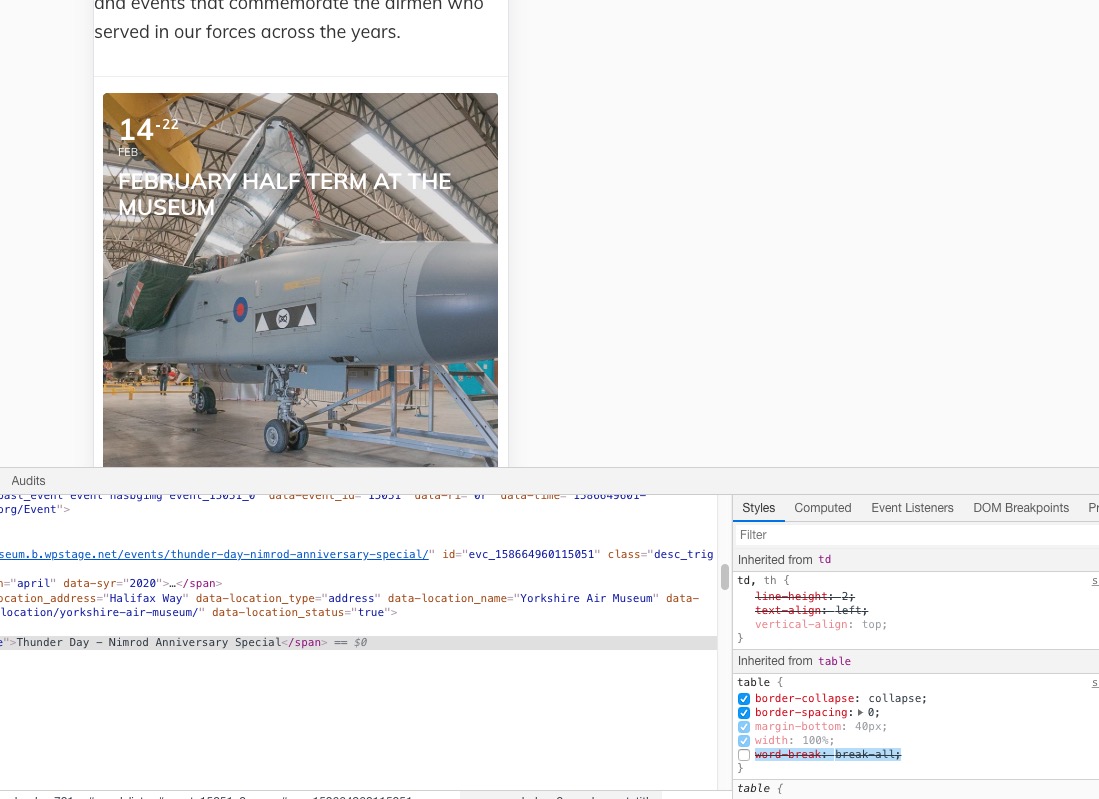
Please add this CSS code to EventON > Styles (If you can’t see any change, EventON > turn off Write styles to header > save settings > turn on Write styles to header):
.ajde_evcal_calendar.boxy #evcal_list .eventon_list_event .evcal_desc span.evcal_event_title { word-break: normal !important; }
Reply to: tickets(162102)
Hello,
Please check these available guides on how to work with categories: https://docs.myeventon.com/documentations/confused-event-type-categories/ and https://docs.myeventon.com/documentations/how-to-use-event-types-to-do-more/.
Please create categories according to my suggested guides. After go to EventON > Action User > Form Fields > select created categories.
Reply to: tickets(162097)
Hello,
Unfortunately, only RSVP add-on has a waiting list: https://www.myeventon.com/addons/rsvp-events-waitlist/. This option is not available for Event Tickets, I am afraid.
However please create a new ticket and select Feature Request as category so others can vote to get it moved into development faster. OR You can send us a customization job request by creating a new ticket in here and selecting Customization Request as the category.
Reply to: tickets(159220)
Hey Basilis,
Did you resolved the ticket with our ftp details ?
We are looking forward for your response,
Thank you
Reply to: tickets(162090)
Hello,
Unfortunately, we cannot refund the main plugin from here (we can only operate with add-ons). Could you contact CodeCanyon about this?
Reply to: tickets(162089)
Hello,
Please add this CSS code to EventON > Styles (If you can’t see any change, EventON > turn off Write styles to header > save settings > turn on Write styles to header):
.ajde_evcal_calendar.boxy .eventon_list_event {
width: 49.5%;
margin: 0 .25% .5%;
}
.ajde_evcal_calendar.boxy #evcal_list {
margin: 0 -.25%;
}
.ajde_evcal_calendar.boxy.box_4 .eventon_list_event, .ajde_evcal_calendar.boxy.box_4 .evoShow_more_events {
width: 24.5%;
margin: 0 .25% .5%;
}
@media (max-width: 650px){
.ajde_evcal_calendar.boxy.box_4 .eventon_list_event, .ajde_evcal_calendar.boxy.box_4 .evoShow_more_events,
.ajde_evcal_calendar.boxy .eventon_list_event{width: 100%;}
}
Reply to: tickets(162088)
Hello,
Unfortunately, I cannot access wp-admin dashboard. Could you check?
Please go to EventON > Events Paging > Select Events Page Template: Default EventON Template. Now your events should look like this http://dev2.myeventon.com/events/performer/ and Google recognises them as events: https://search.google.com/structured-data/testing-tool/u/0/#url=http%3A%2F%2Fdev2.myeventon.com%2Fevents%2Fperformer%2F
Reply to: tickets(160723)
It seems that this style:
#et-boc .et-l .hentry,#et-boc .et-l a,#et-boc .et-l a:active,#et-boc .et-l blockquote,#et-boc .et-l div:not(.woocommerce-message,.star-rating),#et-boc .et-l em,#et-boc .et-l form,#et-boc .et-l h1,#et-boc .et-l h2,#et-boc .et-l h3,#et-boc .et-l h4,#et-boc .et-l h5,#et-boc .et-l h6,#et-boc .et-l hr,#et-boc .et-l iframe,#et-boc .et-l img,#et-boc .et-l input,#et-boc .et-l label,#et-boc .et-l li,#et-boc .et-l object,#et-boc .et-l ol,#et-boc .et-l p,#et-boc .et-l span,#et-boc .et-l strong,#et-boc .et-l textarea,#et-boc .et-l ul,#et-boc .et-l video
{ text-align: inherit; margin: 0; padding: 0; border: none; outline: 0; vertical-align: baseline; background: 0 0; letter-spacing: normal; color: inherit; box-shadow: none; -webkit-box-shadow: none; -moz-box-shadow: none; text-shadow: inherit; border-radius: 0; -moz-border-radius: 0; -webkit-border-radius: 0; -moz-transition: none; -o-transition: none; -webkit-transition: none; transition: none }
Affects every element you put to the main <div id=”et-boc”> section. Could you contact the theme developers and ask about this issue?
Please also note that I checked this from my mobile and didn’t notice the same issue.