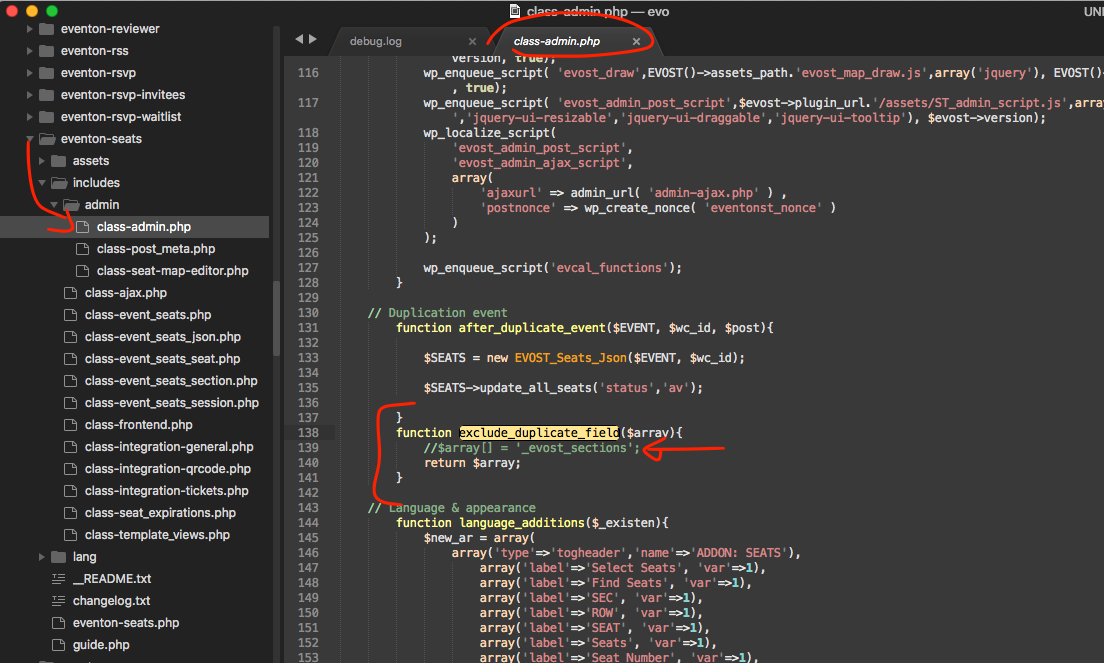
Hello adam, ok so lets try this.
make sure in ur site the file in screenshot that line shown in arrow is commented out. That is the post meta value that holds the seats data array for the event. By commenting the field the seat map data get duplicated into the new event.
Alternatively you can copy the post meta value “_evost_sections” for the event with correct seat map and add that into duplicated event as a new post meta with same name and that will add all the seat data in new duplicated events — this will need to be done via database or php. Hopfully the above solution will work 🙂
Hi,
I’m very sorry to make you loosing your precious time. What I really need is study a bit about Shortcodes. I lost a couple of hours trying to understand what I did before until I discovered that was the shortcodes.
Thanks and Best Regards (sorry again)
Joao
“Hi,
Indeed, you’d the bad rules, you can try again with same acces.
Sorry for the mistake.
https://isratickets.com/wp-admin/
ID : visitor
password : isratickets@2020.com
Regards,”
Ashan: Are you able to find a solution to my issue this week? Thank you.
I just emailed you again. Thank you.
I already this before I contacted you and they said the same thing. So now you guys blame each other and I am in the middle of it.
They specifically said:
The EventOn plugin only pushes the update to the following pages, which is the reason why we are able to see the update on the wp-admin page and not in the IWP admin panel.
plugins.php
update-core.php
admin.php
admin-ajax.php
plugin-install.php
A simple solution would be that the plugin should register the update when someone visits the WordPress site as an admin user.
Note: InfiniteWP doesn’t visit the update-core.php page. It only sends a call to your site URL as an admin User to fetch the updates.
The fact that InfiniteWP does see updates from other premium plugins that come from CodeCanyon proves to me that the issue is not on their end but on your end.
Hi Emmanuel,
Can you please provide us with details what exactly did not worked? We might be able to help onto this
Please give some time for this, I am sorry but I do not know the answer. Asked Artem to look into it.
Hi Michelle,
Unzip the file and upload only the plugin file not everything you download from Envato Please.
Hi Basilis,
what I mean are the arrows in your examples on your website https://www.myeventon.com/
with < and > you can jump to next or last month. Is this also possible for my 3-month-view?
If sombody wants to see the events of month April, now there is no possibility to see them.