Hello,
Unfortunately, Tickets add-on is required for Bookings add-on to work. However if you don’t want to sell tickets maybe you should use this https://www.myeventon.com/addons/rsvp-events/ instead of Ticket and Booking add-ons? Try on http://dev.myeventon.com/wp-admin/
Hello,
The problem is in this style https://www.radnasebi.com/wp-content/plugins/app-template-blocks-for-wpbakery-page-builder/assets/css/flexboxgrid.css?ver=5.3.2 from app-template-blocks-for-wpbakery-page-builder plugin. Could you please add this CSS code to EventON > Styles (If you can’t see any change, EventON > turn off Write styles to header > save settings > turn on Write styles to header):
.evoau_submission_form .evoau_table .row { display: block }
ux_val=”1″ never worked with Tile Design. Could you tell us which version of EventON it worked with? 2.7.3?
Hello,
What do you mean by “quit”? Could you elaborate? If you want to remove it from Event Card please go to EventON > EventCard Data > uncheck LEARN MORE & ADD TO YOUR CALENDAR.
Ashan,
Jan 6,2020 AT 9:50AM – Posted 5 Hours Ago – #156917
Did we change this? Could you check and let the customer know?
Thank you for your messages, I am going to assign this ticket to Ashan and he will be able to take it from here and find you a solution. Please allow some time for him to get back to you, we greatly appreciate your patience and thank you for being a eventon customer! Also please disable any IP blocking on your site if there are any.
Ah yes, sorry about that. Unfortunately, cal_init_nonajax=”yes” isn’t working with FullCal at the moment, so please remove it.
In order to fix the performance issues could you try following https://docs.myeventon.com/documentations/why-my-site-and-eventon-page-loading-slow/
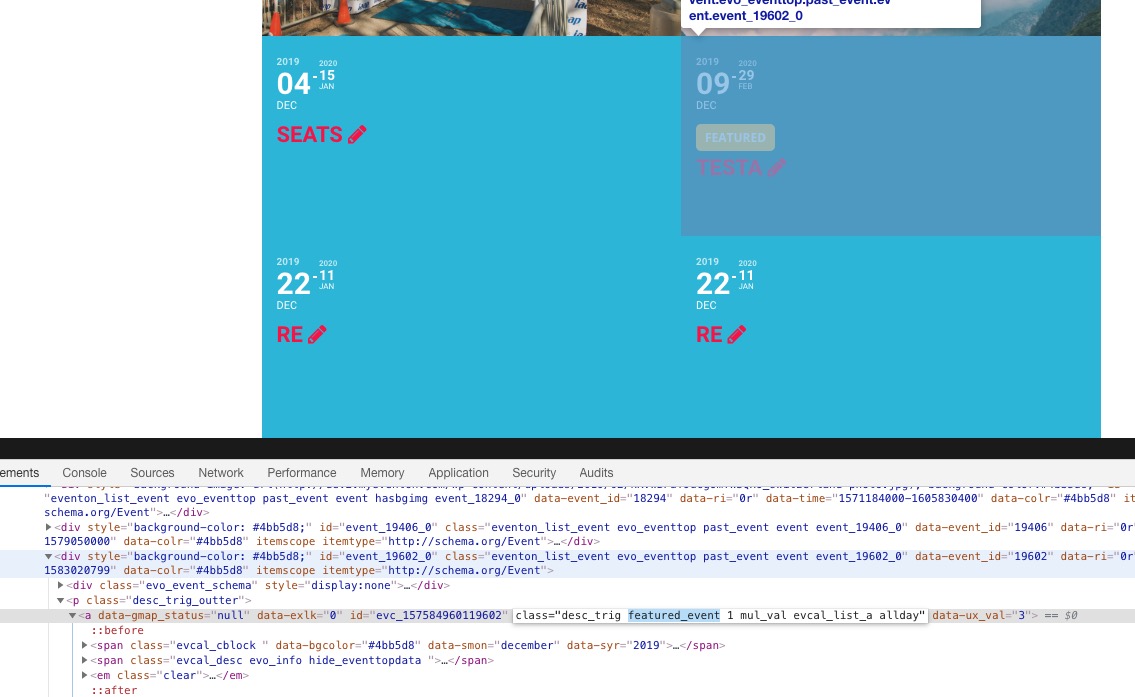
Unfortunately, the tile container doesn’t have classes that can identify events as featured:
So you cannot change tile’s width with CSS.
You can customize the source code and then use CSS or JS and change the width. Please send us a customization job request by creating a new ticket in here and selecting Customization Request as the category.
Hello,
number_of_months only works with Event Lists shortcode. Could you try this shortcode instead of yours:
[add_eventon_list show_upcoming=”1″ number_of_months=”12″ tiles=”yes” tile_count=”4″ tile_bg=”1″ tile_style=”1″ hide_past=”yes”]
Hello,
Found the social media issue. My fault… had “Show social media share icons only on single events” enabled… (my apologies!)
Kind regards.