Access info given – set up a new user as admin for you – let me know if you have any trouble accessing the site.
Archives: Replies
Replies for tickets on suppota
Reply to: tickets(405000)
Hello Raphael, sorry for the delay. Thank you very much for catching that. Allow us sometime to get this sorted out. 🙂
Reply to: tickets(403112)
Hello Holger, Just jumping in here sorry for the delay. Your original message is in german and no one in our team speak german so we are using google translator to translate your message. Please correct us if we are wrong and if you could kindly respond in english we would greatly appreciate.
Your translated message—
Specifically, our questions are:
Is there a way within EventON to automatically split a single event into multiple WooCommerce products upon purchase?
>> Unfortunately eventon can not split into mltiple woocommerce products, This would have to be done via custom codes.
Does EventON fully support Grouped Products, Bundles, or Composite Products?
>> It does not, it supports variable and simple products. You may need to add custom work to have it work with bundles or other product types.
If not: Are there any recommended hooks, filters, or workarounds for automatically adding additional products during the checkout process?
>> Please check the file eventon-tickets/includes/wc/class-wc-checkout.php for the available hooks and filters to connect into and run other codes during the event ticket checkout.
Our goal is to achieve a tax-compliant separation of VAT (7% / 19%) while still presenting a single, bookable event to the customer.
Reply to: tickets(404576)
Hello Ana, this is on your website and creating custom repeats work fine for me. https://www.loom.com/share/da6d0f2482d54970a7882ca9da9579a1
Try hard refreshing the webpage by clicking Control Button + Shift + R on your browser. And see loading a fresh copy of your website will fix this on your website.
Reply to: tickets(405298)
Hello Mike, kindly try what Artem further clarified to change the ”Event Organized by” text to your liking.
Reply to: tickets(405164)
same issue as before…. no change
Reply to: tickets(405414)
Hello,
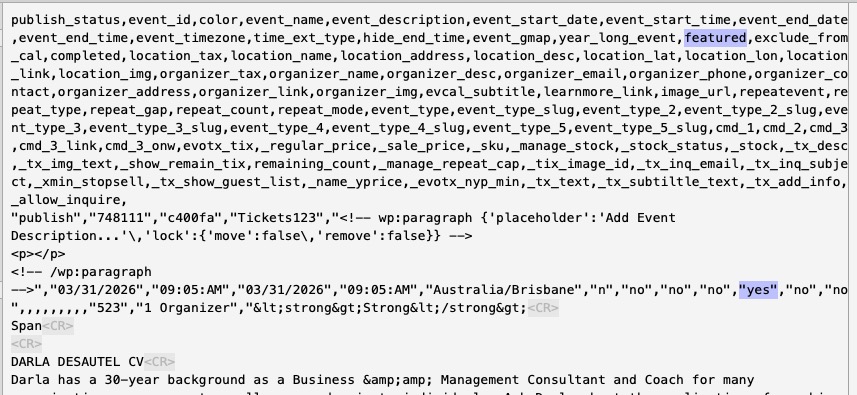
Could you send us a screenshot of how do you set featured to yes in the file?
It seems to be working on my side:
Reply to: tickets(405298)
If you change ”Organizer” according to this screenshot:
https://helpdeskx.s3.amazonaws.com/wp-content/uploads/2026/03/16153427/Screenshot-2026-03-16-at-3.33.40-PM.png
Then ”Event Organised by” will also change:
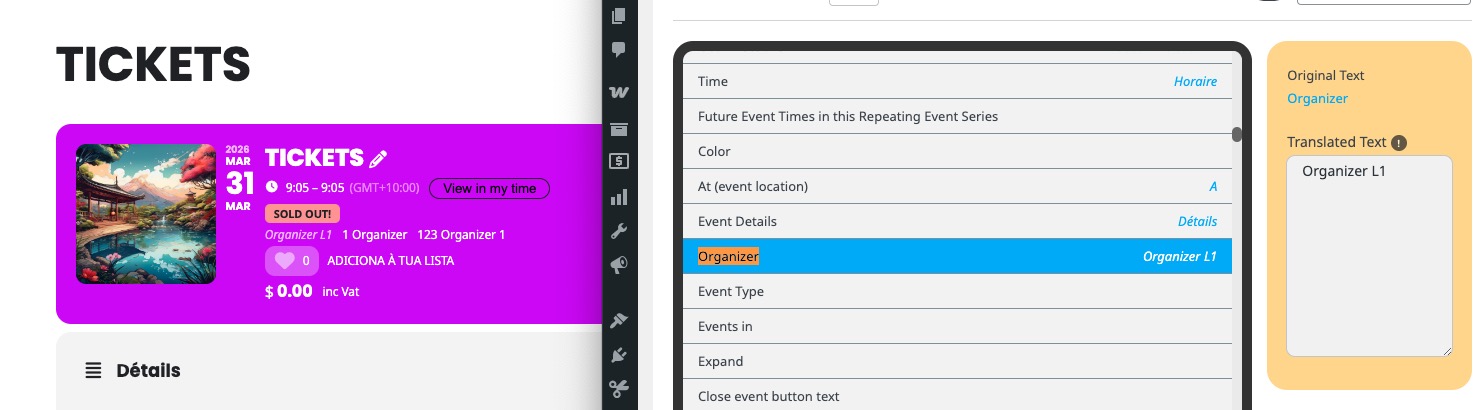
Please check and let me know.
Reply to: tickets(405417)
Hello,
Thank you for your great suggestion, at the moment it is not supported. However please create a new ticket and select Feature Request as category so others can vote on your idea and get it moved into development faster.
Reply to: tickets(405394)
Because, it seems there isn’t enough space for the calendar because sidebar is too small in width.