We have moved the custom meta fields to separate lightbox and should support better saving custom html data.
Archives: Replies
Replies for tickets on suppota
Reply to: tickets(375471)
Thank you thomas for those suggestions we will see what we can do 🙂
custom meta fields, we decided to move to lightbox so it can be editted without distractions. We had customers who use them extensively with over 10 custom fields each with heavy HTML content. But yea we will make sure to add save and close 🙂
Stay tune my friend!
Reply to: tickets(375296)
Yassine, auto update works perfect on our end. Perhaps try manual update this time and may be from then on it will work.
Make sure licenses are activated and cache is cleared on your website.
Reply to: tickets(375490)
Ok. Thx. I’ll look forward to that update soon.
Reply to: tickets(375137)
Hi There,
I cleared the cache and logged into a different browser. Same issue. Settings are no visible.
Thanks.
Reply to: tickets(362848)
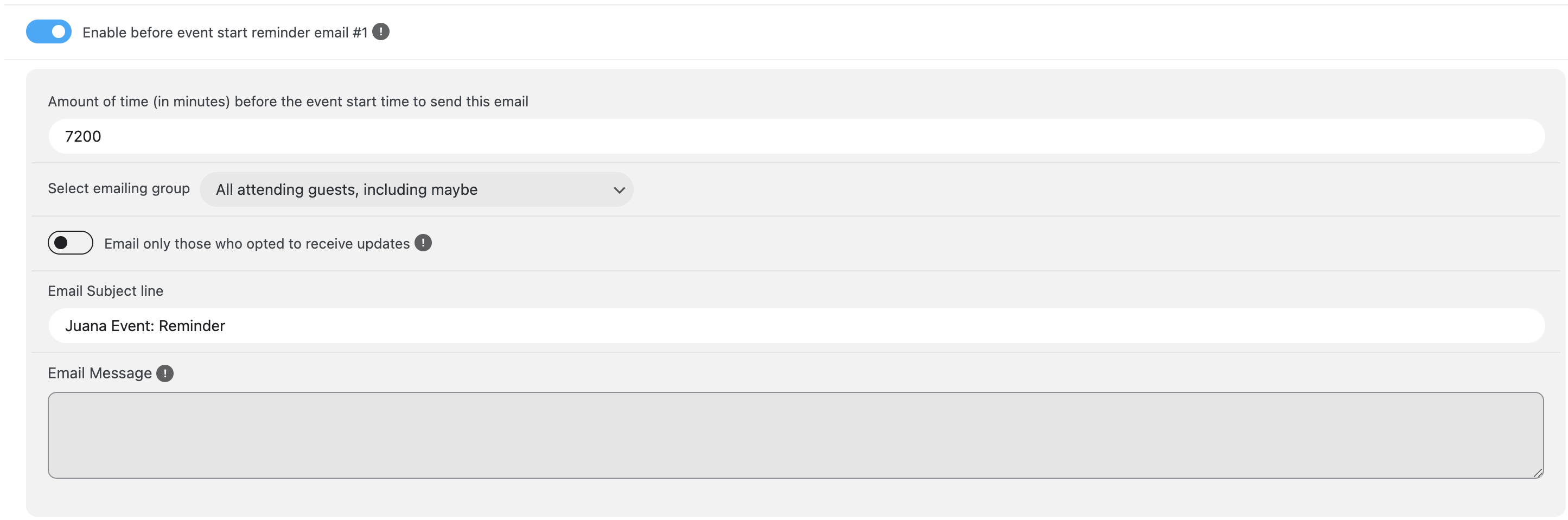
Hi there,
Thank you for all the help so far and everything has been working fine. Recently, for our latest event, we have been unable to set the RSVP reminders.
a) all plugins, and themes has been updated
b) after updates, the email message part has been deleted
c) after inputting email messages again and saving changes, it get deleted again
d) unable to create Cron jobs
See attached images.
Reply to: tickets(375490)
We are testing 4.8.1 before releasing it. It will fix the issue with the styling. It will be available very soon.
Reply to: tickets(375532)
Hello,
Thank you for your messages, I am going to assign this ticket to Ashan and he will be able to take it from here and find you a solution. Please allow some time for him to get back to you, we greatly appreciate your patience and thank you for being a eventon customer!
Reply to: tickets(375123)
CSV Importer. I believe that the format is incorrect. Could you go to EventON > CSV Import > check **CSV file guidelines > make sure that your file is in exact format.
EventTop. Please try moving Event Time under Subtitle and also move all fields from the 4th column to the third one.
Reply to: tickets(375543)
Thank you for your messages, I am going to assign this ticket to Ashan and he will be able to take it from here and find you a solution. Please allow some time for him to get back to you, we greatly appreciate your patience and thank you for being a eventon customer!