Please take a look at this page:
https://crocastor.com/test/
This ticket is private.
Replies for tickets on suppota
Please take a look at this page:
https://crocastor.com/test/
This ticket is private.
Hello,
Please take a look at Event API add-on:
https://www.myeventon.com/addons/event-api/
However, it has limitations. Try on
https://dev.myeventon.com/wp-admin/
Also check
https://docs.myeventon.com/documentations/show-calendar-another-site-via-iframe/
Hello,
Thank you for your great suggestion, at the moment it is not supported. However please create a new ticket and select Feature Request as category so others can vote on your idea and get it moved into development faster.
It seems there is an issue with this event:
https://www.ooveducation.com/us/events/oov-fundamentals-course-chicago-2/
Variations the way you added them by following this guide are causing the issue:
https://docs.myeventon.com/documentations/set-variable-prices-tickets/
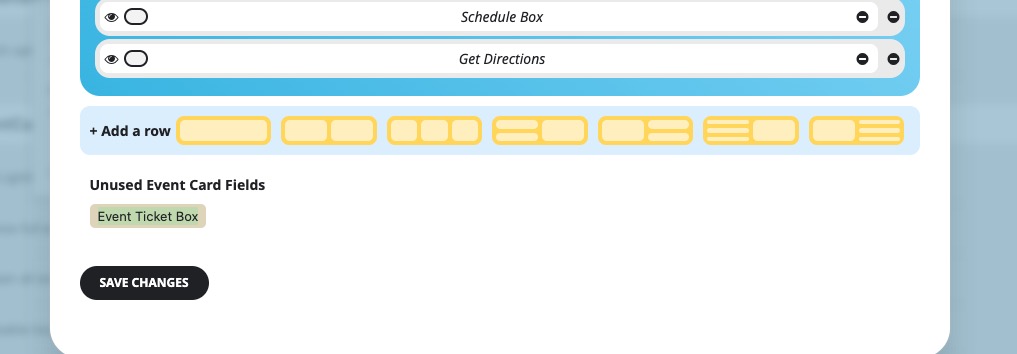
I removed Event Ticket Box so all events are loading now:
 Could you please try the instructions mentioned in this documentation? Because I re-created same variations on our test site and it works:
https://dev2.myeventon.com/events/var-21/
Also please update Tickets add-on.
To update eventon addons: You can download latest eventon addons from myeventon > my account. Then you can go to your website, deactivate old addon and install new one and activate then delete the old addon. This link will further explain the process. Also you can follow us on twitter to get real-time announcements on updates!
Hello Ashan,
Thank you very much, I really need this add-on to work properly
Hope to hear from you soon
Thank you for your messages, I am going to assign this ticket to Ashan and he will be able to take it from here and find you a solution. Please allow some time for him to get back to you, we greatly appreciate your patience and thank you for being a eventon customer! Also please disable any IP blocking on your site if there are any.
If i use this shortcode the formatting works but calendar still not showing
[add_eventon] — Default month calendar
I want to use this shortcode but it doesn’t work at all
[add_eventon_list number_of_months=”12″ hide_empty_months=”yes”]
We are glad your issue is resolved, if you have any further questions or concerns please create a new ticket.
If you have a moment, we would greatly appreciate if you could kindly leave us a review at Codecanyon. By going to your account > Downloads. We are very grateful for your kind review!