Unfortunately hide_month_headers=”yes” did not work inside my shortcode.
unfortunately I cannot register for max. capacity events although there is no registration yet.
VITAL EMPOWERMENT
Replies for tickets on suppota
Unfortunately hide_month_headers=”yes” did not work inside my shortcode.
unfortunately I cannot register for max. capacity events although there is no registration yet.
VITAL EMPOWERMENT
Hello,
Thank you for your great suggestion, at the moment it is not supported. However please create a new ticket and select Feature Request as category so others can vote on your idea and get it moved into development faster.
As a solution you could use Event Type:
https://docs.myeventon.com/documentations/override-event-colors-event-type-colors/
Add a type similar to organizer and then assign it to an event.
Hello,
I am sorry, the access information you have provided did not work for us. Please check them and post the correct login information as a private message, thank you!
Please try adding number_of_months=”12″ to your shortcode.
Hello,
Add to wishlist button is only available for EventTop, I am afraid. There is no way of showing it on Event Card.
However please create a new ticket and select Feature Request as category so others can vote on your idea and get it moved into development faster.
Ashan,
Staging website login link:
Even in Troubleshooting Mode it shows this issue when you open RSVP modal window:
https://helpdeskx.s3.amazonaws.com/wp-content/uploads/2024/12/14083758/popup-scaled.jpg
Test event:
https://staging.taocenter.it/events/test/
Thank you for your messages, I am going to assign this ticket to Ashan and he will be able to take it from here and find you a solution. Please allow some time for him to get back to you, we greatly appreciate your patience and thank you for being a eventon customer! Also please disable any IP blocking on your site if there are any.
I meant the calendar on the website, so I can check visible events and so on.
Here’s the issue:
[16-Dec-2024 13:03:36 UTC] PHP Fatal error: Allowed memory size of 134217728 bytes exhausted (tried to allocate 20480 bytes) in /var/www/vhosts/confinedrock.com/httpdocs/wp-includes/meta.php on line 1195
Please follow this guide:
https://docs.myeventon.com/documentations/increasing-wordpress-memory-limit/
Hello,
We are working on the issue. The update will be available very soon.
Please go to Edit Event > Tickets > set Capacity > then only save
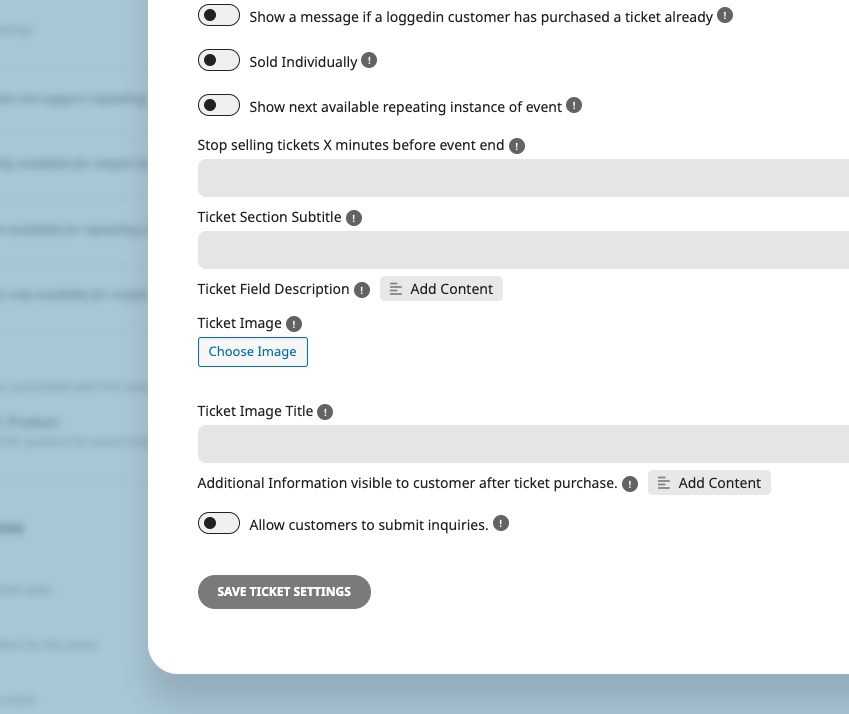
Don’t update the event itself.
Hello,
When I try to access Single Event Page: https://omicron.net.au/event/speed-networking-commercial-lenders-brokers-construction-2/
I get redirected to https://omicron.net.au/events/
Also when I check https://omicron.net.au/events/hyatt/ Single Event page doesn’t use EventON’s template at all so Description and other SEO fields aren’t available for Google to check.