About theme color, i’m writing in CSS. 1300 lines already. Does this impact on site speed? I think no, bc its text lol
So, i write some functions to date wrong format, but none of them worked.
HTML is fine, shows date right, when it convert to front end it mess up.
Example of codes i’ve used
function sanitizeInputValues() {
// Seletor para todos os inputs que precisam de correção
const inputs = document.querySelectorAll(“.datepickerstartdate, .datepickerenddate”);
inputs.forEach((input) => {
// Remove as barras invertidas do valor do campo
input.value = input.value.replace(//g, “”);
// Adiciona um evento para corrigir enquanto o usuário digita ou altera
input.addEventListener(“input”, function () {
this.value = this.value.replace(//g, “”);
});
input.addEventListener(“change”, function () {
this.value = this.value.replace(//g, “”);
});
});
}
// Inicializa ao carregar a página
sanitizeInputValues();
// Observa mudanças no DOM para garantir que novos campos também sejam corrigidos
const observer = new MutationObserver(sanitizeInputValues);
observer.observe(document.body, { childList: true, subtree: true });
Plus, when i select a date from picker, it changes and lost date format. i’ve setted to WP format to try to fix but doenst work
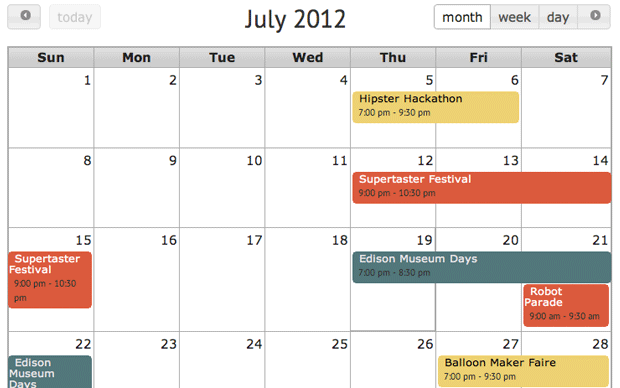
Hi, OK – so this one worked, so thank you for replying fast because I got so frustrated. now I just have one last thing that hopefully is possible and I’m just missing it somehow. is there a way to display a whole month’s calendar? or cards is all there is ? thank you for your help in advance.
Even after clear cache and use ctrl shift r to reset browser cache
The issue now is:
The style i apply in theme panel doesnt apply on site.
Hi,
We have 2 shortcodes n the page as below:
[add_eventon_now show_et_ft_img=”yes” etc_override=”yes” ux_val=”3″ hide_now=”yes”]
[add_eventon tiles=”yes” tile_bg=”1″ tile_count=”4″ tile_style=”1″ ]
You’ll need the website:
it’s
https://untap.nl/wp-admin/
Hi! I’d like to reopen this issue (it wasn’t solved but I let it slide for a while). My hosting provider is increasing the extended support fees for versions of PHP lower than 8, so it’s time to get it fixed =)
I updated all Eventon plugins to the latest version, I use the latest WordPress version, and when I update to PHP 8+ (I switched to 8.2) I get a critical error when I load a page with an Eventon calendar. The page simply won’t load.
I removed all unused plugins and I tried switching the Theme, but it lead to the same error. So I don’t think the theme is the problem.
Could you please take a look? I created an admin account for you:
User: Eventon
Pass: PHP8+check2024
those are the server stats …
PHP Memory Limit: 512 MB already at 512
### Avada Versions ###
Current Version: 7.11.11
Previous Version: 7.11.1 7.11.10
### WordPress Environment ###
Home URL: https://musica-bayreuth.de
Site URL: https://musica-bayreuth.de
WP Content Path: /home/www/buyreuth/_md/musica-bayreuth.de/musica_wp2024/wp-content
WP Path: /home/www/buyreuth/_md/musica-bayreuth.de/musica_wp2024/
WP Version: 6.7.1
WP Multisite: –
PHP Memory Limit: 512 MB
WP Debug Mode: ✔
Language: de_DE
### Server Environment ###
Server Info: Apache (custom)
PHP Version: 8.1.31
PHP Post Max Size: 1.000 MB
PHP Time Limit: 300
PHP Max Input Vars: 20000
ZipArchive: ✔
cURL: ✔
mail: ✔
MySQL Version: 8.0.37
Max Upload Size: 1.000 MB
DOMDocument: ✔
WP Remote Get: ✔
WP Remote Post: ✔
GD Library: bundled (2.1.0 compatible)
### Active Plugins (6) ###
All-in-One WP Migration: von ServMask
EventON: von AshanJay
Avada Builder: von ThemeFusion
Avada Core: von ThemeFusion
Instant CSS: von Dylan Blokhuis
Yoast SEO: von Team Yoast