Hi, As I mentioned. our current website is live and is using an older version. I cannot deactivate until we are ready to publish our development site..
Archives: Replies
Replies for tickets on suppota
Reply to: tickets(367839)
just needed to re-save the eventon>>>settings>>>.event card tab-
We are glad your issue is resolved, if you have any further questions or concerns please create a new ticket.
If you have a moment, we would greatly appreciate if you could kindly leave us a review at Codecanyon. By going to your account > Downloads. We are very grateful for your kind review!
Reply to: tickets(367850)
see https://trlt.org/events/
so I tweaked the shortcode- its now up there on the site
now how else do you want to tweak how things look?
Reply to: tickets(367849)
if its not- Please send us wp-admin access to your site as a private message for us to further assist your situation.
Reply to: tickets(367849)
its in the side bar under event options
Reply to: tickets(367596)
ok thanks
Reply to: tickets(367462)
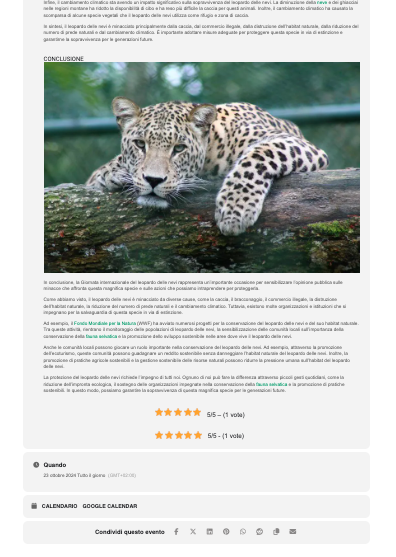
while on the event pages you see double
Reply to: tickets(367462)
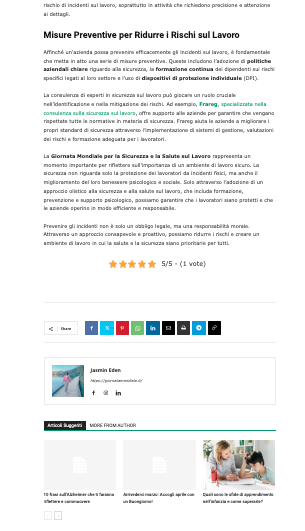
The stars are visible correctly in the blog posts.
Reply to: tickets(367462)
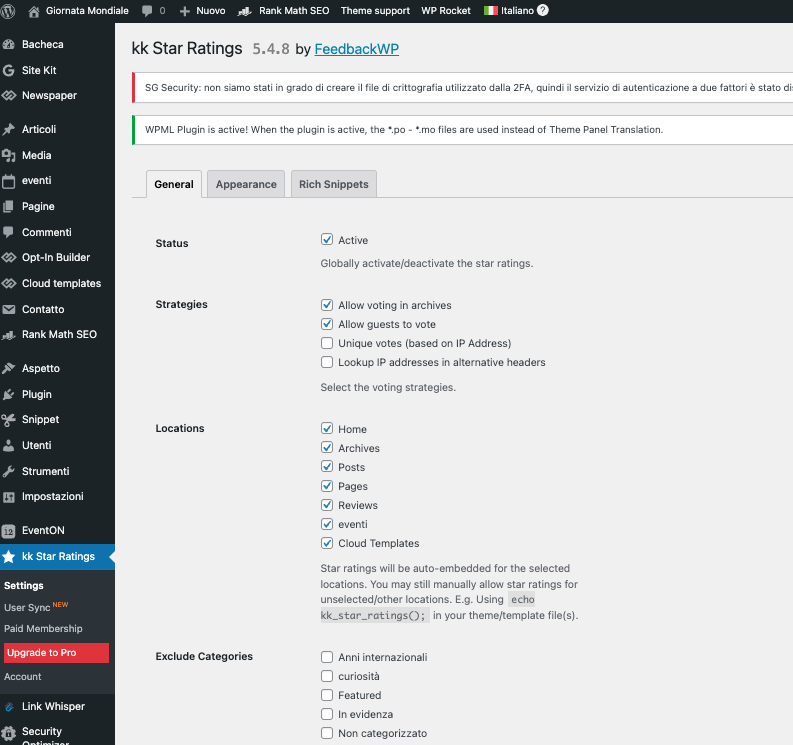
I have activated the ‘kk’ plugin reviews for events:
Reply to: tickets(367745)
Could you instead of Blocks Checkout https://cristianazanuccoli.it/wp-admin/post.php?post=232&action=edit you can try the default WooCommerce Checkout shortcode:
https://woocommerce.com/document/woocommerce-shortcodes/#woocommerce-shortcodes