you’ll need to provide username and password with each ticket due to the limitations of our system
Archives: Replies
Replies for tickets on suppota
Reply to: tickets(366794)
Please send us wp-admin access to your site as a private message for us to further assist your situation.
you can remove it- in myeventon>>>>settings theres a toggle to delete all data when you uninstall but let us have a look first it might need a simple tweak to the edit page
Reply to: tickets(366262)
I see what is going on. There is a bit of a confusion. filter_clear=’yes’ is only work with filter_type=’select’
You have selected certain event types to show and not others, which also hide “All” value which would be what a user can use to reset the filter.
Kindly use filter_type=’select’ for now. We will implement support for clear filter with other filter type as well in the future.
Reply to: tickets(366439)
Hello support,
I do not understand why a font-family styling would interfer with the Font Awesome of your plugin.
The evo-arrows class is not even targeted in the css.
For your information the arrows have been working properly before with no changes to the style.
So it seems that some recent updates of Eventon have generated this issue.
Reply to: tickets(366689)
Was the wp_admin access okey?
Reply to: tickets(366691)
I have tried lowering repeats but this does not help. Is there a filter somewhere that is filtering our export?
Reply to: tickets(366690)
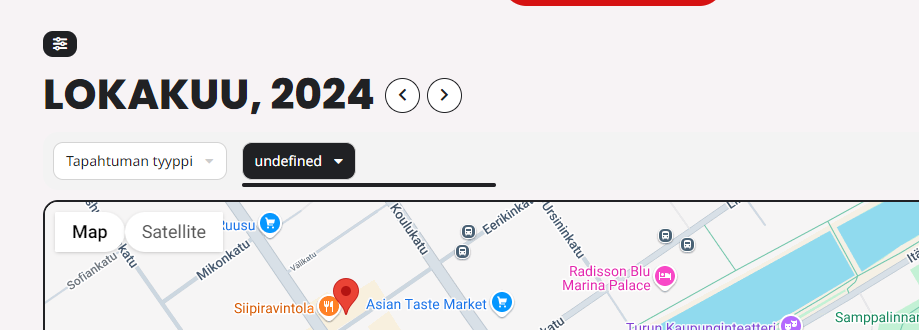
Also, there is a new undefined filter on the landing page and map page which should not be there. This was there after we upgraded EventOnLite to EventOn.
Reply to: tickets(366690)
Please refer below for credentials. this will expire in 14 days. I have removed the API restriction from GCP and now it works fine. But required to enable it again to secure the environment.
eventon
#tQg)#WGrzOrdFF#%VMV2hbt
Reply to: tickets(366449)
Hi Artem,
That fixed the issue, so we should be all set now. Your help is appreciated!
Thanks!
Reply to: tickets(366739)
Thank your for your answer.
I’ve passed on your instructions to my colleague and I come back to you tomorrow (Friday 11,2024).
See you and thank you for your help.