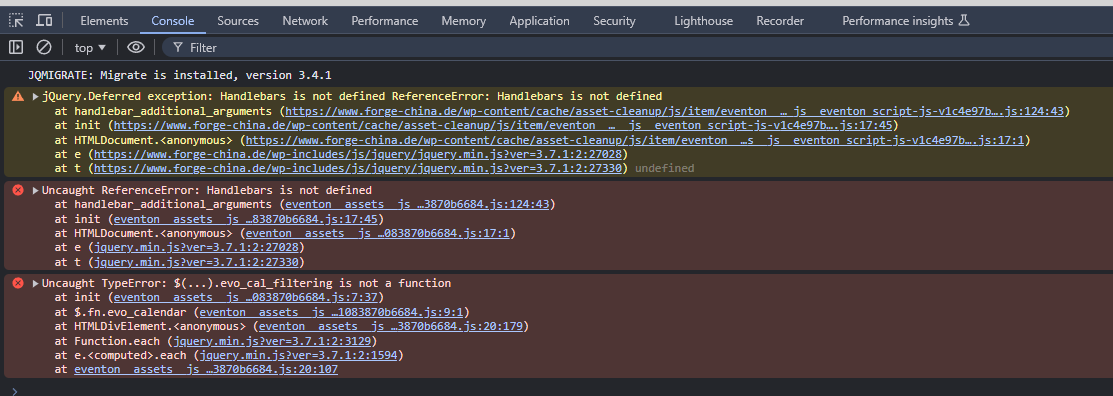
Hi Artem,
We got a new error poping in the homepage related to EventON.
We’ve been having problems with auot-updating the plugins since a few months, and I manually updated it a few days ago, but the errors were there since a while.
The one that appeared today is new though.
Greetings,
Baki
Okay, it is coming now, thanks
Not very urgent, as we can change the name manually. But it could be helpful if it works 🙂
if you want see this event wich is demo at front end https://ticket.satirikotheatro.com/events/test-ek-koilias-mitros-mou/
I am going simply apply the patch from your developer. I cannot change repeats from 10000 to 10 since it must be made from Edit Event manually on each event.
I cannot connect to your FTP with the provided info. Could you try yourself and let me know?
The errors are all referring to Roboto font-family. EventON uses Poppins and Noto Sans.
Are you sure that they are coming from EventON?
Hello,
Please go to EventON > EventCard > open Designer and save > now save EventON Settings. This will fix the issue with content not showing.
You should be able to deactivate your licenses by following
https://docs.myeventon.com/documentations/how-to-deactivate-eventon-addon-licenses/
Please also note that we don’t have access to your account on CodeCanyon.
I cannot see or download the file because it keeps converting. Could you try my suggestion about adding both start/end date/time to the file and try to import it again?
Can we take a look at the website without accessing wp-admin?