Hello,
I cannot check the page because of password it requires.
Could you send us your current shortcode?
Did you try Event Lists shortcode:
[add_eventon_list number_of_months=”12″ hide_empty_months=”yes” hide_month_headers=”yes”]
Replies for tickets on suppota
Hello,
I cannot check the page because of password it requires.
Could you send us your current shortcode?
Did you try Event Lists shortcode:
[add_eventon_list number_of_months=”12″ hide_empty_months=”yes” hide_month_headers=”yes”]
Hello,
Please add this CSS code to EventON > Styles (If you don’t see any change, EventON > Scripts & Styling > turn off Write dynamic styles to header > save settings > turn on Write dynamic styles to header):
.past_event .evocard_box.addtocal { display: none !important; }
Hello,
Our test site has WordPress 6.6.2 and we haven’t encountered any issues with the latest version of the plugin yet. The best solution is to clone the website and then update the plugin.
Hello,
Add-ons can only be updated if you have licenses and also your add-on license subscriptions are up to date.
Do you have access to
https://www.myeventon.com/my-account/
Hi,
I have set up WP Mail SMTP and now all mails seem to come in.
If you want to check this.
Kind regards Dirk
Is there any update on this?
Just wanted to update you. I can also see this issue and we are working on fixing it and releasing the new version 1.0 for invitees addon soon !
Hi Ashan, It’s been a while since I don’t make any movement in my events page. I would like to ask you something before updating all my plugins to their newest version. Are them available for the 6.6.2 version of wordpress?
Thank you!
Regards,
Irene.
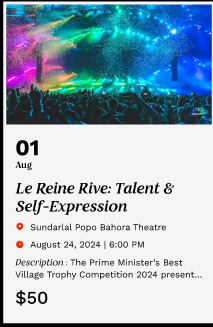
Please see the attached image showing the intended result using the EventOn Plugin
1: if you are using yoast or another SEO plugin you can turn off events being included.
also look to the generated site-maps yoast and other SEO plugins create automatically- you will want to remove those from your server
2: in myeventon>>>>settings>>>>events paging you can toggle “Stop using eventON single event template for single event pages”
this stuffs up the page altho some content is still available but i believe links get stuffed up you can test it out
3: you can delete past events once they are passed
in my eventon>>>settings>>>>advanced settings you can Auto move events to trash when the event date is past
4: in myeventon>>>>settings>>>>single events you can set the single event page to only visible to logged in
(so if they find it on google they click and it doesn’t show)