Hello,
Thank you for your great suggestion, at the moment it is not supported. However please create a new ticket and select Feature Request as category so others can vote on your idea and get it moved into development faster.
Replies for tickets on suppota
Hello,
Thank you for your great suggestion, at the moment it is not supported. However please create a new ticket and select Feature Request as category so others can vote on your idea and get it moved into development faster.
Hello Paolo Lanna,
Perfect! Thank you for letting us know!
Please follow:
To update eventon to latest version: If you are unable to do autoupdate, you can go to codecanyon your account > download and get the latest eventon version as zip file. Then you can go to your website > make sure “Delete eventon settings & data when EventON is uninstalled” is Deslected from eventon settings, delete old eventon, install new one and activate. This link will further explain the process it. Also you can follow us on twitter to get real-time announcements on updates!
Please add this CSS code to EventON > Styles (If you don’t see any change, EventON > Scripts & Styling > turn off Write dynamic styles to header > save settings > turn on Write dynamic styles to header):
#evcal_list .eventon_list_event .evo_metarow_organizer .evo_card_organizer span.evo_card_organizer_name_t a, .evo_pop_body .evo_metarow_organizer .evo_card_organizer span.evo_card_organizer_name_t a { pointer-events: none !important; }
Does it work here for you?
https://wordpress-1134521-4815318.cloudwaysapps.com/wp-admin/post.php?post=889&action=edit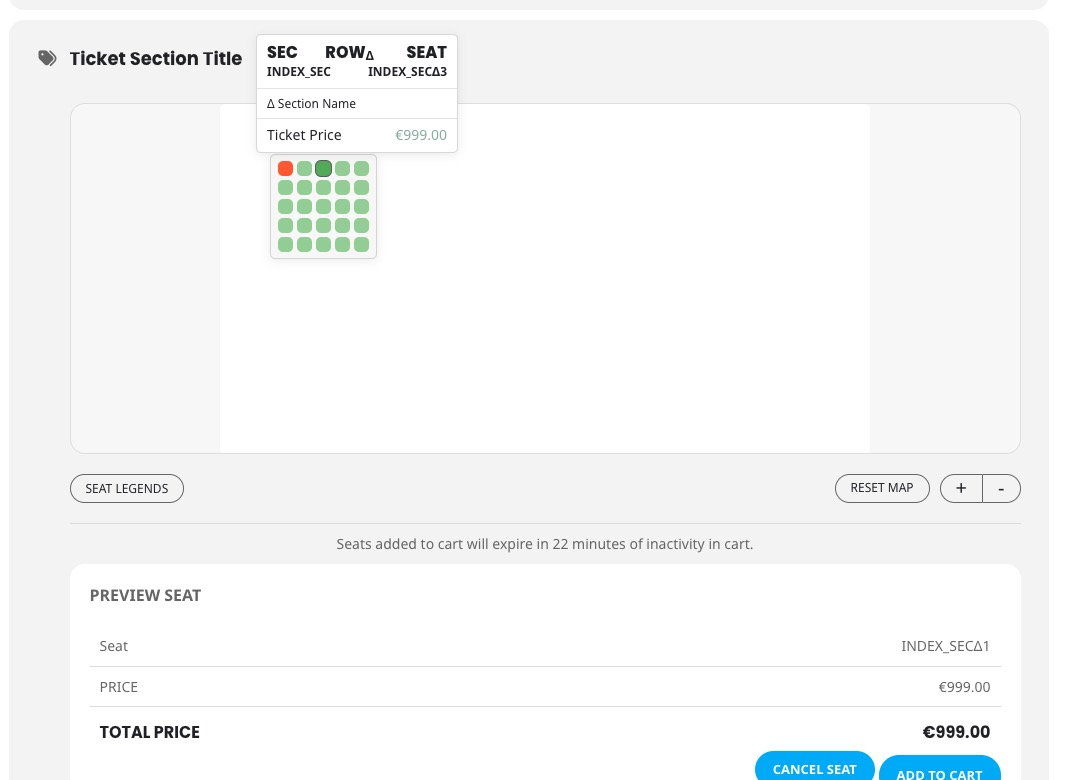
This is how it saved:
Hi,
indeed, the two lines you marked in your example, are present in our wp-config.php.
I am not sure, what other code would have an effect on Ajax requests. Therefor I post here the complete config of our test instance (I changed potentially sensitive data with xxxxx).
Please let me know if I should change anything for your tests.
<?php
@ini_set('display_errors', 5);

// ** MySQL settings - You can get this info from your web host ** //
/** The name of the database for WordPress */
define('DB_NAME', 'xxxxx');

/** MySQL database username */
define('DB_USER', 'xxxxx');

/** MySQL database password */
define('DB_PASSWORD', 'xxxxx');

/** MySQL hostname */
define('DB_HOST', 'xxx.xxxx.xxx.xxx');

/** Database Charset to use in creating database tables. */
define('DB_CHARSET', 'utf8');

/** The Database Collate type. Don't change this if in doubt. */
define('DB_COLLATE', '');

/**#@+
* Authentication Unique Keys and Salts.
*
* Change these to different unique phrases!
* You can generate these using the {@link https://api.wordpress.org/secret-key/1.1/salt/ WordPress.org secret-key service}
* You can change these at any point in time to invalidate all existing cookies. This will force all users to have to log in again.
*
* @since 2.6.0
*/
define('AUTH_KEY', 'xxxxx');
define('SECURE_AUTH_KEY', 'xxxxx');
define('LOGGED_IN_KEY', 'xxxxx');
define('NONCE_KEY', 'xxxxx');
define('AUTH_SALT', 'xxxxx');
define('SECURE_AUTH_SALT', 'xxxxx');
define('LOGGED_IN_SALT', 'xxxxx');
define('NONCE_SALT', 'xxxxx');

/**#@-*/

/**
* WordPress Database Table prefix.
*
* You can have multiple installations in one database if you give each
* a unique prefix. Only numbers, letters, and underscores please!
*/
$table_prefix = 'xxxxx_';

/**
* For developers: WordPress debugging mode.
*
* Change this to true to enable the display of notices during development.
* It is strongly recommended that plugin and theme developers use WP_DEBUG
* in their development environments.
*
* For information on other constants that can be used for debugging,
* visit the Codex.
*
* @link https://codex.wordpress.org/Debugging_in_WordPress
*/
ini_set('display_errors','Off');
ini_set('error_reporting', E_ALL );
define('WP_DEBUG', true);
define('WP_DEBUG_LOG', true);
define('WP_DEBUG_DISPLAY', false);

$_SERVER['HTTPS']='on';
$_SERVER['HTTP_HOST'] = "www.solarserver.de";

/* STOP DEFAULT THEMES, PLUGINS FROM REAPPEARING */
define( 'CORE_UPGRADE_SKIP_NEW_BUNDLED', true );
define( 'WP_DEFAULT_THEME', 'bone-child' );


/* That's all, stop editing! Happy blogging. */

/** Absolute path to the WordPress directory. */
if ( !defined('ABSPATH') )
define('ABSPATH', dirname(__FILE__) . '/');

/** Sets up WordPress vars and included files. */
require_once(ABSPATH . 'wp-settings.php');
Is the information on the booking time (seen in orders beneath each product as for example “Block-Time: 2024-09-15 8:30 pm – 8:30 pm”) saved as a product variant, or is it just some additional product info? We need every date that is chosen as a variant, since that is how we register the order in the rest of our tech stack.
About the lleters and the names of the seats I know how to change it but for example if i try to name it with greek characters for example Γ or Δ or Ε or Ζ the row or seat after save it it change it. It seams have issue with greek characters and accept only english characters.
Hello,
Can we deactivate the click and pop-up window opening for the speakers?
Thank you.