Thank you! Ashan will check this ASAP.
Archives: Replies
Replies for tickets on suppota
Reply to: tickets(362346)
When I tried to connect to the server:
Status: Resolving address of ftp.cnctc.edu.ph
Status: Connecting to 192.185.115.197:21…
Status: Connection established, waiting for welcome message…
Status: Initializing TLS…
Status: TLS connection established.
Command: USER eventon@cnctc.edu.ph
Response: 331 User eventon@cnctc.edu.ph OK. Password required
Command: PASS *************
Response: 530 Login authentication failed
Error: Critical error: Could not connect to server
Reply to: tickets(359754)
Perfect! If you have any further questions or concerns please create a new ticket.
Reply to: tickets(362593)
Perfect! Please keep us updated.
Reply to: tickets(362490)
Unfortunately, not possible without updating.
Please follow “2.2 – Back-end Way” to make sure to keep all the data:
https://docs.myeventon.com/documentations/update-eventon/
Reply to: tickets(362604)
Hello,
Thank you for your messages, I am going to assign this ticket to Ashan and he will be able to take it from here and find you a solution. Please allow some time for him to get back to you, we greatly appreciate your patience and thank you for being a eventon customer! Also please disable any IP blocking on your site if there are any.
Reply to: tickets(360102)
For Tags and Event Type, please go to EventON > EventTop > add Tags and Event Type fields.
Please add this CSS code to EventON > Styles (If you don’t see any change, EventON > Scripts & Styling > turn off Write dynamic styles to header > save settings > turn on Write dynamic styles to header):
.eventon_fc_days .evo_fc_day em.hm { width: 100%; height: 100%; border-radius: 0; }
This changes the round borders day area.
This code to change the color to white:
.eventon_fullcal .eventon_fc_days .evo_fc_day.on_focus { color: white !important; }
The rest should be changeable from EventON > Appearance > FullCal Styles. If you don’t see any change, EventON > Scripts & Styling > turn off Write dynamic styles to header > save settings > turn on Write dynamic styles to header.
Reply to: tickets(362224)
Please send us wp-admin access to your site as a private message for us to further assist your situation.
Reply to: tickets(362224)
I followed the steps you said. I copied the Css code you gave to Eventon>Styles and did everything else you said. The code does not currently have any effect on the location or organizer pages. I opened and saved the setting you mentioned, but it had no effect. Only Google automatic ads were appearing sideways, they were centered. It had no effect on the calendar.
Reply to: tickets(360102)
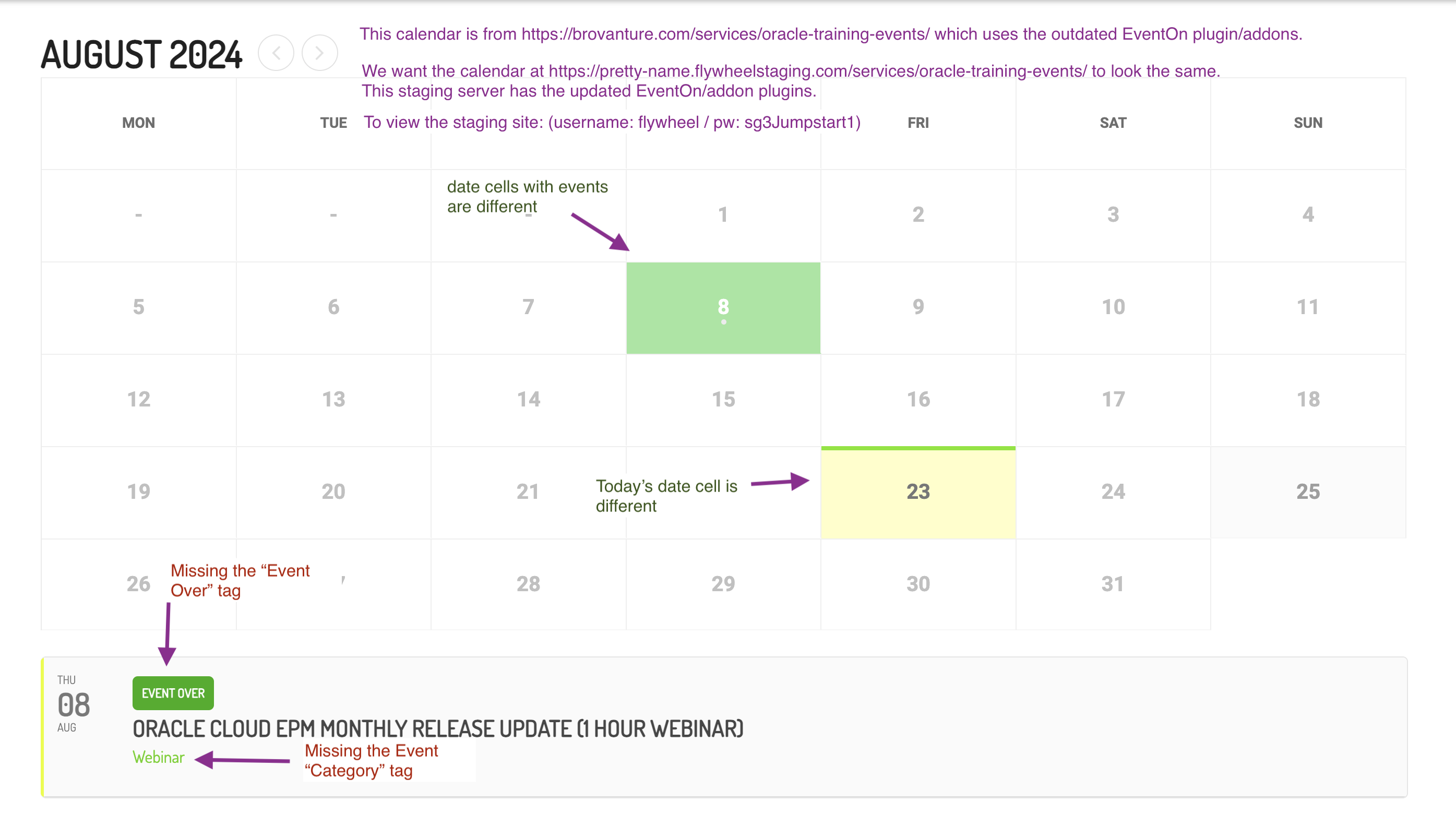
Hi Artem, sorry for the delay. The client got back to me a few days ago but I have been really busy and haven’t been able to respond.
I am attaching a screenshot of the client’s notes. The Notes in Green are not critical that they match but would be nice. The Notes in Red are important.
I have tried and tried but cannot find in the EventOn settings where to fix these items. Any help would be appreciated.
Thanks!
Slade