can you tell me where i set the default url please as currently /events and event-directory is going to the main events page and i want it to be just events but its set to be event-directory
thank you
Replies for tickets on suppota
can you tell me where i set the default url please as currently /events and event-directory is going to the main events page and i want it to be just events but its set to be event-directory
thank you
Do not worry sorry found the option!
Thank you so much that worked. Just one question now that is working as you will see on the site. Is there a way to add a scroll bar to this pop up box? As now we can see the box but it doesnt allow us to scroll down when the box is too big for the screen. Thank you
do you have updated guides on how to do it which is related to my issue
Thanks for the info what is CodeCanyon’s Support Policy?
Please send us wp-admin access to your site as a private message for us to further assist your situation.
Make sure to go to wp-admin > WooCommerce > Orders > Edit > Status is Completed.
Unfortunately, this requires PHP customization we unable to provide because of CodeCanyon’s Support Policy.
Could you please enable “Span the event until hidden end time” and then change End Time: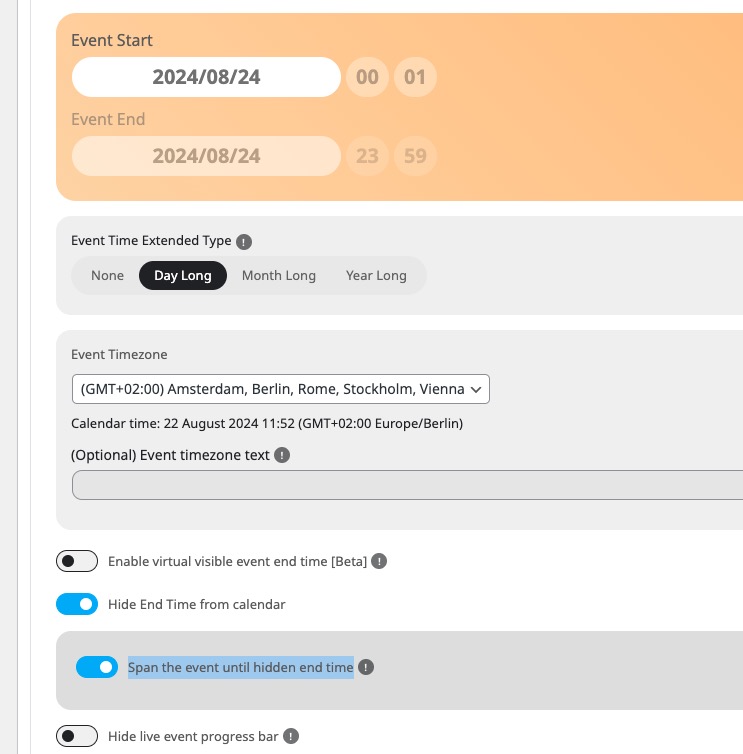
Only then you should be able to select End Time when “Hide End Time from calendar” is enabled.
Hello,
Autoupdate isn’t available at the moment, I am afraid. Please follow:
To update eventon to latest version: If you are unable to do autoupdate, you can go to codecanyon your account > download and get the latest eventon version as zip file. Then you can go to your website > make sure “Delete eventon settings & data when EventON is uninstalled” is Deslected from eventon settings, delete old eventon, install new one and activate. This link will further explain the process it. Also you can follow us on twitter to get real-time announcements on updates!
Variations don’t have such option, I am afraid.
But with WooCommerce’s Coupons you can give users an option to apply a discount on Cart or Checkout:
https://woocommerce.com/document/coupon-management/