Hello,
Please take a look at
https://docs.myeventon.com/documentations/change-css-calendar/
Changes uppercase:
.eventon_events_list .eventon_list_event .evoet_cx span.evcal_desc2, .evo_pop_body .evoet_cx span.evcal_desc2 { text-transform: none !important; }
Category size:
.eventon_events_list .eventon_list_event .evoet_cx .level_4, .evo_pop_body .evoet_cx .level_4 { font-size: 15px; }
Please take a look at this guide on how to hook into EventTop:
https://docs.myeventon.com/documentations/hook-eventtop/
You can also add everything (price tag and other buttons) manually with Custom Meta fields:
https://docs.myeventon.com/documentations/setup-use-custom-meta-fields-events/
“dress code” tag…
Could you send us a screenshot?
Hello,
Thank you for your great suggestions, at the moment they are not supported. However please create a new ticket and select Feature Request as category so others can vote on your ideas and get them moved into development faster.
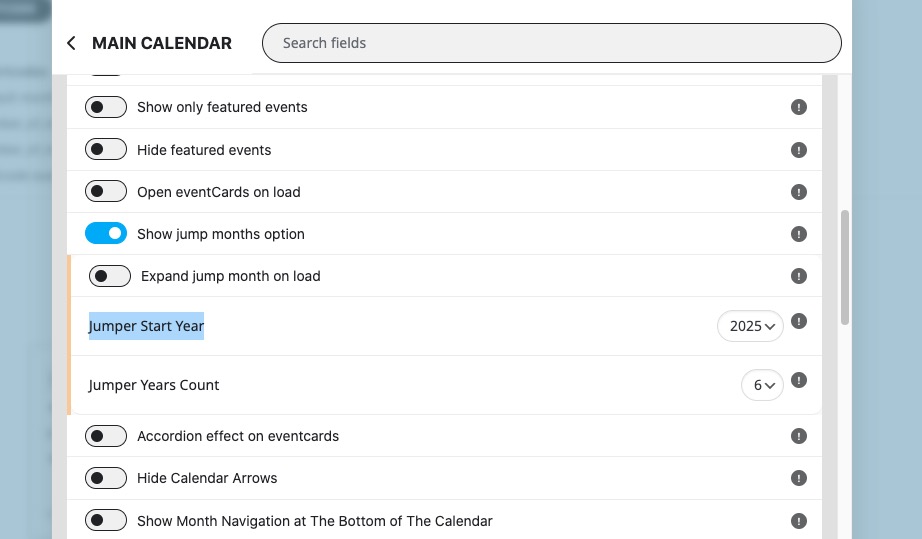
The option you need:
Add these to the shortcode and try changing the numbers to show hide years:
jumper_offset=”3″ jumper_count=”6″
Just like you can display the image source on the gallery images.
Thank you for your great suggestion, at the moment it is not supported. However please create a new ticket and select Feature Request as category so others can vote on your idea and get it moved into development faster.
After deactivate all plugin to check if a conflict, the prblem was still visible.
So we try to uninstall + reinstall plugin and that solved the problem
Ticket close
Hello, I meant how you can hide the years in the calendar view jumper that you don’t need, e.g. 2023 etc.
Just like you can display the image source on the gallery images.
That is the problem. I had did a bulk deactivation on all plugins but that one required an extra step which is why I missed it. There is a CSS conflict with that plugin I will have to address.
Thanks for your assistance.
It seems your solution for translating isn’t compatible with EventON Tickets.
With this you can create a separate event for each language you have:
https://docs.myeventon.com/documentations/setup-language-corresponding-events/
Can you somehow implement this to make it work with https://gtranslate.io/?
Could you tell us more about your browser and OS?
What do you mean by “integrate the years”? Could you elaborate? Are you trying to show more years?
…source information in the calendar posts…
Source info for images on EventCard?
Hello,
When I check your website:

Please send us wp-admin access to your site as a private message for us to further assist your situation.