Good morning, I think the problem is solved for now and we can close the ticket.
Archives: Replies
Replies for tickets on suppota
Reply to: tickets(343355)
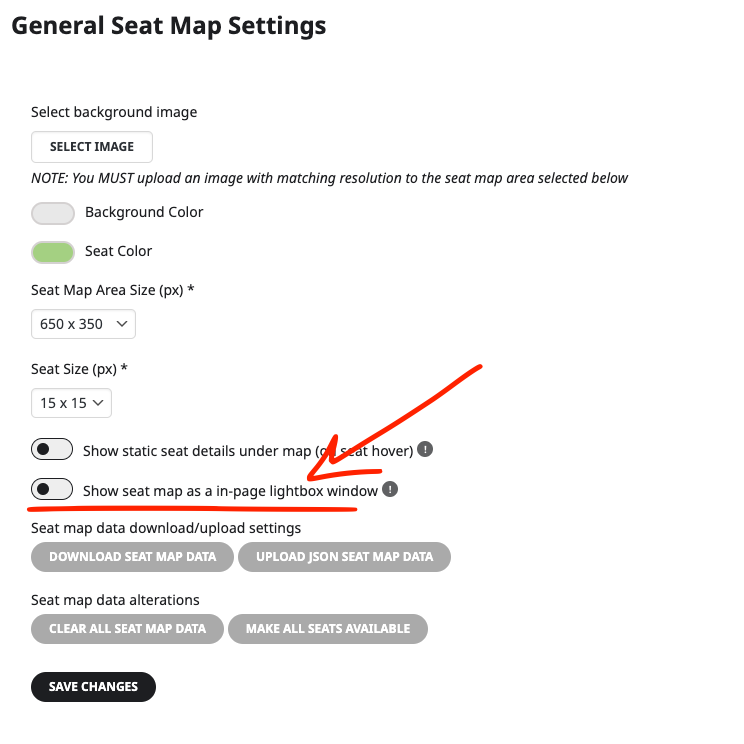
I can also replicate this issue as a temp solution please go to Event Edit > Seat map editor > Seat Map Settings > Show seat map as a in-page lightbox window.
We will get this resorted out before the next release.
Reply to: tickets(351103)
how did you go?
Reply to: tickets(360349)
it does work with full cal BUT no it doesn’t allow filter by city
it does allow you to filter by individual location
you could create states using the event types BUT how many geo locations are you going to make- 10 is easy 200 is a lot of work?
Reply to: tickets(360675)
Login Issues: I’ve logged in successfully this morning. No changes on my end. I have not cleared browser cache or done anything. Nevermind, it works now, so that is a good thing.
EventCard Designer Un/Hide field issue:
I’ve set up wp-admin access
URL: https://instituteofsales.co.nz/nziswplogin
Username: eventonhelp
Password: 9oQfw(y#J@6cXiu4dj7Sxi$x
Reply to: tickets(360538)
–> I changed the theme.. but it did not work either.
Can I ask how it should be? Should i be able to move those fields somewhere?
Reply to: tickets(360538)
–> There is NO option to add any fields, or to move these fields somewhere!!
Reply to: tickets(358737)
Melanie, I want apologize for the delay. We were able to replicate this issue as well on our end and we have resolved it now with new tickets addon version 2.3.3
With the new version the Woocommerce based variations should generate proper event tickets after checkout. Please update and clear cache and test to make sure it works on your end as well. 🙂
Kind Regards, Ashan
Reply to: tickets(359111)
Ok Just wanted to update you the new version of tickets addon 2.3.3 should resolve this.
Reply to: tickets(359704)
Hello Catrine I just updated the documentation https://docs.myeventon.com/documentations/how-to-add-additional-fields-at-checkout/
Using event tickets version 2.3.3 You should be able to use this and show the additional information everywhere there is attendee details.