screenshot
Replies for tickets on suppota
screenshot
Hi Artem,
yes, I know and in fact the system was showing the message that you cannot use wait list for repeating events.
But the thing is that the waitlist got activated somehow. One attendees managed to go in wait list because the system was not showing RSVP anymore.
I have been informed by the customer that one user was not able to RSVP. But we did not change that event.
When I log into the event I noticed that the Waitlist was ON (despite the fact that it was a repeating event), one user was in wait list and no other user was able to RSVP because the system was saying there were no more spaces (that indeed were available).
This is the best I can do to help you guys trying to recreate this…
Thanks
Cristiano
The thing is that you cannot enable Waitlist for repeating events: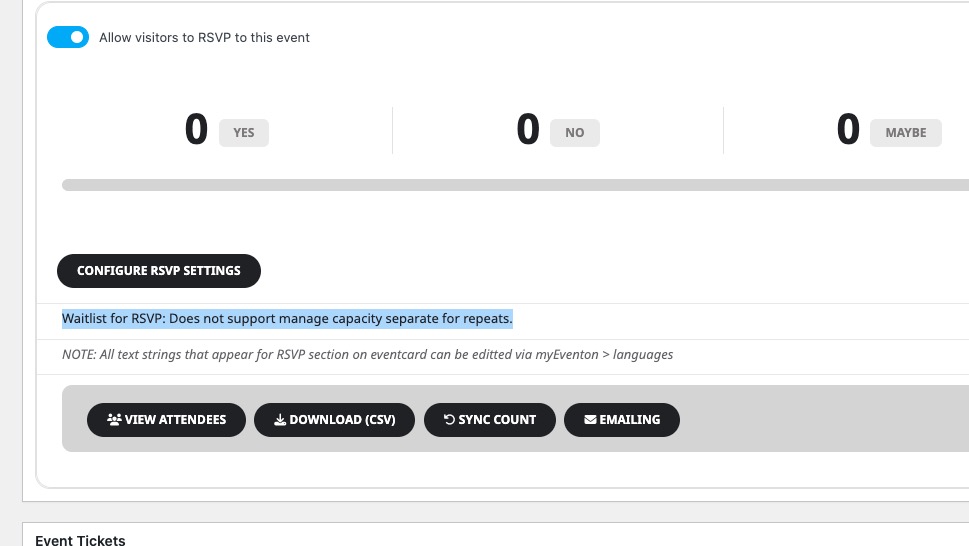
Could you tell us more about how to recreate the issue?
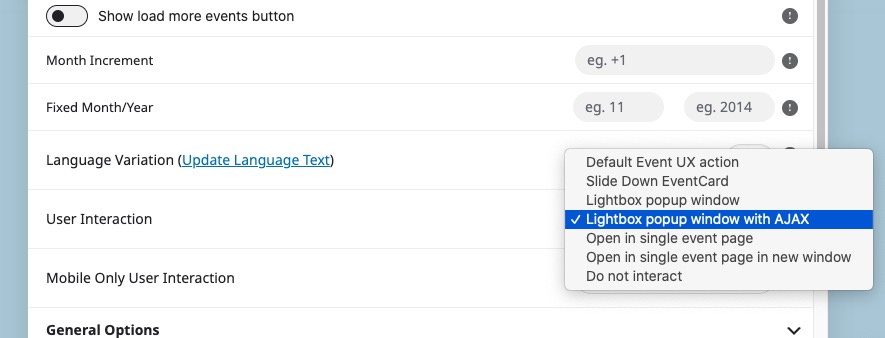
“User Interaction: Lightbox popup window with AJAX”. You can find it in Shortcode Generator:
Hello,
I enabled WP_DEBUG, but also was able to add this event:
https://stayinsavannah.com/wp-admin/post.php?post=8703&action=edit
Could you try recreating the issue, so debug.log can record the error.
Hi Kenneth please try:
SFTP
Port 2222
stayinsavannah.sftp.wpengine.com
stayinsavannah-schlesiger-b
wIUeo0jgoGYb
Does seem to be working! Thank you! What does “ux_val=”3a” in the shortcode do?
Hi Bianca,
Please follow the instructions in this documentation to activate debug in your site to see any PHP errors recorded that can provide insight on to whats going on. Please reply with a link to debug.log file. If you are not able to do this please send us FTP access to your site so we can do this for you.
Hi Tim,
We are glad your issue was resolved, if you have any further questions or concerns please feel free to create a new ticket.
Hi Ashan,
after lots of doublechecking it seems, that it was a problem with our cookie management tool, that blocks some services to be loaded without consent. Not sure, why it only blocked on the page and noot in the pop-up, but hey … we got it working.
Thanks for your help.