Hi there. I was told these features were not yet available for variable tickets…has that been updated now? I have followed the instructions you’ve sent. These are the features which we thought worked – they do for simple tickets – but only after we brought and used the product found they do not for a variable ticket. There is no way I would’ve known this through research. We do not want any other addons, not until the ones we’ve purchased are working fully. Please let me know when variable tickets have been updated. Thank you.
Archives: Replies
Replies for tickets on suppota
Reply to: tickets(401021)
here is the shortcode:
[add_eventon_el cal_id=”1” event_count=”6” ux_val=”4” exp_so=”no” event_past_future=”future” filter_type=”select” show_et_ft_img1=”yes” eventtop_style=”0” tiles=”yes” tile_count=”3” tile_style=”2” livenow_bar=”yes” tile_bg=”1” filter_show_set_only=”no” filter_relationship=”OR” number_of_months=”12” event_count_list=”yes” etc_override=”yes” event_type=”61,120,121,67,63,186,62,202,210”]
Reply to: tickets(400965)
is it possible that the code snippet is the cause? I can see in your screenshot that you are trying to visit the code snippets page? But can you access the wordpress dashboard?
Reply to: tickets(400965)
Hi Dev Help,
I am not sure why you cannot access it I did not do anything with it. The Row issue was fixed because I added a code from claude to help me hide it from the email confirmation and PDFer. This is the code below if you would like to see . The main problem right now is the server resources is very high when someone is trying to book tickets and the website crashes. Is it possible that the eventon and event tickets plugins are not yet updated?
//added code to filter the row==============
// Use output buffering to remove Row from seat info email
add_action(’evotix_confirmation_email_additional_data’, function() {
ob_start();
}, 1, 0);
add_action(’evotix_confirmation_email_additional_data’, function() {
$output = ob_get_clean();
// Remove ”| Row: X” pattern from the output
$output = preg_replace(’/s*|s*Row:s*[^|<]+/i’, ’’, $output);
echo $output;
}, 999, 0);
Reply to: tickets(399684)
Hello Jacy sorry for the late reply — if you do not mind sharing those codes we would love to include them in the next updates to ActionUser. Please use our email info [at] myeventon.com
Kind Regards,
Ashan
Reply to: tickets(400559)
You have purchased eventON from codecanyon, Travis. You may contact codecanyon regarding this and see if they can do anything from their end. If they can cancel that license and issue a new license key that would be the ideal solution.
Please try reaching out to them and see if they are able to provide any solution. https://help.market.envato.com/hc/en-us
Reply to: tickets(400688)
FYI, we just released new version of Seats addon v1.3.1 — Kindly update to the new version and see if the issue still persist on your end.
Reply to: tickets(400688)
Ok Lauren, we were able to access your website, but you have downgraded to working version so we can not replicate this issue on your website.
Would you be able to create a clone of your website OR update eventON and tickets + seats to new version?
We are not able to replicate this issue on our end so we can not tell why you are getting this undefined issue.
Reply to: tickets(400324)
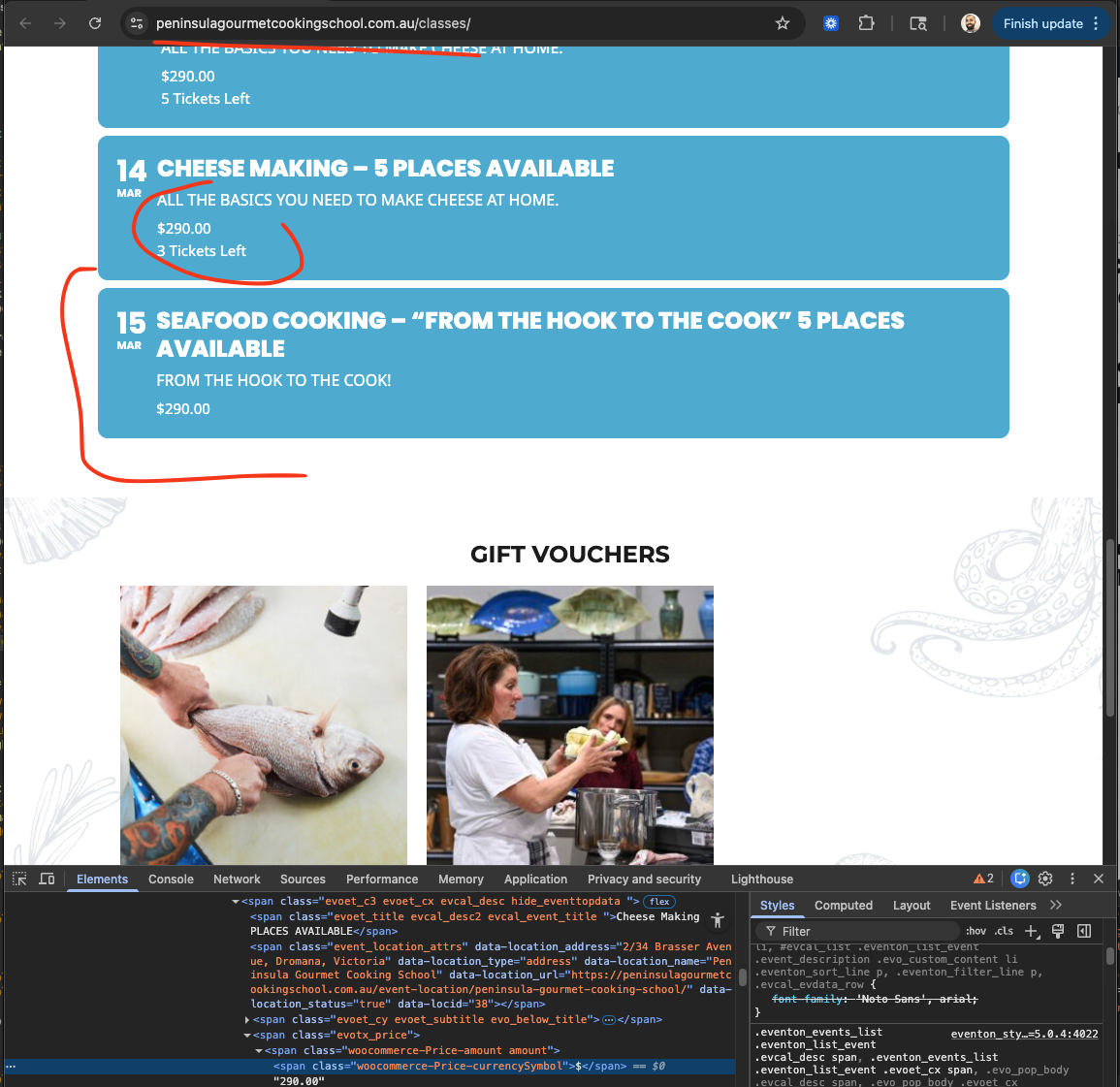
Ok thank you for letting us know of this issue I was able to fix the events breaking issue by switching EventON Settings > Advanced Settings > Event Content Filter Type == to Default WordPress Filter.
2. I also fixed the ticket price on the eventtop to have $ and price on same line.
Do let us know if you have any other issues.
– Chakravarthy
Reply to: tickets(400324)
Hello Karen, it is not in the code, it usually is what someone copy paste into event details. When you copy paste content, sometimes it paste with unclosed html tags. Let me check in your website and see if I can find the issue.