Hello,
Please send us wp-admin access to your site as a private message for us to further assist your situation.
Is EventON > Time Settings > Hide past events for default calendar(s) enabled? We also need to check your shortcode.
Replies for tickets on suppota
Hello,
Please send us wp-admin access to your site as a private message for us to further assist your situation.
Is EventON > Time Settings > Hide past events for default calendar(s) enabled? We also need to check your shortcode.
I’m not able to leave our heavily visited website in debug mode. Are you able to check any other way?
None of tickets are checked-in. Please go to wp-admin > Events > All Event Tickets. Try clicking on CHECK-IN.
I’ve updated the memory limit to 512
Hello,
Please take a look at this guide:
https://docs.myeventon.com/documentations/how-to-add-variations-to-booking-blocks/
Years should become visible if you go to EventON > Appearance > Calendar Header > change Header Month/Year text color. If you don’t see any change, EventON > Scripts & Styling > turn off Write dynamic styles to header > save settings > turn on Write dynamic styles to header.
I changed the shortcode so May 17th event isn’t visible any more.
Please check and let me know.
Hey there, if you want to implement this as a feature going forward let me know. I have successfully figured it out.
// Add a custom column for the event date in the RSVP entries list
function add_rsvp_event_date_column($columns) {
$columns[‘rsvp_event_date’] = __(‘Event Date’, ‘textdomain’);
return $columns;
}
add_filter(‘manage_evo-rsvp_posts_columns’, ‘add_rsvp_event_date_column’);
// Populate the custom column with event date data
function populate_rsvp_event_date_column($column, $post_id) {
if ($column == ‘rsvp_event_date’) {
// Retrieve the event ID from the RSVP post using the correct meta key
$event_id = get_post_meta($post_id, ‘e_id’, true);
if ($event_id) {
// Retrieve the event date from the event post
$event_date = get_post_meta($event_id, ‘evcal_srow’, true);
if ($event_date) {
echo date(‘F j, Y’, $event_date);
} else {
echo __(‘No date found’, ‘textdomain’);
}
} else {
echo __(‘No event ID found’, ‘textdomain’);
}
}
}
add_action(‘manage_evo-rsvp_posts_custom_column’, ‘populate_rsvp_event_date_column’, 10, 2);
// Save event date during RSVP creation
function save_event_date_on_rsvp_creation($rsvp_id, $event_id) {
// Retrieve the event date from the event post
$event_date = get_post_meta($event_id, ‘evcal_srow’, true);
// Save the event date in the RSVP post
update_post_meta($rsvp_id, ‘_event_date’, $event_date);
}
add_action(‘eventon_rsvp_after_save’, ‘save_event_date_on_rsvp_creation’, 10, 2);
The code is in this style.css file of your theme:
https://www.planconpeques.com/wp-content/themes/kids-r-us-child/style.css?ver=1.0.0
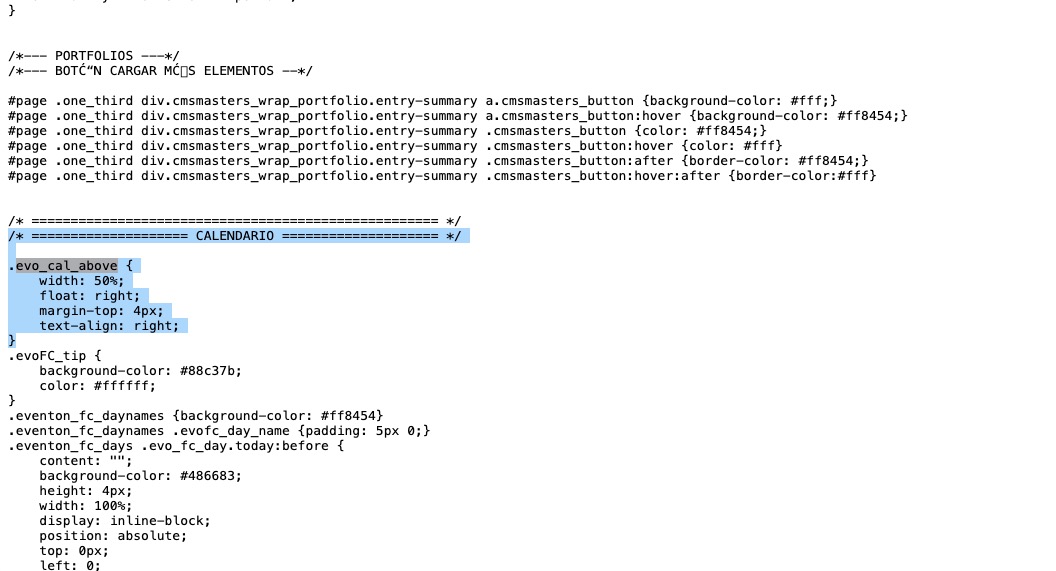
Perfect! If you have any further questions or concerns please create a new ticket.
Sorry, but I don't know where the code is that I should delete from the second photo. Does it seem like it's the browser console?

As far as I know, the changes made in the console are of no use in the backend.

Can you explain to me please, I don't understand.
Thanks again