The Name Your Price feature we used it not needed for Tickets at all but for a shopping/donations page that is independent from our events.
Archives: Replies
Replies for tickets on suppota
Reply to: tickets(344635)
Our Name Your Price feature is a Woo Commerce product.
Reply to: tickets(344635)
Hi Ashan,
We are not using 2.2.8. When we updated to that version of Tickets that is when we started experiencing problems. So we rolled back to version 2.2.5. I think i forwarded the link to the Name Your Price feature — the link was provided by our developer. Do you know it?
Reply to: tickets(343844)
you could try the pop up without ajax
ux_val=”3a″
might need to redo each ” after pasting
and lowering the event count to say 60 instead of 80 in the shortcode
Reply to: tickets(349051)
Please note that when I check your website in Troubleshooting Mode it works. So the issue is with something installed on the server. Please try disabling Porto plugins and the theme itself.
Reply to: tickets(350143)
Sorry, but is Chrome or Edge on the screenshot?
Could you also try if the same issue happens on:
https://dev2.myeventon.com/events/test-146/
I am also note sure how to login. /wp-login.php redirects to 404.
Reply to: tickets(350022)
This email is from WooCommerce, so please check how you can edit it by translating it with Loco Translate:
https://docs.myeventon.com/documentations/translating-eventon-backend/
Install it and then make two translations: WooCommerce and EventON Tickets. Find lines you want to change.
When creating translations, make sure to follow https://localise.biz/wordpress/plugin/beginners#add
PDFer uses EventON’s email confirmation template and not Woo’s.
WooCommerce email looks different on our test site:
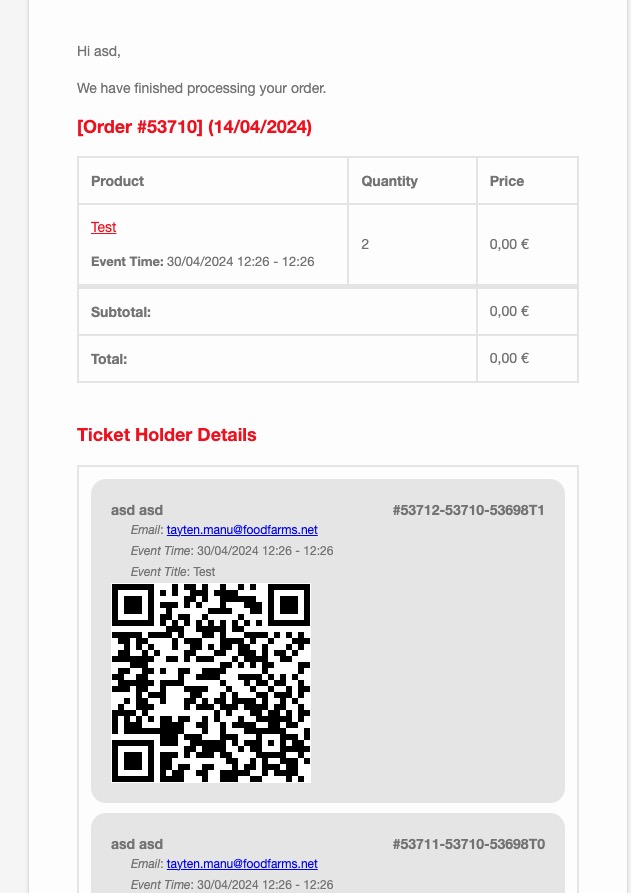
As you can see Ticket Holder Details is visible instead of Event Details.
What’s your version of WooCommerce? Also did you customize Woo’s email templates or EventON’s?
how do i access and is it possible to see via a dashboard on the frontend please.
Please take a look at Action User’s Event Manager. Try on https://dev.myeventon.com/wp-admin/
[evo_event_manager]
Reply to: tickets(350231)
so i can’t put it a description into:
Description is Event Details, if you are referring to Subtitle, then you can only add it to EventTop.
colorful bubbles and now it shows…
Where do you see this? Could you send us a screenshot?
…but i see a grey box without the image.
Please go to EventON > EventCard > try a different Feature image display style.
Reply to: tickets(350344)
Hello,
Thank you for your great suggestion, at the moment it is not supported. However please create a new ticket and select Feature Request as category so others can vote on your idea and get it moved into development faster.
Reply to: tickets(350232)
To translate the front-end please follow
https://docs.myeventon.com/documentations/how-to-translate-calendar-front-end/