Hello,
You should be able to change these from EventON > Appearance > EventTop > Text under event title (on EventTop. Eg. Time, location etc.) and Category title color (eg. Event Type). If you don’t see any change, EventON > Scripts & Styling > turn off Write dynamic styles to header > save settings > turn on Write dynamic styles to header.
Could you try and let us know?
Hello,
All your orders are “Non-Ticket Order”. For example:
https://americoncert.com/wp-admin/post.php?post=4680&action=edit
Could you please try the instructions mentioned in this documentation?
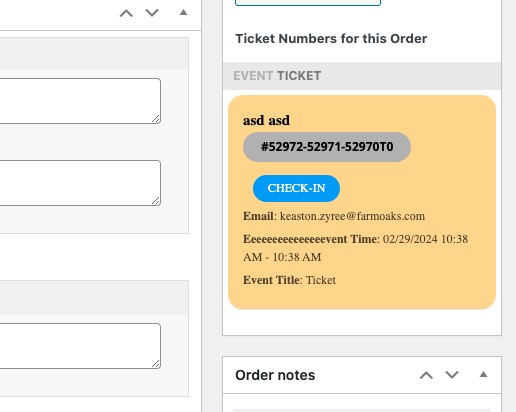
Each order should have this:
Hello,
I checked EventON > EventCard Design and not all of fields have been added.
Could you let us know which fields aren’t showing? Social Share Icons?
Please be advised that this is a live site, do modifications with caution.
Hello,
Could you update Tickets to 2.2.7?
To update eventon addons: You can download latest eventon addons from myeventon > my account. Then you can go to your website, deactivate old addon and install new one and activate then delete the old addon. This link will further explain the process. Also you can follow us on twitter to get real-time announcements on updates!
Also please follow to hide the messages from the front-end:
https://docs.myeventon.com/documentations/how-to-debug-for-php-code-errors/
I am sorry, the access information you have provided did not work for us. Please check them and post the correct login information as a private message, thank you!
Hello,
Please add this CSS code to EventON > Styles (If you don’t see any change, EventON > Scripts & Styling > turn off Write dynamic styles to header > save settings > turn on Write dynamic styles to header):
.single-ajde_events span.ev_ftImg { display: none !important; }
Please use this code:
.eventon_events_list .eventon_list_event .evoet_cx .level_4, .evo_pop_body .evoet_cx .level_4, .eventon_events_list .eventon_list_event .evcal_desc .evcal_desc_info, .eventon_events_list .eventon_list_event .evoet_cx .level_3, .evo_pop_body .evcal_desc .evcal_desc_info, .evo_pop_body .evoet_cx .level_3 {font-size: 15px !important}
I’m translating through translatepress. I couldn’t translate through you, it wouldn’t give me everyhting I need.
I don’t know if it’s your problem. I’m assuming so because it shows part of the calendar (the title and filter).
Hello Jeff,
You are very much welcome, if you have any further questions or concerns please feel free to create a new ticket.
Hi Roberto,
Please add the following CSS code to your site.
.evo_card_organizer_more{display:none;}
To add the CSS code go to Appearance > Customize > Additional CSS.