Hello,
…the link of the button…
Event Type doesn’t have any buttons. Could you elaborate?
For Custom Meta fields please use these acceptable CSV file fields:
cmd_{x} => Custom meta data values. You can add upto 10 custom meta field values with sepeate columns with column headers in format cmd_{x}
cmd_{x}L => can be used for custom field button url data
Hi Roger,
We are glad your issue is resolved, if you have any further questions or concerns please feel free to create a new ticket.
All caches have been deactivated. Still not working consistently.
I’m trying to find a pattern. I’m testing in Edge and Chrome. Sometimes a refresh works. Sometimes I need to clear the cache before the calendar works. But in most cases, I have discovered that I need to resave or update the wordpress page that the calendar is on. Once I do, the page works again.
I test every morning when I sit down to work. Most times the page isn’t working. So I then update the wordpress page to get it working for the day. The next morning, I have to do it over again.
Why is this happening? As I mentioned earlier, we used this calendar all of last year with very few issues. I haven’t added any new plugins to the site. Nothing significant…as far as I can see has changed on our end. Any yet we’re getting emails and calls that our users cannot advance the month on the site. This isn’t happening all the time. I just got a message from one of my students that was asking about class dates. So she was able to see other months at some time. But I did just get a note from one of our instructors telling me he couldn’t see beyond April.
Hi Roger,
Please apply this patch fix to resolve the social media icons issue.
https://docs.myeventon.com/patch-fixes/organizer-and-social-icons-not-showing-on-eventcar/
Let us know if this works for you.
Ok, i disabled, But I cannot have a cache plugin activated?
In another one page with the calendar, after march, i only see one event. And when I click in more events it dont show more.
Can you see?
Pesquisa no Calendário o teu próximo Trail! (portugalrunning.com)
thanks
np
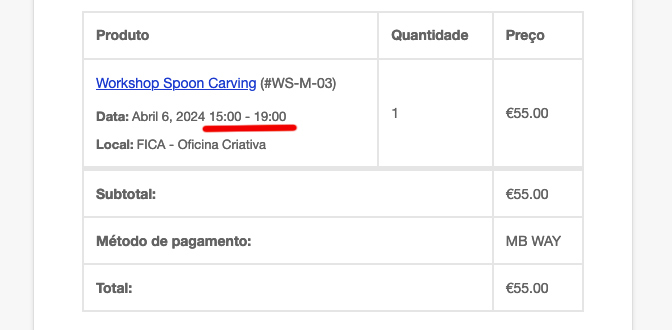
Hello Artem,
Its a wordpress website with woocommerce (image attached). So it sends automatically after an order.
I have the right time zone on wordpress. And correct on the events. For example, in the image, its 15-19h. But everywhere else its 14-18h (my time zone). And this happened after an update of the plugin. Events that i have created before the update, are sending the correct hour. I cant figure out whats happen.
Thank you
Hi,
Thanks for the reply, I got a response from the others about CSS. I don’t know how to manually code, but its sorted now. Didn’t have to turn off the link, however, good to know for future reference.
Another question about paid submissions… I would like to have some users using the calendar submitting events for free or discounted prices. How do I go about setting that up? Would it be a user capability thing, or would I have to create coupons or can I change this in the admin user settings?
Thanks 🙂
Kindly use this patch fix — https://docs.myeventon.com/patch-fixes/organizer-and-social-icons-not-showing-on-eventcar/