background-color: #e3e3e3;;
There are two ;;. Please try removing it.
color: black; !important
Should look like this:
color: black !important;
Could you try and let me know?
Do you have any options for exporting/downloading event pages as PDF’s?
Not at the moment, I am afraid. However please create a new ticket and select Feature Request as category so others can vote on your idea and get it moved into development faster.
We are glad your issue is resolved, if you have any further questions or concerns please create a new ticket. If you have a moment, we would greatly appreciate if you could kindly leave us a review at myeventon/my-account!. Cheers!
I can go and rename files so you can see how it looks like by default, but I need your permission to do so. Can I?
Please send us FTP access to your site as a private message.
This ticket is private now.
It seems that Fusion Builder somehow affects Woo’s functionality. Could you try deactivating it and try to make a purchase with deactivated “German Market” plugin as well?
[06-Feb-2024 20:44:16 UTC] PHP Fatal error: Uncaught Error: Call to a member function is_wc_shop_loop_enabled() on null in /www/htdocs/w01e8966/kino-seeblick.de/wp-content/plugins/fusion-builder/inc/lib/inc/class-fusion-woocommerce.php:101
Stack trace:
#0 /www/htdocs/w01e8966/kino-seeblick.de/wp-includes/class-wp-hook.php(324): Fusion_WooCommerce->wp(Object(WP))
#1 /www/htdocs/w01e8966/kino-seeblick.de/wp-includes/class-wp-hook.php(348): WP_Hook->apply_filters(NULL, Array)
#2 /www/htdocs/w01e8966/kino-seeblick.de/wp-includes/plugin.php(565): WP_Hook->do_action(Array)
#3 /www/htdocs/w01e8966/kino-seeblick.de/wp-includes/class-wp.php(830): do_action_ref_array(‘wp’, Array)
#4 /www/htdocs/w01e8966/kino-seeblick.de/wp-includes/functions.php(1336): WP->main(”)
#5 /www/htdocs/w01e8966/kino-seeblick.de/wp-blog-header.php(16): wp()
#6 /www/htdocs/w01e8966/kino-seeblick.de/index.php(17): require(‘/www/htdocs/w01…’)
#7 {main}
thrown in /www/htdocs/w01e8966/kino-seeblick.de/wp-content/plugins/fusion-builder/inc/lib/inc/class-fusion-woocommerce.php on line 101
However, deactivating it does not help either. The orders are not displayed in the ticket order area.
Even new orders you purchase after deactivating the plugin?
2. Please try adding event_order=”DESC” to the shortcode.
Hello,
Could you please provide more info according to this guide:
https://www.myeventon.com/my-account/license-transfer/
Hello,
Your add-ons should be updated as well. For example, EventON – Full cal. Please update.
To update eventon to latest version: If you are unable to do autoupdate, you can go to codecanyon your account > download and get the latest eventon version as zip file. Then you can go to your website > make sure “Delete eventon settings & data when EventON is uninstalled” is Deslected from eventon settings, delete old eventon, install new one and activate. This link will further explain the process it. Also you can follow us on twitter to get real-time announcements on updates!
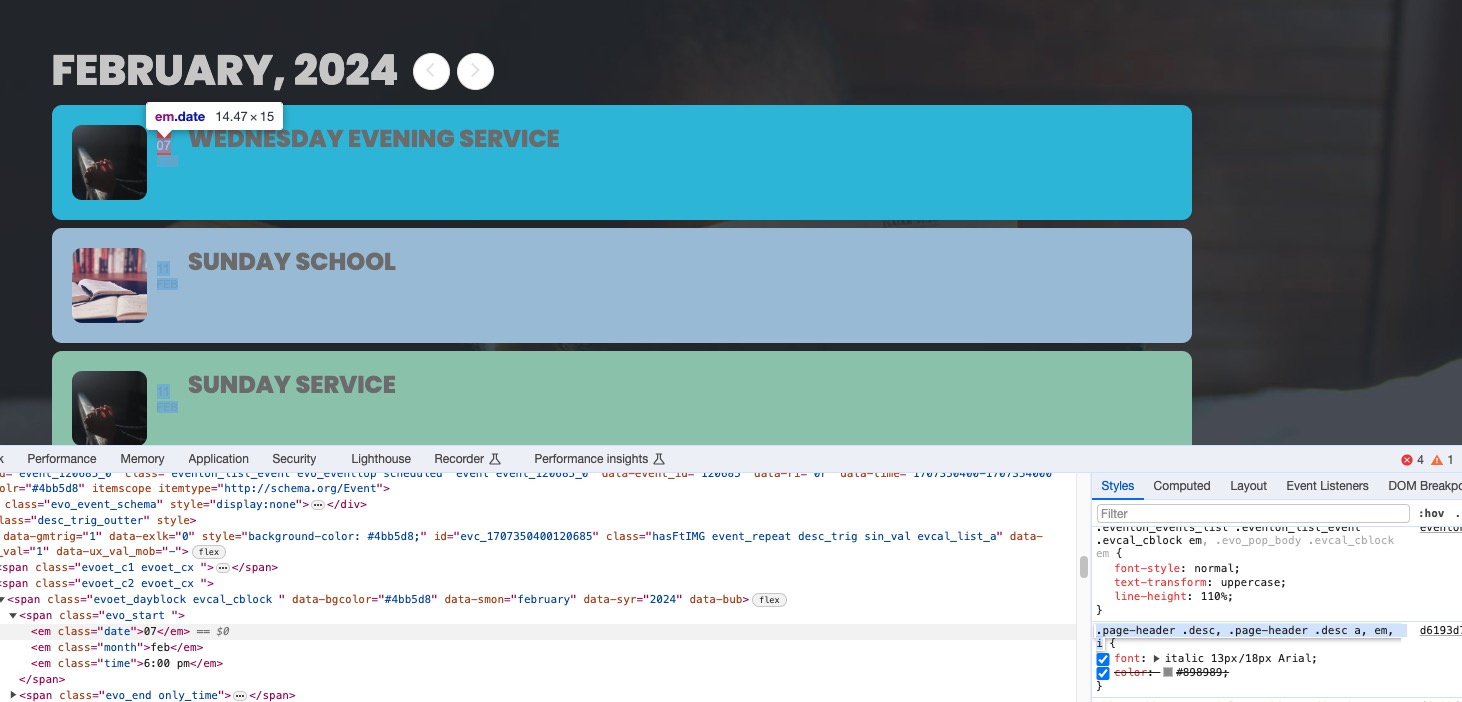
1. The dates are there, it’s just this CSS style makes them really small:
Remove/comment it to make them look correctly.
2. Please try updating to fix this.
Hello Ashan, I was out of the office this week. Yes, I’ve been able to revert back to the 2.9.10 version.
Thank you very much for your help.
Regards.
Hello,
Please update Tickets and RSVP add-ons as well as EventON.
To update eventon to latest version: If you are unable to do autoupdate, you can go to codecanyon your account > download and get the latest eventon version as zip file. Then you can go to your website > make sure “Delete eventon settings & data when EventON is uninstalled” is Deslected from eventon settings, delete old eventon, install new one and activate. This link will further explain the process it. Also you can follow us on twitter to get real-time announcements on updates!
To update eventon addons: You can download latest eventon addons from myeventon > my account. Then you can go to your website, deactivate old addon and install new one and activate then delete the old addon. This link will further explain the process. Also you can follow us on twitter to get real-time announcements on updates!