Hi William,
Please add the following CSS code to change the rounded edges and the spacing between the events.
.ajde_evcal_calendar.boxy .eventon_list_event.hasbgimg {
border-radius: 0;
margin-bottom: 20px;
}
Add the code in Appearance > Customize > Additional CSS
Hi there, without knowing how many seats you have in stock its impossible for me to compare the test event to mine…
It happens with the last seat and then it jumps to 99… did not happen with the version before…
so if I have 10 seats, sell 10 seats, it should be out of stock. it doesnt not show “out of stock”
The next customer sees 99 seats available in the same event …once he puts the one or more seats to the cart, he gets the error message mentioned above (which I did not find the translation string for, btw)..
regards
P.-
ok here are the details
u – EventonSupport
p – SupportEventon123+++
Log In ‹ Hope & Help — WordPress (hopeandhelp.uk)
Great, thanks for your excellent support. Your plugin is awesome!
Hello,
Could you please update Tickets to 2.2.6? It should have the lines.
We are sorry for the delay. Ashan will check this ASAP.
Hello,
Some of your events have different from server’s and default EventON’s timezones:
https://test.oliocompany.de/wp-admin/post.php?post=2006&action=edit
Could you go to EventON > Time > enable Apply default timezone to all events? Now make sure that all events have the correct timezone.
Check now and let us know.
When you add the code please make sure that there are no HTML tags: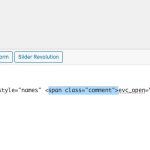
Please update EventON to 4.5.9 and Tickets to 2.2.6.