Ashan,
No issues on dev2:
https://dev2.myeventon.com/test-312/
On customer’s site even in Troubleshooting Mode is the same issue.
Replies for tickets on suppota
Ashan,
No issues on dev2:
https://dev2.myeventon.com/test-312/
On customer’s site even in Troubleshooting Mode is the same issue.
Hello,
Thank you for your messages, I am going to assign this ticket to Ashan and he will be able to take it from here and find you a solution. Please allow some time for him to get back to you, we greatly appreciate your patience and thank you for being a eventon customer! Also please disable any IP blocking on your site if there are any.
Hello,
I am sorry, the access information you have provided did not work for us. Please check them and post the correct login information as a private message, thank you!
What’s your current version of EventON?
Hello,
Since users must login to add events, their emails should be in the system. So you can use any plugin that allows you to contact your userbase. Actin User doesn’t have such functionality, I am afraid.
Unfortunately, we don’t offer paid customisation services at the moment.
Hello,
Please try saving EventON Settings first, sometimes there is a cache issue that affects EventON’s front.
Next, go to EventON > EventCard > select Select which options to show for add to your calendar: All options.
Hello,
Cold you go to EventOn > Advanced > enable Set all past events as completed? Or add event_past_future=”future” to your shortcodes.
Hello,
By default EventON uses ‘Poppins’, sans-serif, but on your website it shows Impact:
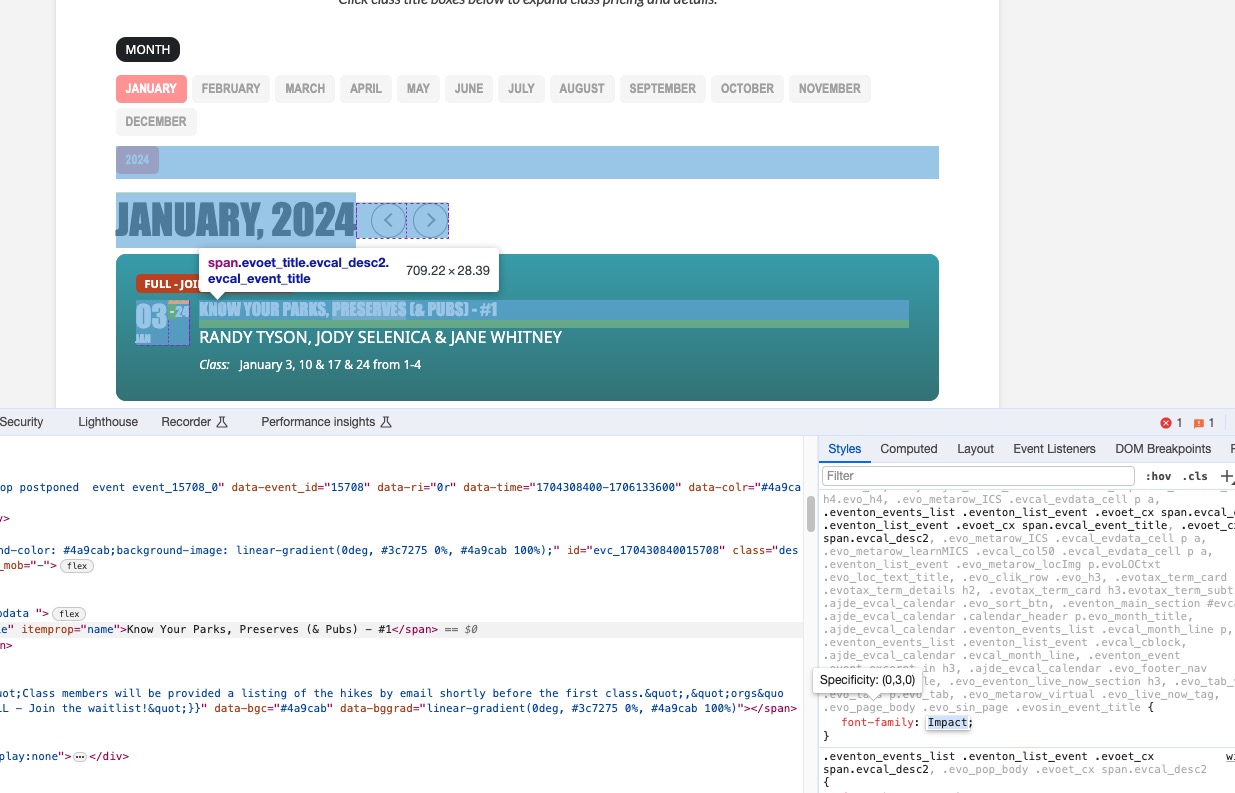
Could you try going to EventON > Scripts > make sure that Write dynamic styles to header is disabled?
Hello,
It seems that when Google checks events the first time, there is something wrong with the cache and it products errors. No issues at the moment:
https://validator.schema.org/#url=https%3A%2F%2Flexcolibrary.com%2Fevents%2Fpreschool-storytime-67%2Fvar%2Fri-1.I-L1
Every time I view the original ticket, it tells me to login again
Could you try clearing your browser cache?