Also – I just found out that the QR codes are populating. We get a broken picture frame in the back end for tickets and they arent showing up in the emails to customers.
https://www.marcoislandart.org/wp-admin/post.php?post=56680&action=edit
Replies for tickets on suppota
Also – I just found out that the QR codes are populating. We get a broken picture frame in the back end for tickets and they arent showing up in the emails to customers.
https://www.marcoislandart.org/wp-admin/post.php?post=56680&action=edit
Perfect! Please wait for 4.5.6. It should fix the issue.
I doubt that 4.5.4 had this issue. Downgrading is the same as updating but with the previous version:
To update eventon to latest version: If you are unable to do autoupdate, you can go to codecanyon your account > download and get the latest eventon version as zip file. Then you can go to your website > make sure “Delete eventon settings & data when EventON is uninstalled” is Deslected from eventon settings, delete old eventon, install new one and activate. This link will further explain the process it. Also you can follow us on twitter to get real-time announcements on updates!
Hello,
Could you downgrade while we are working on this?
4.5.4 can be found here:
https://helpdeskx.s3.amazonaws.com/wp-content/uploads/2024/01/12035959/eventON4.5.4.zip
We are sorry for the delay. It seems there is an issue with Event Lists shortcode. Since the way you try to show past events is mostly a hack, you need to use Event Lists: Ext add-on:
https://www.myeventon.com/addons/event-lists-extended/
Date Range is what you need:
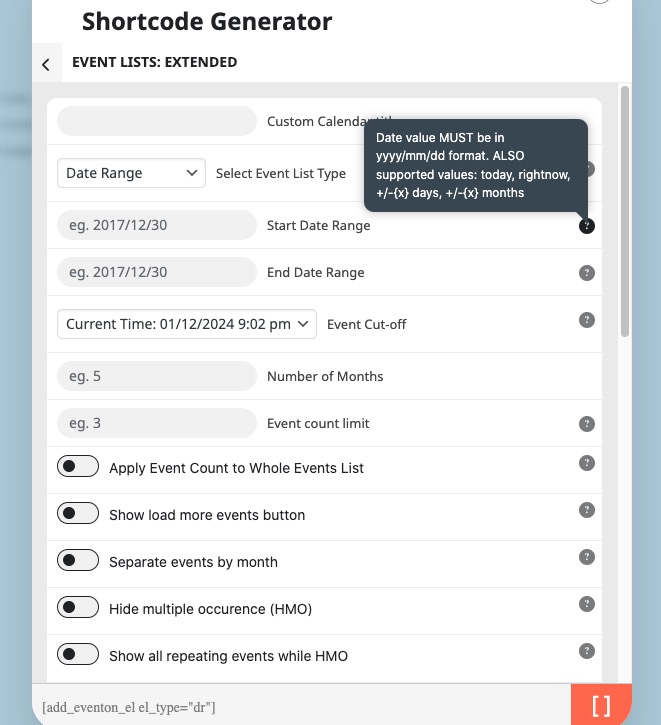
Could you try on https://dev.myeventon.com/wp-admin/ if it works for you?
We are working on a new version of the plugin that should address this issue as well. For now as a temporary solution please hide month headers.
We purchase it through Codecanyon – and the one they have available is the 4.5.5.
I downgraded to 4.5.4
kindly update to QR code addon version 2.0.1 https://docs.myeventon.com/documentations/changelog-qrcode/
Kindly update to QR Code addon version 2.0.1 https://docs.myeventon.com/documentations/changelog-qrcode/
Thanks, that resolved it for the time being.
Hello,
Please try following this guide
https://helpdeskx.s3.amazonaws.com/wp-content/uploads/2023/02/08180337/Screen-Shot-2023-02-08-at-5.02.20-PM.png