We are glad your issue is resolved, if you have any further questions or concerns please create a new ticket. If you have a moment, we would greatly appreciate if you could kindly leave us a review at myeventon/my-account!. Cheers!
Archives: Replies
Replies for tickets on suppota
Reply to: tickets(335057)
Please use this code to remove the background:
.evo_eventon_live_now_section .evo_eventon_now_next { background: none !important; }
And this one to make tiles squared:
.ajde_evcal_calendar.boxy.boxstyle1 #evcal_list .eventon_list_event .desc_trig, .ajde_evcal_calendar.boxy .eventon_list_event.hasbgimg, .ajde_evcal_calendar.boxy.boxstyle1 .evo_boxtop, .ajde_evcal_calendar.boxy.boxstyle2 .evo_boxtop { border-radius: 0 !important; }
Reply to: tickets(336111)
Ashan,
The same on dev2:
https://dev2.myeventon.com/test-272/
Reply to: tickets(336111)
Hello,
Thank you for your messages, I am going to assign this ticket to Ashan and he will be able to take it from here and find you a solution. Please allow some time for him to get back to you, we greatly appreciate your patience and thank you for being a eventon customer! Also please disable any IP blocking on your site if there are any.
Reply to: tickets(336114)
Hello,
Available options can be found on this screenshot?
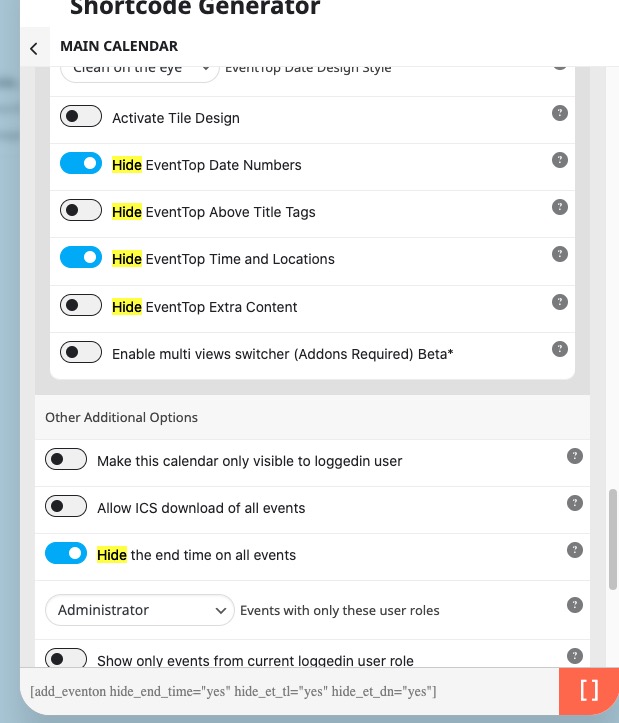
For the rest please follow:
https://docs.myeventon.com/documentations/change-css-calendar/
Reply to: tickets(335989)
I went to EventON > Advanced > set Select event calendar WP Query method: Query only the event posts created this year. Seems to be working now.
You can switch it back to All Events and then follow the instructions in this documentation to activate debug in your site to see any PHP errors recorded that can provide insight on to whats going on. Please reply with a link to debug.log file. If you are not able to do this please send us FTP access to your site so we can do this for you.
Reply to: tickets(336116)
Hello,
I am sorry, the access information you have provided did not work for us. Please check them and post the correct login information as a private message, thank you!
Error: la contraseña que has introducido para la dirección de correo electrónico ***************** no es correcta.
Could you go to EventON > Advanced > make sure that Select event calendar WP Query method is set to Query all the event posts?
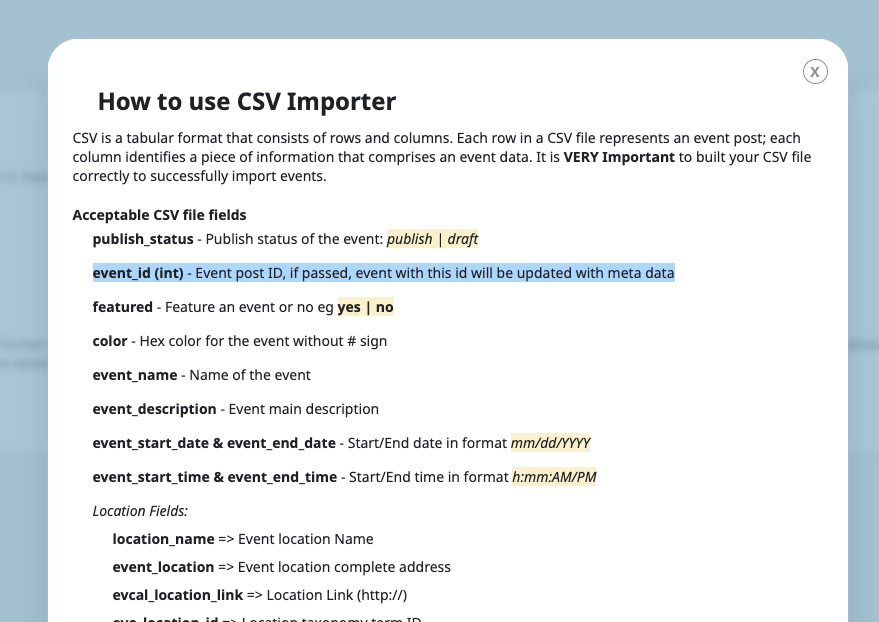
Also if you want to update existing events you need to use
event_id (int) – Event post ID, if passed, event with this id will be updated with meta data
Reply to: tickets(336024)
Ashan,
The same on dev2:
https://dev2.myeventon.com/test-272/
Try “test” or “rsvp”.
Reply to: tickets(336024)
Thank you for your messages, I am going to assign this ticket to Ashan and he will be able to take it from here and find you a solution. Please allow some time for him to get back to you, we greatly appreciate your patience and thank you for being a eventon customer! Also please disable any IP blocking on your site if there are any.
Reply to: tickets(336118)
Hello,
Thank you for your messages, I am going to assign this ticket to Ashan and he will be able to take it from here and find you a solution. Please allow some time for him to get back to you, we greatly appreciate your patience and thank you for being a eventon customer!