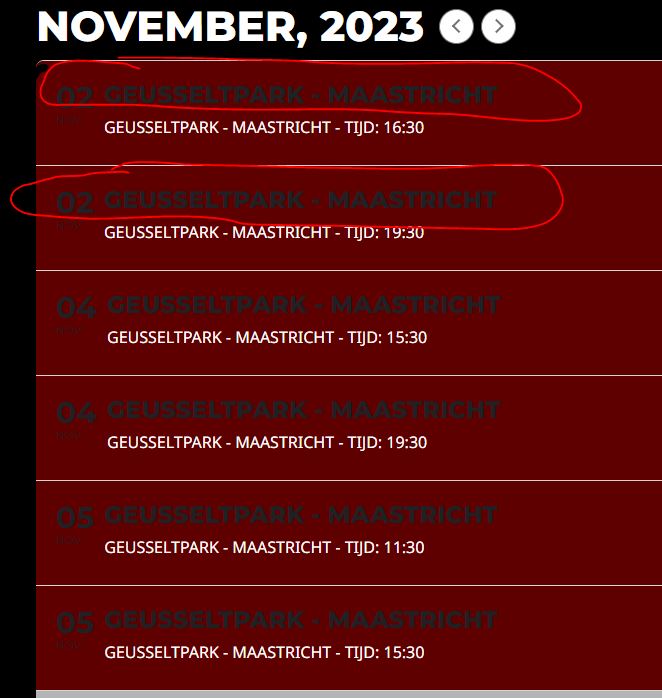
Hi Ashan,
It works 🙂 but I have a strage problem during the update; after updating localy it worked tight away (this was a fresh backup install); then I updated the server (deleting plugin and installing as new);
After that I tested and it didn’t work on Firefox (my standard browser) but on safari and chrome; so I thought that this might be some caching issue ..
I deleted the firefox cache and it works
Do you have an idea what is cached ? I checked in the theme and there are 2 options that are enabled:
- When enabled, we will generate the main app.css and plugins.css files to include only the modules and shortcodes enabled below.
- Remove the ?v=4.1 query strings from theme css and js loaded files (This is sometimes required if you want to increase your Google page speed scores and for better file caching.)
I also have wp optimize installed but do not use cache and minification there so that should not be a problem.
Do you have an idea how to get rid of the cache automatically so that returnig users do not have to clear it if the page is not working ?
Thanks
Marcin
Hello,
Please go to EventON > Appearance > EventTop > change Event Title font color. If you don’t see any change, EventON > Scripts & Styling > turn off Write dynamic styles to header > save settings > turn on Write dynamic styles to header.
This is how WooCommerce works, I am afraid. There is always one person who purchases and the rest just their group.
We are glad your issue is resolved, if you have any further questions or concerns please create a new ticket.
If you have a moment, we would greatly appreciate if you could kindly leave us a review at myeventon/my-account!. Cheers!
Hello,
First thing please go to EventON > Scripts & Styling > turn off Write dynamic styles to header > save settings > turn on Write dynamic styles to header. This should make sure that all styles are updated.
Please send us wp-admin access to your site as a private message for us to further assist your situation.
For now please provide the file to rewind to the previous version.
Which file are you referring to? Please note that when you do any custom work on the plugin, there is always a chance that some of them will stop working after updates.
We are glad your issue is resolved, if you have any further questions or concerns please create a new ticket.
If you have a moment, we would greatly appreciate if you could kindly leave us a review at myeventon/my-account!. Cheers!
We are glad your issue is resolved, if you have any further questions or concerns please create a new ticket.
If you have a moment, we would greatly appreciate if you could kindly leave us a review at myeventon/my-account!. Cheers!
Hello,
Please take a look at the shortcode on this page:
https://www.synergeinproject.com/test/
Thank you! Ashan will check this ASAP.