Hello,
Your current working seems to be working:
https://lincolnalabama.com/test/
6 months starting with November.
…with no way to go forward to December.
Are you trying to use Main Calendar add_eventon or Event Lists add_eventon_list shortcode?
Replies for tickets on suppota
Hello,
Your current working seems to be working:
https://lincolnalabama.com/test/
6 months starting with November.
…with no way to go forward to December.
Are you trying to use Main Calendar add_eventon or Event Lists add_eventon_list shortcode?
Hi Ashan,
It looks like events were still sent to the trash over the weekend with the most recent code changes applied…
Is there anything else you can think of that would be causing events to go to trash when expired?
Can you provide the code changes so that we can just disable that feature completely?
Thanks!
Steve
EventOn 4.5.3
Tickets 2.2.3
Kindly update to Reminders addon version 0.6 https://docs.myeventon.com/documentations/changelog-for-reminders/ should resolve this issue.
Hello,
There is a new Single Event Page template that is available. You can find it by going to EventON Folder > templates.
Unfortunately, we unable to help with such customizations since it’s against CodeCanyon’s Support Policy.
Any update on this?
Hey sorry I thought you figured it out since we havent heard from you. So from what we could tell, there is no data for those custom fields saved, thats why the CSV comes out with blank for those custom fields.
After continuing to troubleshoot I did find the article that was causing the conflict with my main calendar. It is a single article, and the article does include shortcode that displays calendar events.
Solution: When I changed the “Include Anything” dates to include November (Nov 24 – Dec 24), it caused the November calendar to go blank. When I edited the “Include Anything” dates to be December 1-24, the November calendar events reappeared as normal, and December is also normal. So I assume there is some conflict between the article and a November event, but I haven’t been able to figure that out. Just wanted to share in case it is helpful down the road.
https://lakelandmom.com/santa-photos/
The other two issues remain:
-Massive number of lines being generated in Chome DevTools Console
-Still can’t turn off Include Anything within articles where it is already switched on. All I can do is change the dates. I’m assuming this is also a conflict with another plugin on my site, I haven’t been able to troubleshoot it yet.
Is there any way you can download the file and then upload? I know its not as robost as using the URL,..
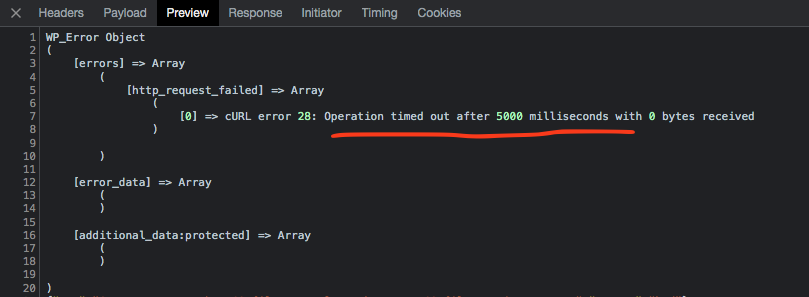
SO on my end I get this error on debug mode. It just seems wordpress wp_remote_get() fuction is having trouble getting that file from the URL maybe because it takes some time to load…